Complete Technical Paper Content — Ai Call Transcription
1. Executive Abstract, Problem Formulation & Background
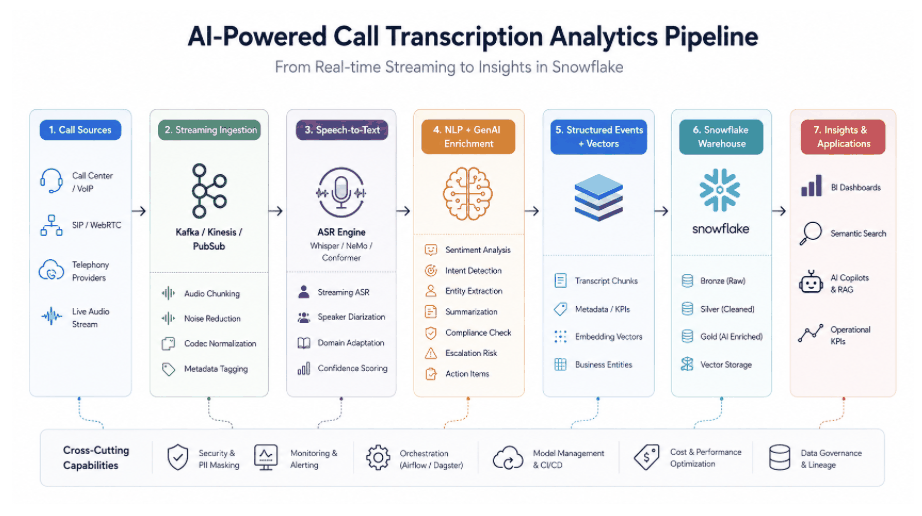
This project is a full-stack voice recording and transcription system that leverages Twilio Voice API, OpenAI GPT-4, and Google Cloud Speech-to-Text to process, transcribe, and analyze recorded phone calls in real-time. 🎯 Key Features 📞 Twilio Voice API Integration – Handles incoming calls, captures voice input, and stores call metadata. 🗣️ GPT-4 Conversational AI – Provides intelligent, real-time voice interactions for a dynamic caller experience. 🎙️ Automated Speech Recognition (ASR) – Uses Google Cloud Speech-to-Text for high-accuracy transcription with speaker diarization. 🛠️ Flask Backend with SQLAlchemy – Stores caller responses, transcriptions, and call recordings in a structured relational database. 📂 Google Cloud Storage Support – Securely stores and processes audio files for long-term access and retrieval. 🔍 Data Logging & Debugging – Comprehensive logging for monitoring API interactions and database transactions. 📌 Tech Stack Backend: Python, Flask, SQLAlchemy APIs & Services: Twilio, OpenAI GPT-4, Google Cloud Speech-to-Text, Google Cloud Storage Database: PostgreSQL / SQLite Logging & Monitoring: Python Logging Module 📝 Usage Deploy the Flask server and configure Twilio webhooks. Initiate a call to the Twilio number and interact with the AI-powered system. Transcriptions are processed, stored, and available for further analysis. 💡 Future Improvements Enhanced NLP-based sentiment analysis. Real-time voice authentication. Multi-language transcription support.
This project is a full-stack voice recording and transcription system that leverages Twilio Voice API, OpenAI GPT-4, and Google Cloud Speech-to-Text to process, transcribe, and analyze recorded phone calls in real-time.
📞 Twilio Voice API Integration – Handles incoming calls, captures voice input, and stores call metadata. 🗣️ GPT-4 Conversational AI – Provides intelligent, real-time voice interactions for a dynamic caller experience. 🎙️ Automated Speech Recognition (ASR) – Uses Google Cloud Speech-to-Text for high-accuracy transcription with speaker diarization. 🛠️ Flask Backend with SQLAlchemy – Stores caller responses, transcriptions, and call recordings in a structured relational database. 📂 Google Cloud Storage Support – Securely stores and processes audio files for long-term access and retrieval. 🔍 Data Logging & Debugging – Comprehensive logging for monitoring API interactions and database transactions. 📌 Tech Stack
Backend: Python, Flask, SQLAlchemy APIs & Services: Twilio, OpenAI GPT-4, Google Cloud Speech-to-Text, Google Cloud Storage Database: PostgreSQL / SQLite Logging & Monitoring: Python Logging Module 📝 Usage
Deploy the Flask server and configure Twilio webhooks. Initiate a call to the Twilio number and interact with the AI-powered system. Transcriptions are processed, stored, and available for further analysis. 💡 Future Improvements
Enhanced NLP-based sentiment analysis. Real-time voice authentication. Multi-language transcription support.
2. Related Work, Literature Survey & Algorithmic Foundations
This project is a full-stack voice recording and transcription system that leverages Twilio Voice API, OpenAI GPT-4, and Google Cloud Speech-to-Text to process, transcribe, and analyze recorded phone calls in real-time.
Phone Call Transcription and Summarisation This project transcribes stereo phone call recordings and generates AI-powered summaries using local Ollama LLM. It can either be run native on your machine, or via Docker containers. It relies on the fact that the audio files have one caller on the left and another on the right. Architecture flowchart TD %% Input Layer A["📱 Stereo Audio File<br/>(MP3 with Left/Right Channels)"] --> B["🎧 Audio Processing<br/>(Channel Separation)"] %% Audio Processing Layer B --> C["🔊 Left Channel<br/>(Speaker 1)"] B --> D["🔊 Right Channel<br/>(Speaker 2)"] %% Transcription Layer C --> E["🤖 Whisper AI<br/>(Speech-to-Text)"] D --> F["🤖 Whisper AI<br/>(Speech-to-Text)"] %% Processing Layer E --> G["📝 Timestamped Segments<br/>(Left Channel)"] F --> H["📝 Timestamped Segments<br/>(Right Channel)"] G --> I["🔗 Chronological Merger<br/>(Timeline Reconstruction)"] H --> I %% Analysis Layer I --> J["📄 Formatted Transcript<br/>(Human-readable)"] %% AI Summarisation Layer J --> K["🧠 Ollama LLM<br/>(Local AI Analysis)"] %% Configuration Layer L["⚙️ Configuration<br/>(config.txt)"] --> M["🎯 Application Settings"] N["📋 Prompt Template<br/>(prompt_template.txt)"] --> M M --> E M --> F M --> K %% Output Layer J --> O["📁 calls_transcribed/<br/>Formatted Transcript"] K --> P["📁 calls_summary/<br/>AI Summary"] I --> Q["📁 calls_analysis/<br/>Conversation Metrics"] %% Deployment Options subgraph Docker ["🐳 Docker Deployment"] R["🦙 Ollama Container<br/>(Port 11434)"] S["📦 Transcribe Container<br/>(Python App)"] T["💾 Persistent Volumes<br/>(Models & Cache)"] R --> S S --> T end subgraph Native ["💻 Native Deployment"] U["🐍 Python Environment<br/>(pip + venv)"] V["🦙 Local Ollama<br/>(System Service)"] U --> V end %% Styling - optimised for both light and dark modes classDef inputStyle fill:#4A90E2,stroke:#2E5C8A,stroke-width:2px,color:#FFFFFF classDef processStyle fill:#8A2BE2,stroke:#5A1B8F,stroke-width:2px,color:#FFFFFF classDef aiStyle fill:#FF8C00,stroke:#CC6600,stroke-width:2px,color:#FFFFFF classDef outputStyle fill:#32CD32,stroke:#228B22,stroke-width:2px,color:#FFFFFF classDef configStyle fill:#FFD700,stroke:#B8860B,stroke-width:2px,color:#000000 classDef deployStyle fill:#DC143C,stroke:#A50A2E,stroke-width:2px,color:#FFFFFF class A inputStyle class B,C,D,I processStyle class E,F,K,R,V aiStyle class O,P,Q outputStyle class L,N,M configStyle class Docker,Native,S,T,U deployStyle Loading Key Components Audio Processing : Separates stereo channels representing different speakers Whisper AI : Performs speech-to-text conversion with precise timestamps Chronological Merger : Reconstructs conversation timeline from both channels Ollama LLM : Provides local AI analysis and summarisation Configuration System : Flexible settings for models, speakers, and prompts Dual Deployment : Docker (recommended) or native Python installation Features Stereo Channel Separation : Automatically separates left and right audio channels representing different speakers Chronological Transcription : Creates time-ordered conversation flow with precise timestamps High-Quality Transcription : Uses OpenAI Whisper with timing information for accurate speech-to-text conversion Human-Readable Format : Professional transcript layout with timestamps, speaker labels, and clean text Conversation Analytics : Detailed statistics on speaking time, turns, and conversation dynamics Local AI Summarisation : Uses Ollama (llama3.1) running locally for intelligent call summaries Customisable AI Prompts : Easy-to-edit prompt templates for tailored analysis (customer service, sales, medical, etc.) Structured CSV Output : Extract specific data from transcripts into Excel-compatible CSV files with customizable columns Docker Support : Fully containerised with isolated Ollama service for consistent deployments Flexible Deployment : Choose between Docker (recommended) or native Python installation Prerequisites System Requirements 8GB RAM minimum for AI summarisation features 6GB storage for models and cache Docker environment with 8GB RAM (for Colima: colima start --memory 8 ) Docker Installation (Recommended) Docker and Docker Compose installed Docker environment running with 8GB+ RAM Native Installation macOS, Linux, or WSL (required for automated setup script) Python 3.11+ (can be automatically installed via script) Ollama (can be automatically installed via script) 8GB+ RAM for optimal performance Quick Start Docker (Recommended) # Setup (one-time) colima start --memory 8 # For Colima users ./docker-run.sh setup # Run cp your_audio_file.mp3 calls_to_process/ ./docker-run.sh single your_audio_file.mp3 Native (Automated - Recommended for macOS/Linux/WSL) Note: The automated setup script requires macOS, Linux, or WSL (Windows Subsystem for Linux) # Automated setup and run (handles everything automatically) ./run-native.sh The script will: ✓ Install Python 3.11+ via pyenv (if needed) ✓ Create virtual environment ✓ Install all dependencies ✓ Install and configure Ollama ✓ Download AI models ✓ Guide you through processing your files Native (Manual Setup) # Setup (one-time) pyenv install 3.11.13 curl -fsSL https://ollama.ai/install.sh | sh ollama serve & && ollama pull llama3.1 python3 -m venv venv && source venv/bin/activate pip install -r requirements.txt # Run source venv/bin/activate cp your_audio_file.mp3 calls_to_process/ python transcribe_and_summarise.py --file your_audio_file.mp3 Usage Basic Commands Docker: ./docker-run.sh single < file > # Process single file ./docker-run.sh batch # Process all files in calls_to_process/ ./docker-run.sh logs # View logs ./docker-run.sh stop # Stop services ./docker-run.sh cleanup # Complete cleanup Native: source venv/bin/activate python transcribe_and_summarise.py --file < file > # Single file python transcribe_and_summarise.py --batch # Batch processing python transcribe_and_summarise.py --language english # Force language python transcribe_and_summarise.py --structured structured_prompt_example.txt # Generate CSV from transcripts File Organisation calls_to_process/ # Input: Place audio files here calls_transcribed/ # Output: Transcription files (.txt) calls_summary/ # Output: AI summaries (.txt) calls_analysis/ # Output: Conversation analysis (.txt) calls_structured_output/ # Output: Structured CSV files Advanced Options Language Options: --language auto (default): Automatic detection --language english : Force English (faster) --language spanish/french/german/etc. : Other languages Batch Processing Options: --batch : Process all files in calls_to_process/ --input-folder custom_folder : Process from custom directory --force : Reprocess existing files Testing & Configuration: python test_ollama.py : Test Ollama connection python configure.py : Interactive configuration menu Structured Output (CSV): # Generate structured CSV from existing transcripts python transcribe_and_summarise.py --structured structured_prompt_example.txt For detailed documentation, see docs/STRUCTURED_OUTPUT.md Output Files The system generates three types of output for each processed audio file: Transcript ( calls_transcribed/filename.txt ) Chronologically ordered conversation with timestamps Speaker labels (configurable: Customer/Agent by default) Clean, human-readable format AI Summary ( calls_summary/filename.txt ) Key topics discussed Action items and commitments Decisions made and next steps Overall tone and customer satisfaction Conversation Analysis ( calls_analysis/filename.txt ) Speaking time per speaker (percentages and duration) Turn-taking patterns and frequency Average turn length statistics Structured CSV Output When using the --structured mode, the system generates a single Excel-compatible CSV file in the calls_structured_output/ folder: One row per transcript : Each analyzed call becomes a row in the CSV Customizable columns : Define what data to extract using a prompt file Timestamped filename : e.g., calls_structured_output/structured_output_20241030_143022.csv Quote-delimited : Fully compatible with Microsoft Excel Use Cases: Customer service analytics (extract names, issues, resolutions, satisfaction scores) Sales call analysis (identify needs, objections, products discussed, likelihood to close) Quality assurance (agent performance ratings, compliance checks) Trend analysis (categorize calls, identify patterns over time) See docs/STRUCTURED_OUTPUT.md for detailed documentation. How It Works Audio Processing : Loads the MP3 file and separates stereo channels Transcription : Uses Whisper to transcribe each channel separately Formatting : Combines transcriptions with speaker labels Summarisation : Sends transcript to local Ollama for analysis Output : Saves both transcript and summary to text files Project Structure Transcribe/ ├── transcribe_and_summarise.py # Main script with batch processing ├── configure.py # Configuration interface ├── requirements.txt # Python dependencies ├── requirements-dev.txt # Development dependencies ├── .python-version # Python version for pyenv ├── .flake8 # Linting configuration │ ├── config.txt # Configuration settings ├── prompt_template.txt # Default AI analysis prompt template ├── prompt_example_*.txt # Example prompts (customer service, sales, medical, meetings) ├── structured_prompt_example.txt # Example structured CSV prompt file │ ├── run-native.sh # Automated native setup script (macOS/Linux/WSL) ├── docker-compose.yml # Docker services configuration ├── Dockerfile # Docker image definition ├── docker-entrypoint.sh # Docker startup script ├── docker-run.sh # Docker convenience commands ├── docker.env # Docker environment variables ├── .dockerignore # Docker build exclusions │ ├── test_ollama.py # Ollama connectivity test ├── test_faster_whisper.py # Whisper model test ├── test_structured_output.py # Structured output test │ ├── docs/ # Documentation │ └── STRUCTURED_OUTPUT.md # Structured CSV feature documentation │ ├── calls_to_process/ # Input: Place audio files here ├── calls_transcribed/ # Output: Formatted transcripts (.txt) ├── calls_summary/ # Output: AI summaries (.txt) ├── calls_analysis/ # Output: Conversation metrics (.txt) ├── calls_structured_output/ # Output: Structured CSV files ├── transcript_insights/ # Output: Combined analysis reports │ ├── README.md # Project documentation ├── SECURITY.md # Security policy ├── SETUP.md # Setup guide ├── CHANGELOG.md # Version history ├── CONTRIBUTING.md # Contribution guidelines └── CODE_OF_CONDUCT.md # Community guidelines Dependencies All dependencies are managed via requirements.txt : faster-whisper==1.1.1 - High-performance transcription engine (optimized for all platforms) pydub==0.25.1 - Audio processing SpeechRecognition==3.10.0 - Fallback transcription requests==2.31.0 - Ollama API communication tqdm==4.67.0 - Progress bars Troubleshooting Docker Issues Services Not Starting # Check Docker daemon is running docker info # Check service status docker-compose ps # View detailed logs ./docker-run.sh logs # Restart services ./docker-run.sh stop ./docker-run.sh start # Complete rebuild if needed docker-compose build --no-cache Ollama Model Issues # Check if model is available docker-compose exec ollama ollama list # Pull model manually docker-compose exec ollama ollama pull llama3.1:latest # Check Ollama service health docker-compose exec ollama ollama list # View Ollama logs specifically ./docker-run.sh logs ollama Volume/Permission Issues # Check directory permissions ls -la calls_to_process calls_transcribed calls_summary calls_analysis # Recreate directories with proper permissions ./docker-run.sh setup # If permission issues persist on Linux/macOS: sudo chown -R $USER : $USER calls_ * Performance Issues # Check system resources docker stats # Increase Docker memory limits in Docker Desktop if needed # Stop other containers to free resources docker stop $( docker ps -q ) Native Installation Issues Ollama Connection Issues # Check if Ollama is running (native installation) ollama list # Start Ollama if needed ollama serve Audio Processing Issues Ensure activitycall.mp3 exists in the project directory Check that the file is a stereo MP3 with speakers on left/right channels Environment Issues # Recreate virtual environment if needed rm -rf venv python3 -m venv venv source venv/bin/activate pip install -r requirements.txt Configuration Interactive Configuration # Native source venv/bin/activate && python configure.py # Docker ./docker-run.sh shell && python configure.py Configuration Files config.txt - Application settings: # AI Models OLLAMA_MODEL =llama3.1:latest WHISPER_MODEL =base # Speaker Labels LEFT_SPEAKER_NAME =Customer RIGHT_SPEAKER_NAME =Agent # Processing SEGMENT_MERGE_THRESHOLD =2.0 FORCE_LANGUAGE =auto docker.env - Docker environment variables: OLLAMA_MODEL =llama3.1:latest WHISPER_MODEL =base LEFT_SPEAKER_NAME =Customer RIGHT_SPEAKER_NAME =Agent prompt_template.txt - AI analysis instructions (customisable) Performance & Optimisation System Requirements Minimum : 4GB RAM, 10GB storage Recommended : 8GB+ RAM, 20GB+ storage First run : Downloads ~4GB Ollama model Subsequent runs : Fast startup (~1-2 seconds) Model Selection # In config.txt or docker.env WHISPER_MODEL =tiny # Fastest (~39MB) WHISPER_MODEL =base # Balanced (default, ~139MB) WHISPER_MODEL =small # Better accuracy (~461MB) WHISPER_MODEL =medium # Best accuracy (~1.42GB) Speed Optimisation Set FORCE_LANGUAGE=english to skip language detection Use smaller Whisper models for faster processing Ensure adequate system RAM (8GB+ recommended)
This project transcribes stereo phone call recordings and generates AI-powered summaries using local Ollama LLM. It can either be run native on your machine, or via Docker containers. It relies on the fact that the audio files have one caller on the left and another on the right.
flowchart TD %% Input Layer A["📱 Stereo Audio File<br/>(MP3 with Left/Right Channels)"] --> B["🎧 Audio Processing<br/>(Channel Separation)"] %% Audio Processing Layer B --> C["🔊 Left Channel<br/>(Speaker 1)"] B --> D["🔊 Right Channel<br/>(Speaker 2)"] %% Transcription Layer C --> E["🤖 Whisper AI<br/>(Speech-to-Text)"] D --> F["🤖 Whisper AI<br/>(Speech-to-Text)"] %% Processing Layer E --> G["📝 Timestamped Segments<br/>(Left Channel)"] F --> H["📝 Timestamped Segments<br/>(Right Channel)"] G --> I["🔗 Chronological Merger<br/>(Timeline Reconstruction)"] H --> I %% Analysis Layer I --> J["📄 Formatted Transcript<br/>(Human-readable)"] %% AI Summarisation Layer J --> K["🧠 Ollama LLM<br/>(Local AI Analysis)"] %% Configuration Layer L["⚙️ Configuration<br/>(config.txt)"] --> M["🎯 Application Settings"] N["📋 Prompt Template<br/>(prompt_template.txt)"] --> M M --> E M --> F M --> K %% Output Layer J --> O["📁 calls_transcribed/<br/>Formatted Transcript"] K --> P["📁 calls_summary/<br/>AI Summary"] I --> Q["📁 calls_analysis/<br/>Conversation Metrics"] %% Deployment Options subgraph Docker ["🐳 Docker Deployment"] R["🦙 Ollama Container<br/>(Port 11434)"] S["📦 Transcribe Container<br/>(Python App)"] T["💾 Persistent Volumes<br/>(Models & Cache)"] R --> S S --> T end subgraph Native ["💻 Native Deployment"] U["🐍 Python Environment<br/>(pip + venv)"] V["🦙 Local Ollama<br/>(System Service)"] U --> V end %% Styling - optimised for both light and dark modes classDef inputStyle fill:#4A90E2,stroke:#2E5C8A,stroke-width:2px,color:#FFFFFF classDef processStyle fill:#8A2BE2,stroke:#5A1B8F,stroke-width:2px,color:#FFFFFF classDef aiStyle fill:#FF8C00,stroke:#CC6600,stroke-width:2px,color:#FFFFFF classDef outputStyle fill:#32CD32,stroke:#228B22,stroke-width:2px,color:#FFFFFF classDef configStyle fill:#FFD700,stroke:#B8860B,stroke-width:2px,color:#000000 classDef deployStyle fill:#DC143C,stroke:#A50A2E,stroke-width:2px,color:#FFFFFF class A inputStyle class B,C,D,I processStyle class E,F,K,R,V aiStyle class O,P,Q outputStyle class L,N,M configStyle class Docker,Native,S,T,U deployStyle
# Setup (one-time) colima start --memory 8 # For Colima users ./docker-run.sh setup # Run cp your_audio_file.mp3 calls_to_process/ ./docker-run.sh single your_audio_file.mp3
Note: The automated setup script requires macOS, Linux, or WSL (Windows Subsystem for Linux)
3. Dataset Ingestion, Preprocessing & Stochastic Augmentations
# Setup (one-time) pyenv install 3.11.13 curl -fsSL https://ollama.ai/install.sh | sh ollama serve & && ollama pull llama3.1 python3 -m venv venv && source venv/bin/activate pip install -r requirements.txt # Run source venv/bin/activate cp your_audio_file.mp3 calls_to_process/ python transcribe_and_summarise.py --file your_audio_file.mp3
./docker-run.sh single < file > # Process single file ./docker-run.sh batch # Process all files in calls_to_process/ ./docker-run.sh logs # View logs ./docker-run.sh stop # Stop services ./docker-run.sh cleanup # Complete cleanup
source venv/bin/activate python transcribe_and_summarise.py --file < file > # Single file python transcribe_and_summarise.py --batch # Batch processing python transcribe_and_summarise.py --language english # Force language python transcribe_and_summarise.py --structured structured_prompt_example.txt # Generate CSV from transcripts
calls_to_process/ # Input: Place audio files here calls_transcribed/ # Output: Transcription files (.txt) calls_summary/ # Output: AI summaries (.txt) calls_analysis/ # Output: Conversation analysis (.txt) calls_structured_output/ # Output: Structured CSV files
# Generate structured CSV from existing transcripts python transcribe_and_summarise.py --structured structured_prompt_example.txt
When using the --structured mode, the system generates a single Excel-compatible CSV file in the calls_structured_output/ folder:
4. Neural Network Backbone, Layer Specifications & Loss Formulations
Transcribe/ ├── transcribe_and_summarise.py # Main script with batch processing ├── configure.py # Configuration interface ├── requirements.txt # Python dependencies ├── requirements-dev.txt # Development dependencies ├── .python-version # Python version for pyenv ├── .flake8 # Linting configuration │ ├── config.txt # Configuration settings ├── prompt_template.txt # Default AI analysis prompt template ├── prompt_example_*.txt # Example prompts (customer service, sales, medical, meetings) ├── structured_prompt_example.txt # Example structured CSV prompt file │ ├── run-native.sh # Automated native setup script (macOS/Linux/WSL) ├── docker-compose.yml # Docker services configuration ├── Dockerfile # Docker image definition ├── docker-entrypoint.sh # Docker startup script ├── docker-run.sh # Docker convenience commands ├── docker.env # Docker environment variables ├── .dockerignore # Docker build exclusions │ ├── test_ollama.py # Ollama connectivity test ├── test_faster_whisper.py # Whisper model test ├── test_structured_output.py # Structured output test │ ├── docs/ # Documentation │ └── STRUCTURED_OUTPUT.md # Structured CSV feature documentation │ ├── calls_to_process/ # Input: Place audio files here ├── calls_transcribed/ # Output: Formatted transcripts (.txt) ├── calls_summary/ # Output: AI summaries (.txt) ├── calls_analysis/ # Output: Conversation metrics (.txt) ├── calls_structured_output/ # Output: Structured CSV files ├── transcript_insights/ # Output: Combined analysis reports │ ├── README.md # Project documentation ├── SECURITY.md # Security policy ├── SETUP.md # Setup guide ├── CHANGELOG.md # Version history ├── CONTRIBUTING.md # Contribution guidelines └── CODE_OF_CONDUCT.md # Community guidelines
# Check Docker daemon is running docker info # Check service status docker-compose ps # View detailed logs ./docker-run.sh logs # Restart services ./docker-run.sh stop ./docker-run.sh start # Complete rebuild if needed docker-compose build --no-cache
# Check if model is available docker-compose exec ollama ollama list # Pull model manually docker-compose exec ollama ollama pull llama3.1:latest # Check Ollama service health docker-compose exec ollama ollama list # View Ollama logs specifically ./docker-run.sh logs ollama
# Check directory permissions ls -la calls_to_process calls_transcribed calls_summary calls_analysis # Recreate directories with proper permissions ./docker-run.sh setup # If permission issues persist on Linux/macOS: sudo chown -R $USER : $USER calls_ *
# Check system resources docker stats # Increase Docker memory limits in Docker Desktop if needed # Stop other containers to free resources docker stop $( docker ps -q )
# Check if Ollama is running (native installation) ollama list # Start Ollama if needed ollama serve
5. Training Protocol, Convergence Behavior & Experimental Evaluation
# Recreate virtual environment if needed rm -rf venv python3 -m venv venv source venv/bin/activate pip install -r requirements.txt
# Native source venv/bin/activate && python configure.py # Docker ./docker-run.sh shell && python configure.py
# AI Models OLLAMA_MODEL =llama3.1:latest WHISPER_MODEL =base # Speaker Labels LEFT_SPEAKER_NAME =Customer RIGHT_SPEAKER_NAME =Agent # Processing SEGMENT_MERGE_THRESHOLD =2.0 FORCE_LANGUAGE =auto
OLLAMA_MODEL =llama3.1:latest WHISPER_MODEL =base LEFT_SPEAKER_NAME =Customer RIGHT_SPEAKER_NAME =Agent
# In config.txt or docker.env WHISPER_MODEL =tiny # Fastest (~39MB) WHISPER_MODEL =base # Balanced (default, ~139MB) WHISPER_MODEL =small # Better accuracy (~461MB) WHISPER_MODEL =medium # Best accuracy (~1.42GB)
AI-powered phone call transcription and summarisation using Whisper and Ollama. Separates stereo channels, provides detailed analytics, and generates intelligent summaries locally.
Model Figures & Evaluation Curves (4 Images)
Deep Learning Execution Pipeline
(Preprocessing)
(Feature Extraction)
(Self-Attention)
(Loss Optimization)