Complete Technical Paper Content — Ai Calorie Estimation
1. Executive Abstract, Problem Formulation & Background
Food Calorie Estimations Using Deep Learning And Computer Vision Table of Contents Food Calorie Estimations Using Deep Learning And Computer Vision Table of Contents Overview Dataset Information Code and Usage Project Report and Papers Extra Components Attribution & Academic Use Contributors License Contact Overview This repository contains a project that estimates food calories using deep learning and computer vision techniques. It implements object detection models using both YOLOv4 and YOLOv5, offering practical insights into building and training these models. Dataset Information Custom Datasets: You can use your own dataset by uploading it to Google Drive and mounting the drive in your notebook. Roboflow Integration: Create an account on Roboflow and upload your dataset under Workspace -> Project -> Your_Dataset . Adjust the necessary variables (workspace, project, private key) in the notebooks. Notebooks for Training: YOLOv4: Use Train_Custom_YOLOv4_Darknet_Roboflow.ipynb YOLOv5: Use CJ_Roboflow_Train_Custom_YOLOv5.ipynb Dataset Access: View & download dataset from: My Roboflow Dataset Code and Usage Main implementation notebook: Food calorie estimations Using Deep Learning And Computer Vision.ipynb Project Report and Papers Project Report: Project Report of Food calorie estimations Using Deep Learning And Computer Vision.pdf Presentation: Food Calorie Estimation BE Project PPT Research Papers: SURVEY ON FOOD CALORIE ESTIMATION USING DEEP LEARNING AND COMPUTER VISION Food Calorie Estimation Using Deep Learning and Computer Vision Extra Components This folder contains additional resources including configuration files and extra notebooks: Custom YOLOv4 (Darknet): Path To Code file Weights and config files for training a custom YOLOv4 model. Download YOLOv4 Weights Custom YOLOv5: Path to code files YOLOv5s V1 model suitable for Android applications. Download YOLOv5 Weights YOLOv5 Folder Additional Links: See the links.txt file for more details. Attribution & Academic Use If you are using this project for academic purposes—such as incorporating it into a final year project—it is mandatory that you provide clear and proper attribution. You must: Acknowledge that the project is originally developed by Chetan Jarande, Mukta Bhagwat, Vishakha Patil, and Diya Ukirde . Include a statement that the work is based on the open-source project available on GitHub and that you are using it with modifications (if any). Not claim the project as entirely your own original work. Failure to adhere to these conditions violates both the project’s license and academic integrity standards. Contributors Made With 💖 by Chetan Jarande Mukta Bhagwat Vishakha Patil Diya Ukirde License This project is licensed under the Creative Commons Attribution-NonCommercial 4.0 International License . Contact For suggestions or inquiries, please reach out: Chetan Jarande Linkedin Visit my website
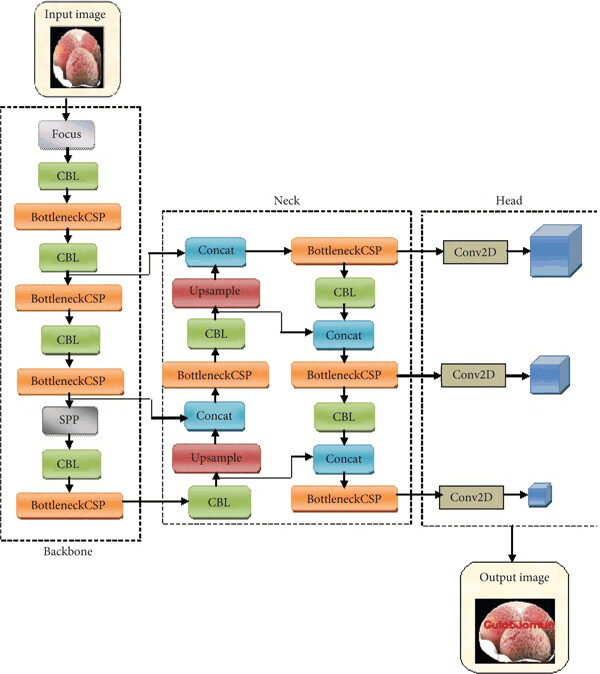
This repository contains a project that estimates food calories using deep learning and computer vision techniques. It implements object detection models using both YOLOv4 and YOLOv5, offering practical insights into building and training these models.
This folder contains additional resources including configuration files and extra notebooks:
If you are using this project for academic purposes—such as incorporating it into a final year project—it is mandatory that you provide clear and proper attribution. You must:
This project is licensed under the Creative Commons Attribution-NonCommercial 4.0 International License .
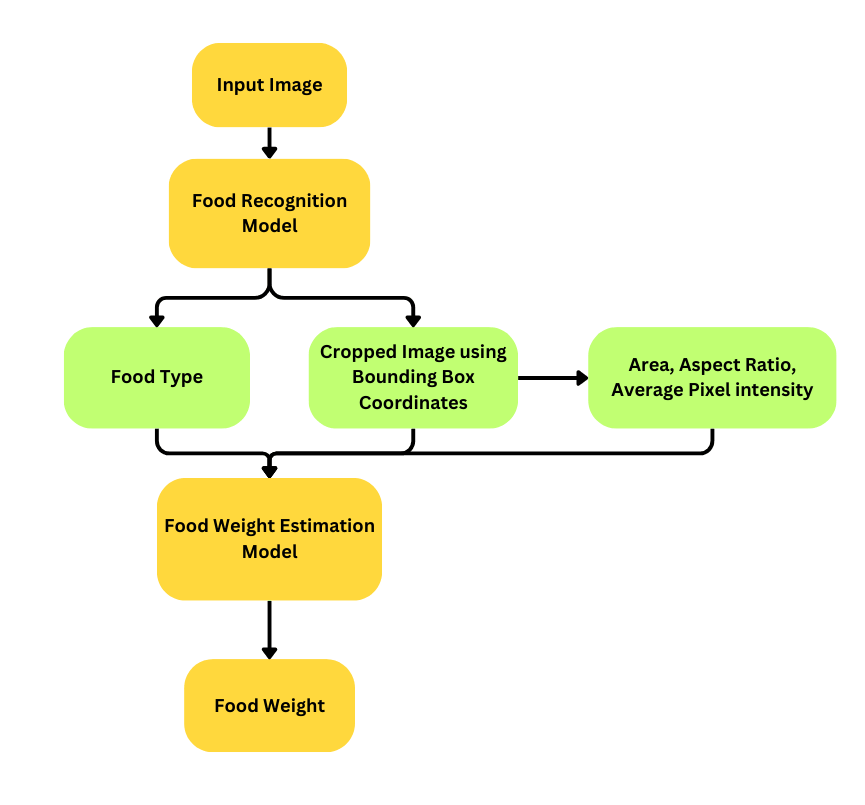
🍱 CalorieAI — Deep Learning-Based Food Calorie Estimation System Implementation of the paper published in TIJER (Vol 11, Issue 7, July 2024) "CalorieAI: Deep Learning-Based Food Calorie Estimation System" Pramod Chandra P · Parthasarathy S · Prem raj V · Mrs. Priya Dept. of AI & DS, Panimalar Engineering College, Chennai, India ISSN: 2349-9249 📄 Paper Abstract An image of food often includes a range of meals and dishes. In food photographs with several dishes, we must identify each one. We employ the YOLO v8 algorithm to identify meals and serving utensils . We use YOLO v8 as a food detector to identify each dish, and image-based food calorie estimation is used to estimate the food calories of each recognized dish. 🏗 System Pipeline — Paper Figure 5 FOOD ──► CAPTURING IMAGE ──► PRE-TRAINED CNN (YOLOv8) ──► PREDICTION OF CALORIES │ WEB APPLICATION ──► SETUP WEBSERVER ──► DATABASE INTEGRATION 🧮 Calorie Estimation Formulas — Paper Section IV-C Step 1 — Bounding box pixel area area = width × height Step 2 — Real-life area via known capture distance D 1 / Area_real (cm²) = (D / Distance_real)² D = known distance at which the photo was taken (cm) Step 3 — Per-item calories Calories = Abbox × Cfood Abbox = real-life bounding box area (cm²) Cfood = caloric density (kcal/cm²) from USDA Food Composition Database Step 4 — Total calories Total Calories = Σ Calories_food 🧠 YOLOv8 Architecture — Paper Section III-A Component Detail Type Single-stage (full image in one pass) Backbone CSPDarknet53 / EfficientNet Neck C2f module (replaces CSPLayer from YOLOv5) Head Bounding-box + sigmoid objectness + softmax class probs Loss CIoU + DFL (Distribution Focal Loss) 📊 Dataset — Paper Section IV-A Property Value Source Roboflow "Food Detection Image Dataset" Total images 3,543 Train 3,376 (95%) Validation 110 (3%) Test 57 (2%) Preprocessing Auto-Orient + uniform scale → 256×256 px Augmentation Horizontal flip + rotation ±15° (× 3 per sample) Foods from paper Figure 3: chinese_cabbage · curry · mung_bean_sprouts · triangle_hash_brown · fried_dumplings · carrot_eggs Serving utensils (paper Abstract): plate · bowl · chopsticks · spoon · fork 📈 Results — Paper Section IV-B Metric Value mAP@0.5 86% Epochs 100 Loss curves Figure 4: box_loss ↓, cls_loss ↓, DFL_loss ↓, precision ↑, mAP ↑ 📁 Project Structure CalorieAI/ ├── src/ │ ├── detector/ │ │ ├── detector.py # YOLOv8 + Roboflow classes (Figure 3 foods) │ │ └── train_detector.py # 100 epochs · 256×256 · flip + ±15° rotation │ ├── estimator/ │ │ ├── calorie_estimator.py # All 4 paper formula steps + USDA DB │ │ └── cnn_classifier.py # ResNet-50 CNN food classifier │ ├── utils/ │ │ ├── preprocess.py # Auto-Orient · 256×256 · ×3 augmentations │ │ └── visualize.py # Bounding boxes + calorie overlay │ └── api/ │ ├── app.py # Flask (paper Section V) │ ├── routes.py # /api/estimate · /api/history · /api/classes │ └── database.py # SQLite — Database Integration (Figure 5) ├── web/ │ ├── templates/index.html # Web demo with formula trace │ └── templates/history.html # Food log viewer ├── scripts/ │ └── prepare_dataset.py # Roboflow download + 256×256 preprocessing ├── tests/ │ └── test_calorieai.py # Tests for every formula step + DB + API ├── requirements.txt · Dockerfile · docker-compose.yml └── README.md ⚙ Installation git clone https://github.com/YOUR_USERNAME/CalorieAI.git cd CalorieAI python -m venv venv && source venv/bin/activate pip install -r requirements.txt 🗂 Dataset Preparation # From Roboflow (paper source) python scripts/prepare_dataset.py --roboflow --api_key YOUR_KEY # Local dataset python scripts/prepare_dataset.py --local --data_dir path/to/dataset Applies: Auto-Orient → 256×256 uniform scale (paper preprocessing). 🏋 Training (paper exact config) # Generate dataset YAML python src/detector/train_detector.py gen_yaml --data_dir data/processed # Train: 100 epochs · imgsz=256 · flip + ±15° rotation → 86% mAP python src/detector/train_detector.py train \ --data data/processed/food_calorieai.yaml \ --model m --epochs 100 --imgsz 256 --batch 16 --device 0 # Evaluate vs. paper benchmark python src/detector/train_detector.py eval \ --weights models/yolov8m_calorieai.pt \ --data data/processed/food_calorieai.yaml # Expected: mAP@0.5 ≥ 0.86 ✅ 🚀 Run the Flask Web App # Local python src/api/app.py # Open http://localhost:5000 # Docker docker-compose up --build 🧪 Tests pytest tests/ -v Tests verify every paper formula step: Test Paper Reference area = width × height Section IV-C Step 1 1/Area_real = (D/D_real)² Section IV-C Step 2 Cfood from USDA DB Section IV-C Step 3 Calories = Abbox × Cfood Section IV-C Step 4 TotalCalories = Σ Calories_food Section IV-C Figure 3 foods in USDA DB Section IV-B Figure 3 Roboflow classes (foods + utensils) Abstract + Figure 3 ×3 augmentation variants Section IV-A 256×256 preprocessing Section IV-A Database save/retrieve Figure 5 Flask API endpoints Section V 📚 References (from paper) Ren et al. Faster R-CNN. NeurIPS 2015. Ege & Yanai. Simultaneous food + calorie estimation (multi-task CNN). MVA 2017. Felzenszwalb et al. Object detection with discriminatively trained part-based models. IEEE TPAMI 2010. Redmon et al. You Only Look Once. CVPR 2016. Terven & Cordova-Esparza. A Comprehensive Review of YOLO. arXiv 2023. Hussain M. YOLO-v1 to YOLO-v8. University of Huddersfield. 📜 License MIT © 2024 · Panimalar Engineering College, Chennai, India
"CalorieAI: Deep Learning-Based Food Calorie Estimation System" Pramod Chandra P · Parthasarathy S · Prem raj V · Mrs. Priya Dept. of AI & DS, Panimalar Engineering College, Chennai, India ISSN: 2349-9249
An image of food often includes a range of meals and dishes. In food photographs with several dishes, we must identify each one. We employ the YOLO v8 algorithm to identify meals and serving utensils . We use YOLO v8 as a food detector to identify each dish, and image-based food calorie estimation is used to estimate the food calories of each recognized dish.
2. Related Work, Literature Survey & Algorithmic Foundations
FOOD ──► CAPTURING IMAGE ──► PRE-TRAINED CNN (YOLOv8) ──► PREDICTION OF CALORIES │ WEB APPLICATION ──► SETUP WEBSERVER ──► DATABASE INTEGRATION
Foods from paper Figure 3: chinese_cabbage · curry · mung_bean_sprouts · triangle_hash_brown · fried_dumplings · carrot_eggs
CalorieAI/ ├── src/ │ ├── detector/ │ │ ├── detector.py # YOLOv8 + Roboflow classes (Figure 3 foods) │ │ └── train_detector.py # 100 epochs · 256×256 · flip + ±15° rotation │ ├── estimator/ │ │ ├── calorie_estimator.py # All 4 paper formula steps + USDA DB │ │ └── cnn_classifier.py # ResNet-50 CNN food classifier │ ├── utils/ │ │ ├── preprocess.py # Auto-Orient · 256×256 · ×3 augmentations │ │ └── visualize.py # Bounding boxes + calorie overlay │ └── api/ │ ├── app.py # Flask (paper Section V) │ ├── routes.py # /api/estimate · /api/history · /api/classes │ └── database.py # SQLite — Database Integration (Figure 5) ├── web/ │ ├── templates/index.html # Web demo with formula trace │ └── templates/history.html # Food log viewer ├── scripts/ │ └── prepare_dataset.py # Roboflow download + 256×256 preprocessing ├── tests/ │ └── test_calorieai.py # Tests for every formula step + DB + API ├── requirements.txt · Dockerfile · docker-compose.yml └── README.md
git clone https://github.com/YOUR_USERNAME/CalorieAI.git cd CalorieAI python -m venv venv && source venv/bin/activate pip install -r requirements.txt
# From Roboflow (paper source) python scripts/prepare_dataset.py --roboflow --api_key YOUR_KEY # Local dataset python scripts/prepare_dataset.py --local --data_dir path/to/dataset
# Generate dataset YAML python src/detector/train_detector.py gen_yaml --data_dir data/processed # Train: 100 epochs · imgsz=256 · flip + ±15° rotation → 86% mAP python src/detector/train_detector.py train \ --data data/processed/food_calorieai.yaml \ --model m --epochs 100 --imgsz 256 --batch 16 --device 0 # Evaluate vs. paper benchmark python src/detector/train_detector.py eval \ --weights models/yolov8m_calorieai.pt \ --data data/processed/food_calorieai.yaml # Expected: mAP@0.5 ≥ 0.86 ✅
# Local python src/api/app.py # Open http://localhost:5000 # Docker docker-compose up --build
FoodLens: AI-Powered Calorie Estimation System FoodLens is a full-stack, distributed system designed to provide accurate nutritional analysis of meals using computer vision and large language models. The project bridges the gap between raw visual data and nutritional insights through a multi-stage AI pipeline. System Architecture The system is built on SOLID principles and follows a decoupled microservice architecture: Frontend : Built with React Native (Expo), featuring a custom authentication flow and camera integration. Main Backend : Developed with ASP.NET Core, handling user management, SQL data persistence, and orchestration. AI Microservice : A FastAPI service running on Google Colab (GPU accelerated), hosting deep learning models for segmentation, depth estimation, and zero-shot classification. The AI Pipeline FoodLens employs a "Vision-to-Reasoning" pipeline to ensure accuracy beyond simple 2D image recognition: Semantic Segmentation : Uses Segformer to identify and isolate individual food items within a single plate. Monocular Depth Estimation : Uses Depth-Anything-V2 to calculate spatial depth, providing the system with a 3D understanding of food volume. Zero-Shot Classification : Utilizes OpenAI CLIP to identify specific ingredients based on a dynamic list seeded from TheMealDB API. Nutritional Reasoning : Passes isolated visual segments and mathematical spatial data to Google Gemini 2.5 Flash for final volume-to-weight estimation and calorie calculation. Technical Stack Backend (ASP.NET Core) Identity & Security : ASP.NET Identity with JWT (JSON Web Token) authentication. Data Access : Entity Framework Core using the Repository Pattern for high testability and decoupling. Database : SQL Server for user profiles, ingredient types, and historical food logs. Integration : Typed HttpClient with delegation handlers for communicating with the AI microservice. Frontend (React Native) Navigation : React Navigation with protected stacks based on authentication state. State Management : React Context API for global authentication and user session handling. Hardware Integration : expo-camera and expo-image-picker for image acquisition. AI Service (Python/FastAPI) Framework : FastAPI with Uvicorn. ML Libraries : PyTorch, Transformers (HuggingFace), OpenCV, and NumPy. Tunneling : Ngrok for secure, real-time exposure of the Colab-hosted GPU environment. Features Automated Ingredient Seeding : Automatically populates the database with hundreds of ingredients from TheMealDB API on first run. Spatial Awareness : Uses depth maps to help the AI distinguish between a large portion and a close-up photo. Historical Logging : Users can track their nutritional intake over time with persistent storage. Cross-Origin Support : Fully configured CORS policy for seamless communication between web/mobile and the API. Project Structure Backend/ : ASP.NET Core solution (Controllers, Repositories, Interfaces, Entities). Frontend/ : Expo project (Screens, Context, API services). AI-Service/ : Python FastAPI implementation and model configuration. Installation & Setup Backend Configure the DefaultConnection string in appsettings.json . Run dotnet ef database update to apply migrations. Update the VisionApiService base address with your active AI service URL. Frontend Navigate to the Frontend folder. Run npm install . Execute npx expo start to launch the Metro bundler. AI Service Load the main.py script into a Google Colab notebook with a T4 GPU. Install dependencies: pip install fastapi uvicorn pyngrok google-generativeai transformers . Launch the server and copy the provided Ngrok URL to the backend configuration. Set your Google Gemini API key and ngrok Auth key: open main.py and replace the YOUR_GEMINI_API_KEY_HERE and YOUR_NGROK_AUTH_TOKEN_HERE placeholders with your keys or set the environment variables before running the service.
3. Dataset Ingestion, Preprocessing & Stochastic Augmentations
FoodLens is a full-stack, distributed system designed to provide accurate nutritional analysis of meals using computer vision and large language models. The project bridges the gap between raw visual data and nutritional insights through a multi-stage AI pipeline.
The system is built on SOLID principles and follows a decoupled microservice architecture:
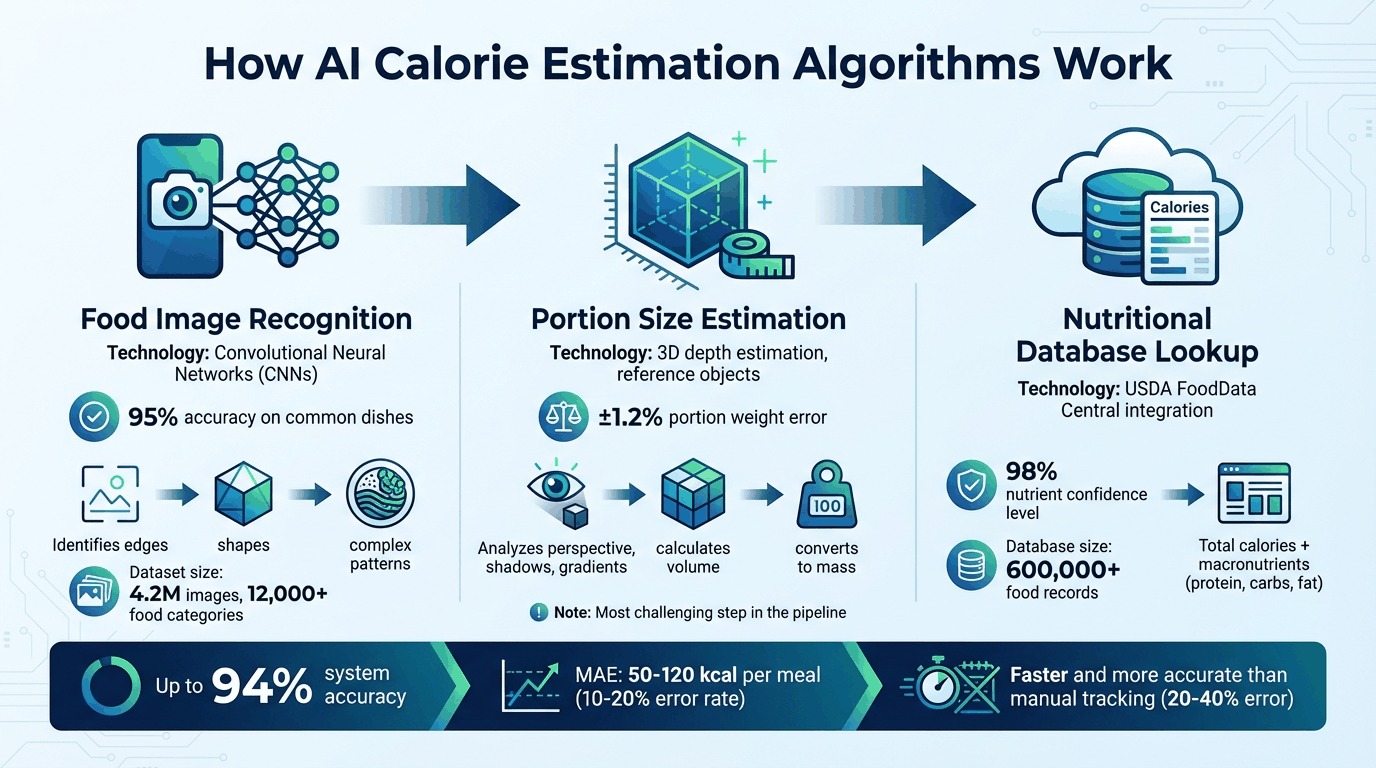
FoodLens employs a "Vision-to-Reasoning" pipeline to ensure accuracy beyond simple 2D image recognition:
An AI-powered calorie estimation system that uses computer vision and large language models to accurately calculate food weight and nutritional value from a single photo.
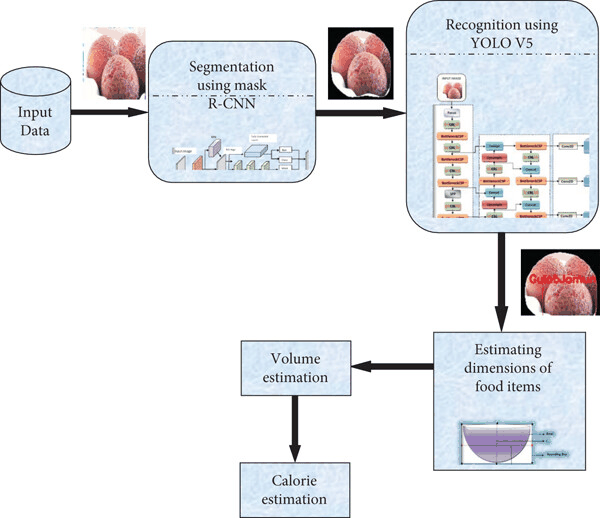
Food Recognition and Calorie Estimation Team Members : M. Gopi Chakradhar, K. Rohith Guide : Dr. N. Srinivas Naik, IIITDM Kurnool About the Project This project integrates Vision Transformer (ViT) and Mask R-CNN to provide an automated solution for food recognition and calorie estimation. By leveraging cutting-edge deep learning techniques, the system identifies food items, calculates portion sizes, and estimates caloric content from a single image. Key Features Accurate classification of 251 food categories using Vision Transformer. Precise segmentation of food items with Mask R-CNN for portion size estimation. Automated calorie calculation based on standardized caloric density values. Target Users Anyone who wants to track their calorie intake effortlessly. Dataset We used the FoodX-251 dataset, consisting of: Training Set : 120,216 images. Validation Set : 12,170 images. Test Set : 28,399 images. The dataset features a wide variety of food categories, but it poses challenges like noisy labels and high intra-class variability. Access the dataset here. System Design Workflow Overview : Technologies Used Deep Learning : PyTorch, Vision Transformer, Mask R-CNN. Data Handling : Python, NumPy, Pandas. Visualization : Matplotlib, Seaborn. Deployment : Jupyter Notebooks. Experimental Results Food Classification Accuracy : Achieved 88% Top-3 accuracy on FoodX-251. Calorie Estimation Accuracy : Low percentage error, with minor variations for larger portions. Portion Size Categorization : Automated segmentation provided IoU > 75% for most categories. Core Codebase /Food-Recognition-Calorie-Estimation ├── /notebooks │ ├── MAIN.ipynb │ ├── foodx-251-preprocessing.ipynb │ ├── PART1.ipynb │ ├── PART2.ipynb │ ├── Mask_R_CNN_for_Portion_Estimation.ipynb │ ├── Implementation_and_Inference.ipynb │ └── Model_Architecture_for_Food_Recognition.ipynb ├── /src │ ├── classes_names.txt │ ├── train_info_clean.csv │ ├── val_info.csv │ ├── food_estimates_by_gc.csv │ └── train_info_dirty.csv ├── /data (FoodX-251) │ ├── Dataset_images_link.txt │ └── dataset_organization.ipynb Reports and References: Project Report : Food Calorie Estimation Using ViT and Mask R-CNN. Literature Review :- Reference Papers Similar Products App Name Pros Cons Lose It! Tracks weight loss goals. No image-based calorie prediction. Calorie Mama Classifies food automatically. Requires manual weight input. MyFitnessPal Provides detailed nutrition breakdown. Does not support food recognition from images. Plagiarism Check For transparency and academic integrity, we have checked the project's report for plagiarism using industry-standard tools. You can view the plagiarism report generated by iThenticate here: iThenticate Plagiarism Report Alternatively, the Turnitin plagiarism check can be accessed here: Turnitin Plagiarism Report For Contributions For contributions, issues, or pull requests, feel free to reach out or submit to this repository! ✨ Built with passion and creativity by Gopi Chakradhar ✨
Team Members : M. Gopi Chakradhar, K. Rohith Guide : Dr. N. Srinivas Naik, IIITDM Kurnool
This project integrates Vision Transformer (ViT) and Mask R-CNN to provide an automated solution for food recognition and calorie estimation. By leveraging cutting-edge deep learning techniques, the system identifies food items, calculates portion sizes, and estimates caloric content from a single image.
The dataset features a wide variety of food categories, but it poses challenges like noisy labels and high intra-class variability. Access the dataset here.
4. Neural Network Backbone, Layer Specifications & Loss Formulations
├── /notebooks │ ├── MAIN.ipynb │ ├── foodx-251-preprocessing.ipynb │ ├── PART1.ipynb │ ├── PART2.ipynb │ ├── Mask_R_CNN_for_Portion_Estimation.ipynb │ ├── Implementation_and_Inference.ipynb │ └── Model_Architecture_for_Food_Recognition.ipynb ├── /src │ ├── classes_names.txt │ ├── train_info_clean.csv │ ├── val_info.csv │ ├── food_estimates_by_gc.csv │ └── train_info_dirty.csv ├── /data (FoodX-251) │ ├── Dataset_images_link.txt │ └── dataset_organization.ipynb
For transparency and academic integrity, we have checked the project's report for plagiarism using industry-standard tools. You can view the plagiarism report generated by iThenticate here: iThenticate Plagiarism Report
Alternatively, the Turnitin plagiarism check can be accessed here: Turnitin Plagiarism Report
For contributions, issues, or pull requests, feel free to reach out or submit to this repository!
🍎 EatSmart AI - Food Image Classifier & Calorie Estimator 🌟 Overview EatSmart AI is an intelligent food recognition and calorie estimation system that uses deep learning to automatically classify food items from images and estimate their nutritional content. Built with a modern Flask web interface and powered by Convolutional Neural Networks (CNN), it helps users maintain healthy eating habits by providing instant calorie information. ✨ Key Features 🎯 Accurate Food Classification : CNN-based model trained on diverse food datasets 📊 Real-time Calorie Estimation : Instant nutritional information for classified foods 🎨 Modern Web Interface : Beautiful, responsive design with smooth animations 📱 Mobile-Friendly : Optimized for all devices and screen sizes 🔧 Easy Training : Comprehensive training scripts for custom datasets 📈 Scalable Architecture : Modular design for easy feature additions 🍽️ Supported Food Classes The system currently supports classification of the following food items: Food Item Calories (per 100g) Food Item Calories (per 100g) 🍎 Apple 52 kcal 🍌 Banana 89 kcal 🫘 Beans 337 kcal 🥚 Boiled Egg 155 kcal 🍩 Doughnut 452 kcal 🍇 Grape 62 kcal 🥮 Mooncake 266 kcal 🍊 Orange 47 kcal 🍝 Pasta 131 kcal 🥝 Kiwi 61 kcal 🚀 Quick Start Prerequisites Python 3.11 or higher Conda (recommended for environment management) Git Installation Clone the repository git clone https://github.com/kamaljyotsingh/eatsmart-ai.git cd eatsmart-ai Create and activate conda environment conda create -n eatsmart python=3.11 conda activate eatsmart Install dependencies pip install -r requirements.txt Run the application python run.py Open your browser Navigate to http://localhost:5000 📸 Screenshots 🏠 Home Page 🔍 Prediction Interface 📊 Results Display 🧠 Model Architecture CNN Architecture Our custom CNN model consists of: Input Layer : 224x224x3 RGB images Convolutional Layers : Multiple conv layers with ReLU activation Pooling Layers : Max pooling for dimension reduction Dropout : Regularization to prevent overfitting Dense Layers : Fully connected layers for classification Output Layer : Softmax activation for multi-class classification Training Process Data Preprocessing : Image resizing, normalization, and augmentation Model Training : Using TensorFlow/Keras with callbacks Validation : Cross-validation for model evaluation Model Saving : Best model saved as .h5 file 🎯 Usage Web Interface Upload Image : Click "Choose File" to select a food image Analyze : Click "Analyze Image" to process the photo View Results : See classification results and calorie estimates Get Details : View nutritional information and serving suggestions Training Custom Model See TRAINING_GUIDE.md for detailed instructions on: Dataset preparation Model training Hyperparameter tuning Model evaluation 📁 Project Structure eatsmart-ai/ ├── run.py # Main Flask application ├── model.py # CNN model architecture ├── calorie.py # Calorie estimation logic ├── segmentimage.py # Image segmentation utilities ├── train_real_model.py # Training script for real data ├── requirements.txt # Python dependencies ├── static/ # Static assets │ ├── images/ # Sample images and logos │ └── styles/ # CSS stylesheets ├── templates/ # HTML templates │ ├── index.html # Home page │ ├── predict.html # Prediction page │ └── layout.html # Base template ├── images/ # Processing examples └── model/ # Trained models (not in repo) 🔧 Configuration Environment Variables Create a .env file for custom configurations: FLASK_ENV = development MODEL_PATH = model/food_classifier_model.h5 LABELS_PATH = label.npy Model Settings Update run.py to use your trained model: MODEL_NAME = "your_trained_model.h5" # Update this after training 🤝 Contributing We welcome contributions! Please follow these steps: Fork the repository Create a feature branch ( git checkout -b feature/AmazingFeature ) Commit your changes ( git commit -m 'Add some AmazingFeature' ) Push to the branch ( git push origin feature/AmazingFeature ) Open a Pull Request 📝 License This project is licensed under the MIT License - see the LICENSE file for details. 🙏 Acknowledgments Dataset Sources : FOODD Dataset and ECUST Food Dataset Deep Learning : TensorFlow and Keras frameworks Web Framework : Flask for the web interface UI Design : Modern CSS with gradient animations 📞 Support If you encounter any issues or have questions: 📧 Create an issue on GitHub 🐛 Report bugs with detailed descriptions 💡 Suggest new features Made with ❤️ for healthy eating ⭐ Star this repository if you found it helpful!
EatSmart AI is an intelligent food recognition and calorie estimation system that uses deep learning to automatically classify food items from images and estimate their nutritional content. Built with a modern Flask web interface and powered by Convolutional Neural Networks (CNN), it helps users maintain healthy eating habits by providing instant calorie information.
eatsmart-ai/ ├── run.py # Main Flask application ├── model.py # CNN model architecture ├── calorie.py # Calorie estimation logic ├── segmentimage.py # Image segmentation utilities ├── train_real_model.py # Training script for real data ├── requirements.txt # Python dependencies ├── static/ # Static assets │ ├── images/ # Sample images and logos │ └── styles/ # CSS stylesheets ├── templates/ # HTML templates │ ├── index.html # Home page │ ├── predict.html # Prediction page │ └── layout.html # Base template ├── images/ # Processing examples └── model/ # Trained models (not in repo)
FLASK_ENV = development MODEL_PATH = model/food_classifier_model.h5 LABELS_PATH = label.npy
5. Training Protocol, Convergence Behavior & Experimental Evaluation
A deep learning project that uses convolutional neural networks to identify food items from images and estimate their calorie content. Built using Python, TensorFlow/Keras, and OpenCV.
AUTOMATED-FOOD-IDENTIFICATION-AND-CALORIE-CALCULATION | Computer Vision, Deep Learning, Healthcare, Python Introduction:- This project introduces an AI-driven solution for diet management using deep learning and computer vision techniques. We developed a system that employs Convolutional Neural Networks (CNNs) to accurately identify food items from photos and estimate their calorie content using predictive analytics. Unlike traditional calorie tracking methods that rely on manual data entry and generic nutritional values, our approach automates the process with image recognition and machine learning algorithms, enhancing precision and user engagement. By training the CNN model on a diverse dataset using supervised learning, we ensure high accuracy in real-world scenarios. This tool simplifies dietary tracking, utilizing AI-powered automation to make it easier for users to monitor their intake and maintain a healthy lifestyle. Modules:- Convolutional Neural Network (CNN): A deep learning algorithm that processes images through layers of convolution and pooling, extracting features for accurate food classification and calorie estimation. TensorFlow: The machine learning platform that powers the CNN, handling numerical computations and tensor processing for model training and deployment. Keras: A high-level neural network library that simplifies CNN architecture design, data preprocessing, and model training, optimizing the AI for precise food recognition and calorie calculation. Result:- Our deep learning model demonstrates strong generalization and durability, achieving a test accuracy of 95.26% in classifying food images. This high accuracy reflects the model’s ability to learn and differentiate distinct food categories effectively. The loss value of 0.3423 indicates the model's confidence in its predictions, with lower loss suggesting more reliable classifications. Through multiple epochs, our CNN model consistently performed well in both training and validation phases, as illustrated in the "Training Accuracy" and "Validation Accuracy" graphs, underscoring its effectiveness in AI-driven food categorization and calorie estimation. Training accuracy over epochs. Validation accuracy.
This project introduces an AI-driven solution for diet management using deep learning and computer vision techniques. We developed a system that employs Convolutional Neural Networks (CNNs) to accurately identify food items from photos and estimate their calorie content using predictive analytics. Unlike traditional calorie tracking methods that rely on manual data entry and generic nutritional values, our approach automates the process with image recognition and machine learning algorithms, enhancing precision and user engagement. By training the CNN model on a diverse dataset using supervised learning, we ensure high accuracy in real-world scenarios. This tool simplifies dietary tracking, utilizing AI-powered automation to make it easier for users to monitor their intake and maintain a healthy lifestyle.
Convolutional Neural Network (CNN): A deep learning algorithm that processes images through layers of convolution and pooling, extracting features for accurate food classification and calorie estimation.
TensorFlow: The machine learning platform that powers the CNN, handling numerical computations and tensor processing for model training and deployment.
Keras: A high-level neural network library that simplifies CNN architecture design, data preprocessing, and model training, optimizing the AI for precise food recognition and calorie calculation.
Our deep learning model demonstrates strong generalization and durability, achieving a test accuracy of 95.26% in classifying food images. This high accuracy reflects the model’s ability to learn and differentiate distinct food categories effectively. The loss value of 0.3423 indicates the model's confidence in its predictions, with lower loss suggesting more reliable classifications. Through multiple epochs, our CNN model consistently performed well in both training and validation phases, as illustrated in the "Training Accuracy" and "Validation Accuracy" graphs, underscoring its effectiveness in AI-driven food categorization and calorie estimation.
This project introduces an AI-driven solution for diet management using deep learning and computer vision techniques. It employs convolutional neural networks (CNNs) to identify food items from images and estimate their caloric content. The system aims to assist users in tracking their dietary intake more accurately and conveniently.
Model Figures & Evaluation Curves (4 Images)
Deep Learning Execution Pipeline
(Preprocessing)
(Feature Extraction)
(Self-Attention)
(Loss Optimization)