Complete Technical Paper Content — Ai Diagnostic Assistant
1. Executive Abstract, Problem Formulation & Background
Medical AI Diagnostic Assistant AI-powered preliminary health assessment tool Overview The Medical AI Diagnostic Assistant is a machine learning-powered application designed to assist in preliminary health assessments. It combines a TensorFlow deep learning model with a rule-based symptom analyzer to provide intelligent diagnostic suggestions based on reported symptoms. ⚠️ DISCLAIMER : This tool is for educational and research purposes only . It is NOT a substitute for professional medical advice, diagnosis, or treatment. Always consult a qualified healthcare provider for medical concerns. Tech Stack Component Technology Language Python 3.10+ Deep Learning TensorFlow / Keras API Framework FastAPI + Uvicorn Data Processing NumPy, Pandas, Scikit-learn Validation Pydantic Serialization Python Multipart Features 🤖 ML-Based Diagnosis : TensorFlow neural network trained to recognize disease patterns from symptom vectors 📋 Rule-Based Symptom Analysis : Knowledge-engineered symptom-disease mapping for transparent reasoning 🔗 Dual Engine Architecture : Combines ML predictions with rule-based analysis for robust results 💊 Treatment Recommendations : Evidence-based self-care tips, medication info, and when to seek medical help 🧠 10 Disease Categories : Influenza, Pneumonia, COVID-19, Malaria, Tuberculosis, Hypertension, Anemia, Migraine, Gastritis, Heart Disease 🌐 RESTful API : Well-documented FastAPI endpoints for easy integration 📊 Confidence Scoring : Predictions include probability and confidence levels (high/medium/low) Project Structure medical-ai-diagnostic/ ├── api.py # FastAPI application and route definitions ├── main.py # Entry point to run the server ├── config.py # Configuration constants and paths ├── requirements.txt # Python dependencies ├── .gitignore # Git ignore rules ├── README.md # Project documentation ├── models/ │ ├── __init__.py # Package exports │ ├── diagnosis_model.py # TensorFlow model definition, training, inference │ └── symptom_analyzer.py # Rule-based symptom-disease mapping engine ├── src/ │ ├── __init__.py # Package exports │ ├── preprocessing.py # Data vectorization and encoding utilities │ ├── diagnostic_engine.py # Orchestrates ML + rule-based diagnosis │ └── recommendations.py # Treatment recommendation database and engine └── tests/ # Test directory (placeholder) Installation Prerequisites Python 3.10 or higher pip (Python package manager) (Optional) GPU with CUDA support for faster TensorFlow training Steps # 1. Clone the repository git clone https://github.com/roohan-514/medical-ai-diagnostic.git cd medical-ai-diagnostic # 2. Create and activate a virtual environment python -m venv venv # On Windows: venv \S cripts \a ctivate # On macOS/Linux: # source venv/bin/activate # 3. Install dependencies pip install -r requirements.txt # 4. Run the API server python main.py The server will start at http://localhost:8000 . Visit http://localhost:8000/docs for the interactive Swagger UI. API Endpoints GET /health Health check endpoint. Response: { "status" : " healthy " , "service" : " Medical AI Diagnostic Assistant " , "version" : " 1.0.0 " } POST /predict Full diagnosis (ML + rule-based analysis) from a list of symptoms. Request: { "symptoms" : [ " fever " , " cough " , " fatigue " ] } Response: { "rule_based_analysis" : { "predictions" : [ { "disease" : " Influenza " , "probability" : 0.3333 , "matched_symptoms" : [ " fever " , " cough " , " fatigue " ], "symptom_count" : 3 } ], "total_symptoms_analyzed" : 3 , "diseases_considered" : 10 }, "ml_based_analysis" : { "predictions" : [ { "disease" : " Influenza " , "probability" : 0.8921 , "confidence" : " high " } ], "model_used" : " tensorflow " }, "disclaimer" : " ... " } POST /analyze-symptoms Rule-based symptom analysis with optional severity scoring. Request: { "symptoms" : [ " fever " , " cough " ], "severity" : { "fever" : 2.0 , "cough" : 1.0 } } POST /get-recommendations Get treatment recommendations for a specific disease. Request: { "disease" : " Influenza " } GET /available-symptoms Returns the list of all supported symptoms. GET /available-diseases Returns the list of all supported diseases. Model Information Architecture The deep learning model is a feedforward neural network: Layer Type Output Shape Parameters Input Dense + ReLU (None, 256) 33,024 Batch Normalization BatchNormalization (None, 256) 1,024 Dropout Dropout (0.3) (None, 256) 0 Hidden 1 Dense + ReLU (None, 128) 32,896 Batch Normalization BatchNormalization (None, 128) 512 Dropout Dropout (0.3) (None, 128) 0 Hidden 2 Dense + ReLU (None, 64) 8,256 Output Dense + Sigmoid (None, 10) 650 Total parameters: ~76,362 Training The model uses: Loss function : Binary Crossentropy (multi-label classification) Optimizer : Adam (learning rate = 0.001) Metrics : Accuracy, AUC Regularization : Batch normalization + Dropout (0.3) Input Format The model accepts a 128-dimensional binary vector where each index corresponds to a symptom (1 = present, 0 = absent). The output is a 10-dimensional vector of probabilities, one for each disease class. Usage Examples Python Client import requests BASE_URL = "http://localhost:8000" # Health check response = requests . get ( f" { BASE_URL } /health" ) print ( response . json ()) # Full diagnosis response = requests . post ( f" { BASE_URL } /predict" , json = { "symptoms" : [ "fever" , "cough" , "fatigue" , "body ache" ]} ) print ( response . json ()) # Get recommendations response = requests . post ( f" { BASE_URL } /get-recommendations" , json = { "disease" : "Influenza" } ) print ( response . json ()) cURL curl -X POST http://localhost:8000/predict \ -H " Content-Type: application/json " \ -d ' {"symptoms": ["fever", "cough", "headache"]} ' Training Your Own Model import numpy as np from models import DiagnosisModel from src import Preprocessor # Generate or load your training data X_train = np . random . rand ( 1000 , 128 ) y_train = np . random . randint ( 0 , 2 , ( 1000 , 10 )) # Build and train model = DiagnosisModel () metrics = model . train ( X_train , y_train , epochs = 30 ) # Save the model model . save () # Evaluate X_test = np . random . rand ( 200 , 128 ) y_test = np . random . randint ( 0 , 2 , ( 200 , 10 )) eval_results = model . evaluate ( X_test , y_test ) print ( eval_results ) Roadmap Integration with real medical datasets (e.g., MIMIC-III, NHANES) Support for image-based diagnostics (X-ray, MRI) Patient history tracking and longitudinal analysis Multi-language symptom input Frontend dashboard (React/Next.js) CI/CD pipeline with automated testing License This project is licensed under the MIT License. See the LICENSE file for details. Contributing Contributions are welcome! Please open an issue or submit a pull request. Fork the repository Create a feature branch ( git checkout -b feature/amazing-feature ) Commit your changes ( git commit -m 'Add amazing feature' ) Push to the branch ( git push origin feature/amazing-feature ) Open a Pull Request
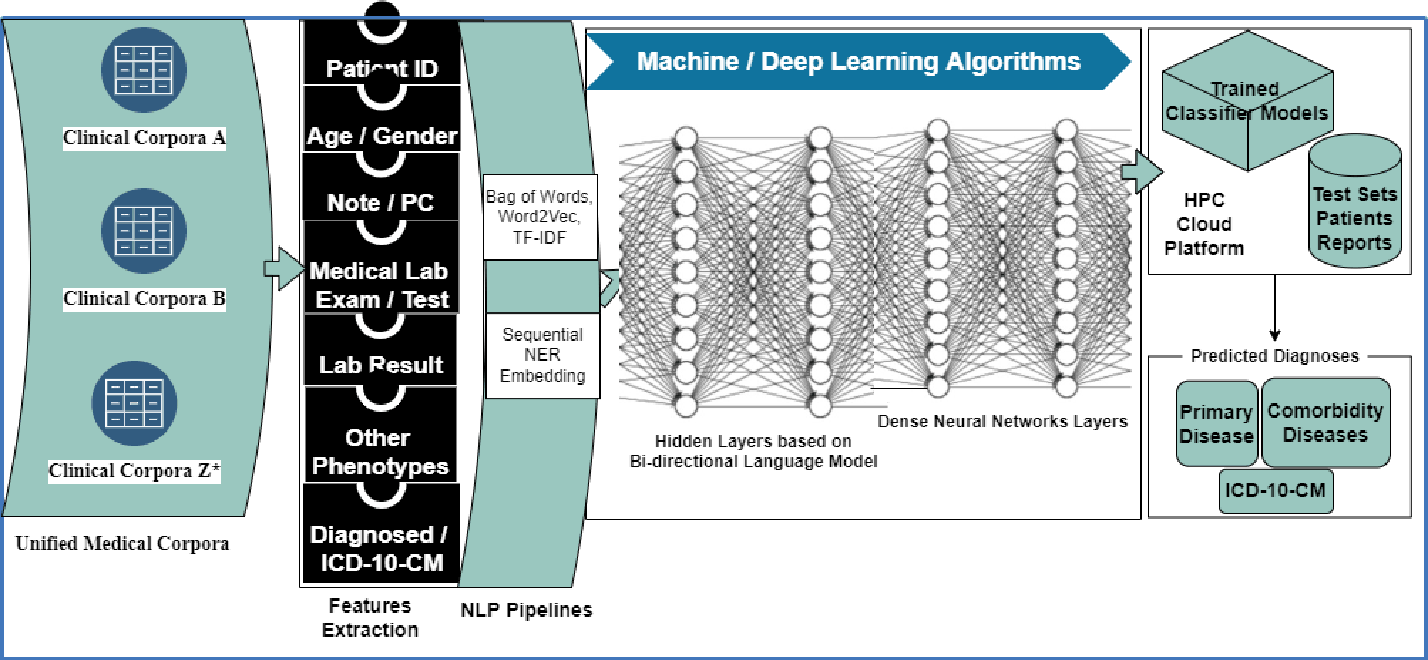
The Medical AI Diagnostic Assistant is a machine learning-powered application designed to assist in preliminary health assessments. It combines a TensorFlow deep learning model with a rule-based symptom analyzer to provide intelligent diagnostic suggestions based on reported symptoms.
⚠️ DISCLAIMER : This tool is for educational and research purposes only . It is NOT a substitute for professional medical advice, diagnosis, or treatment. Always consult a qualified healthcare provider for medical concerns.
medical-ai-diagnostic/ ├── api.py # FastAPI application and route definitions ├── main.py # Entry point to run the server ├── config.py # Configuration constants and paths ├── requirements.txt # Python dependencies ├── .gitignore # Git ignore rules ├── README.md # Project documentation ├── models/ │ ├── __init__.py # Package exports │ ├── diagnosis_model.py # TensorFlow model definition, training, inference │ └── symptom_analyzer.py # Rule-based symptom-disease mapping engine ├── src/ │ ├── __init__.py # Package exports │ ├── preprocessing.py # Data vectorization and encoding utilities │ ├── diagnostic_engine.py # Orchestrates ML + rule-based diagnosis │ └── recommendations.py # Treatment recommendation database and engine └── tests/ # Test directory (placeholder)
# 1. Clone the repository git clone https://github.com/roohan-514/medical-ai-diagnostic.git cd medical-ai-diagnostic # 2. Create and activate a virtual environment python -m venv venv # On Windows: venv \S cripts \a ctivate # On macOS/Linux: # source venv/bin/activate # 3. Install dependencies pip install -r requirements.txt # 4. Run the API server python main.py
The server will start at http://localhost:8000 . Visit http://localhost:8000/docs for the interactive Swagger UI.
2. Related Work, Literature Survey & Algorithmic Foundations
{ "status" : " healthy " , "service" : " Medical AI Diagnostic Assistant " , "version" : " 1.0.0 " }
{ "rule_based_analysis" : { "predictions" : [ { "disease" : " Influenza " , "probability" : 0.3333 , "matched_symptoms" : [ " fever " , " cough " , " fatigue " ], "symptom_count" : 3 } ], "total_symptoms_analyzed" : 3 , "diseases_considered" : 10 }, "ml_based_analysis" : { "predictions" : [ { "disease" : " Influenza " , "probability" : 0.8921 , "confidence" : " high " } ], "model_used" : " tensorflow " }, "disclaimer" : " ... " }
{ "symptoms" : [ " fever " , " cough " ], "severity" : { "fever" : 2.0 , "cough" : 1.0 } }
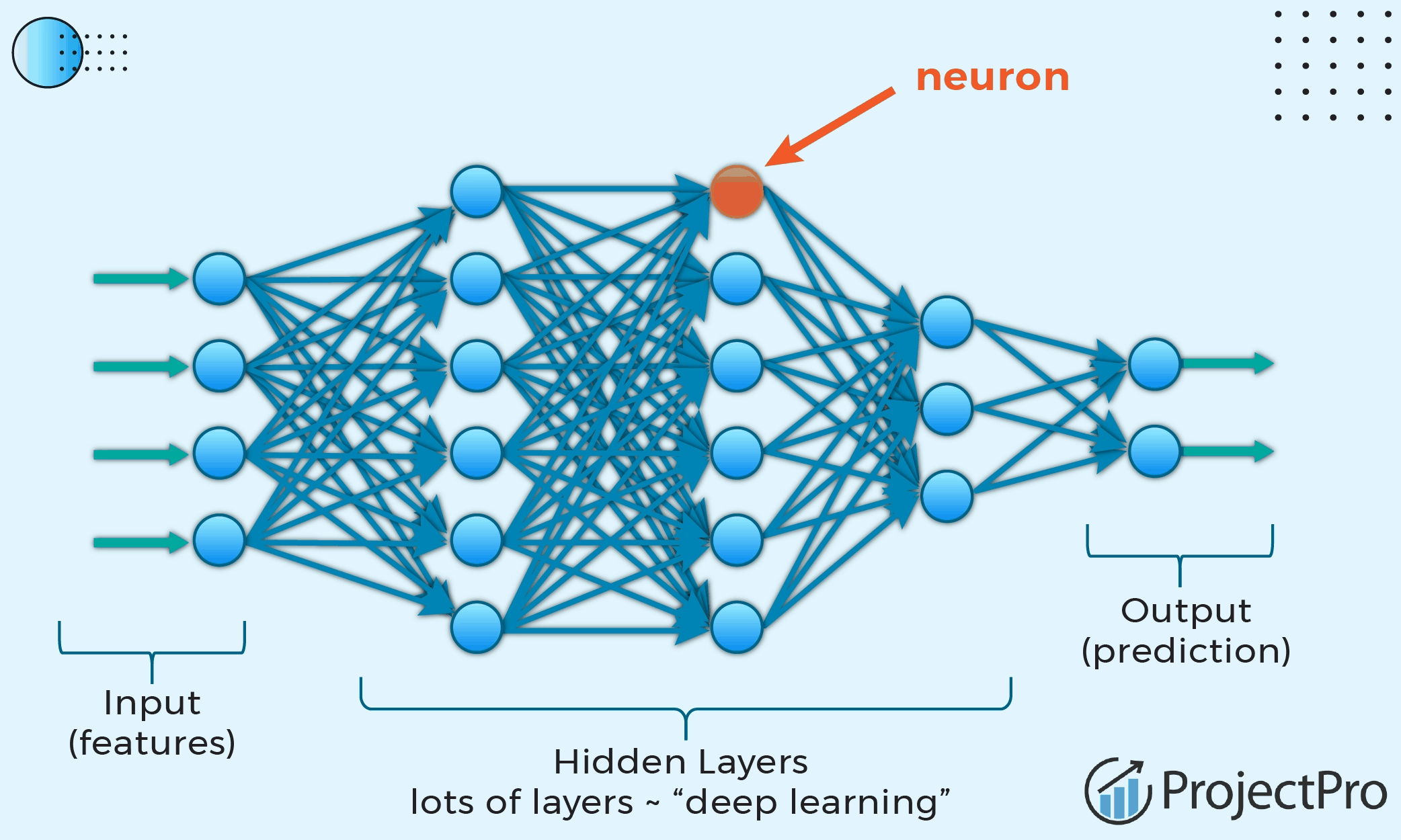
The model accepts a 128-dimensional binary vector where each index corresponds to a symptom (1 = present, 0 = absent). The output is a 10-dimensional vector of probabilities, one for each disease class.
import requests BASE_URL = "http://localhost:8000" # Health check response = requests . get ( f" { BASE_URL } /health" ) print ( response . json ()) # Full diagnosis response = requests . post ( f" { BASE_URL } /predict" , json = { "symptoms" : [ "fever" , "cough" , "fatigue" , "body ache" ]} ) print ( response . json ()) # Get recommendations response = requests . post ( f" { BASE_URL } /get-recommendations" , json = { "disease" : "Influenza" } ) print ( response . json ())
curl -X POST http://localhost:8000/predict \ -H " Content-Type: application/json " \ -d ' {"symptoms": ["fever", "cough", "headache"]} '
3. Dataset Ingestion, Preprocessing & Stochastic Augmentations
import numpy as np from models import DiagnosisModel from src import Preprocessor # Generate or load your training data X_train = np . random . rand ( 1000 , 128 ) y_train = np . random . randint ( 0 , 2 , ( 1000 , 10 )) # Build and train model = DiagnosisModel () metrics = model . train ( X_train , y_train , epochs = 30 ) # Save the model model . save () # Evaluate X_test = np . random . rand ( 200 , 128 ) y_test = np . random . randint ( 0 , 2 , ( 200 , 10 )) eval_results = model . evaluate ( X_test , y_test ) print ( eval_results )
Medical diagnostic assistant leveraging AI to assist in preliminary health assessments. Built with Python, TensorFlow, and FastAPI.
AI-Powered Alzheimer's Disease Detection & Diagnostic Assistant An advanced, AI-driven medical diagnostic assistant for Alzheimer's Disease detection based on Brain MRI (Magnetic Resonance Imaging) scans. This system utilizes a deep learning classification pipeline combined with LLM-powered clinical report generation to assist clinicians and medical professionals. 📷 Screenshots 1. Home Page 2. Sidebar Navigation & Session History 3. MRI Upload & Automated Validation 4. Diagnostic Dashboard & Class Probabilities 5. AI Clinical Neurological Summary & Next Steps 6. PDF Clinical Report Generation & Download Key Features Brain MRI Validation : Integrated with the Gemini API to analyze and validate uploaded files. The app checks if the uploaded image is actually a human brain MRI scan before performing any diagnostics. Deep Learning Classification : Powered by a custom-trained ConvNeXt-Tiny PyTorch model that classifies brain MRI scans into four distinct diagnostic stages: 🟢 Non Demented 🟡 Very Mild Demented 🟠 Mild Demented 🔴 Moderate Demented AI Clinical Summary : Generates structured, professional clinical neurological summaries using the Gemini model. Summaries contain diagnosis overviews, literature-linked neuroimaging markers (e.g., hippocampal atrophy, cortical thinning), lifestyle/care advice, and recommended next steps. PDF Report Compiler : Compiles high-quality, professional PDF clinical reports including probability distribution charts, Patient/MRI details, and clinical summaries. Session History Track : A built-in history panel tracking recent MRI uploads and diagnostic results. Project Structure AI_medical_diagnostic_assistant/ ├── .streamlit/ │ ├── config.toml # Streamlit configuration (Port 8502) │ └── secrets.toml # Streamlit secrets (Gemini API Key) ├── assets/ # UI screenshots and visual assets │ ├── clinical_summary1.png │ ├── clinical_summary2.png │ ├── diagnosis_dashboard.png │ ├── home.png │ ├── report_download.png │ ├── sidebar.png │ └── upload_mri.png ├── history/ # Contains diagnostic prediction history │ └── prediction_history.json ├── models/ # Saved PyTorch model weights │ └── best_convnext_tiny.pth ├── pages/ │ └── 1_Diagnosis_report.py # Main diagnosis page ├── reports/ # Output directory for generated PDF reports ├── uploads/ # Temporary directory for uploaded MRI images ├── utils/ │ ├── gemini_helper.py # Gemini API integration (validation & summary) │ ├── history.py # History JSON read/write helper │ ├── image_utils.py # Image loading and conversion │ ├── model_loader.py # ConvNeXt model initialization & weights loader │ └── report_generator.py # ReportLab PDF generator & matplotlib plotter ├── app1.py # Main entrypoint application (Upload UI) ├── predict.py # PyTorch inference script ├── preprocessing.py # Transforms (Normalize, Resize, Data Augmentation) └── requirements.txt # Project package requirements Setup & Installation 1. Prerequisites Python 3.10+ installed on your system. An active Google Gemini API Key . 2. Clone and Initialize Environment Navigate to the project root directory and create a virtual environment: # Create virtual environment python - m venv venv # Activate virtual environment # On Windows: venv\Scripts\Activate # On macOS/Linux: source venv / bin / activate 3. Install Dependencies Install all required packages: pip install - r requirements.txt 4. Configure Gemini API Key Create or edit .streamlit/secrets.toml and add your Google Gemini API key: GEMINI_API_KEY = " YOUR_GEMINI_API_KEY_HERE " Alternatively, you can set it as an environment variable ( GEMINI_API_KEY or GOOGLE_API_KEY ). 5. Upload trained ConvNeXt-Tiny model to the models folder Filename: best_convnext_tiny.pth 💻 Running the Application Start the Streamlit application using: streamlit run app1.py The app will initialize and host on http://localhost:8502 Model Architecture & Deep Learning Details The diagnostic classifier uses the ConvNeXt-Tiny architecture, adapted for 4-class medical image classification. Input Dimension : 224x224 pixels. Channels : 3 (RGB). Preprocessing (test_transform) : Resize to (224, 224) Convert to RGB Normalize to tensor space with Mean [0.5, 0.5, 0.5] and Std [0.5, 0.5, 0.5] . Classification Output : Softmax probability scores across the 4 stages of cognitive impairment. Disclaimer This application is built as an AI-powered diagnostic assistant for educational purposes. The classifications and clinical summaries generated by the AI models do NOT constitute medical advice or official diagnoses. All findings should be reviewed and verified by a qualified medical professional or neurologist.
An advanced, AI-driven medical diagnostic assistant for Alzheimer's Disease detection based on Brain MRI (Magnetic Resonance Imaging) scans. This system utilizes a deep learning classification pipeline combined with LLM-powered clinical report generation to assist clinicians and medical professionals.
AI_medical_diagnostic_assistant/ ├── .streamlit/ │ ├── config.toml # Streamlit configuration (Port 8502) │ └── secrets.toml # Streamlit secrets (Gemini API Key) ├── assets/ # UI screenshots and visual assets │ ├── clinical_summary1.png │ ├── clinical_summary2.png │ ├── diagnosis_dashboard.png │ ├── home.png │ ├── report_download.png │ ├── sidebar.png │ └── upload_mri.png ├── history/ # Contains diagnostic prediction history │ └── prediction_history.json ├── models/ # Saved PyTorch model weights │ └── best_convnext_tiny.pth ├── pages/ │ └── 1_Diagnosis_report.py # Main diagnosis page ├── reports/ # Output directory for generated PDF reports ├── uploads/ # Temporary directory for uploaded MRI images ├── utils/ │ ├── gemini_helper.py # Gemini API integration (validation & summary) │ ├── history.py # History JSON read/write helper │ ├── image_utils.py # Image loading and conversion │ ├── model_loader.py # ConvNeXt model initialization & weights loader │ └── report_generator.py # ReportLab PDF generator & matplotlib plotter ├── app1.py # Main entrypoint application (Upload UI) ├── predict.py # PyTorch inference script ├── preprocessing.py # Transforms (Normalize, Resize, Data Augmentation) └── requirements.txt # Project package requirements
# Create virtual environment python - m venv venv # Activate virtual environment # On Windows: venv\Scripts\Activate # On macOS/Linux: source venv / bin / activate
4. Neural Network Backbone, Layer Specifications & Loss Formulations
Alternatively, you can set it as an environment variable ( GEMINI_API_KEY or GOOGLE_API_KEY ).
The diagnostic classifier uses the ConvNeXt-Tiny architecture, adapted for 4-class medical image classification.
This application is built as an AI-powered diagnostic assistant for educational purposes. The classifications and clinical summaries generated by the AI models do NOT constitute medical advice or official diagnoses. All findings should be reviewed and verified by a qualified medical professional or neurologist.
🧠 AI-Based Diagnostic Assistant 🚀 Project Overview The AI-Based Diagnostic Assistant is a smart healthcare platform designed to assist doctors in analyzing medical images (X-ray, MRI, CT scans) using machine learning, explainable AI, and large language models. It delivers accurate predictions, highlights critical regions in scans, and generates diagnostic reports—enhancing the speed and quality of medical decisions. 🧩 Key Features 🧠 AI-Powered Image Analysis using CNN/YOLO with >90% accuracy. 🔍 Explainable AI with GRADCAM : Highlights key regions to improve diagnostic confidence. 🧾 Automated Report Generation using LangChain + LLMs . 🧬 Vector-Based Image Search : Retrieve similar past cases from database. 🧯 Anomaly Detection : Identifies irregular or abnormal scan patterns. 🌐 Frontend : Simple UI using HTML, CSS, JavaScript. 🌈 Dynamic Image Display : Toggle between HSV, RGB, BGR formats. 🔄 System Architecture 📊 AI Workflow Image Collection → X-ray, MRI, CT images are preprocessed. ML Model → CNN/YOLO models trained on labeled data. Visual Explanation → GRADCAM overlays highlight key regions. Report Generation → LLM generates structured diagnosis using LangChain. Image Storage → Processed data stored in PostgreSQL database. Vector Retrieval → Similar image cases fetched via vector database for comparison. 🌐 Frontend Workflow Built using HTML, CSS, JS. Image upload, preview with GRADCAM heatmap. View historical patient records and similar case search. 🛠️ Tech Stack Component Technology Frontend HTML, CSS, JavaScript Backend Python (Flask) Machine Learning CNN, YOLO, GRADCAM Database PostgreSQL LLM & Reports LangChain Image Search Vector DB Storage Local filesystem 🧪 Use Cases Use Case Description Auto Reporting Converts image data into a readable diagnostic report. Case Comparison Doctors compare new cases with past similar cases. 📉 Challenges & Solutions Challenge Solution Model Interpretability Used GRADCAM to visualize predictions. Image Storage Stored locally and linked via PostgreSQL. Efficient Search Integrated vector similarity on patient image history. Easy UI Designed clean, simple web interface without frameworks. ✅ Feasibility Technical : Scalable ML models, local PostgreSQL database for storage. Operational : Streamlined workflows for image review and diagnosis. Economic : Local storage and open-source tools reduce infrastructure cost. Medical : Assists doctors with clear visuals and automated documentation.
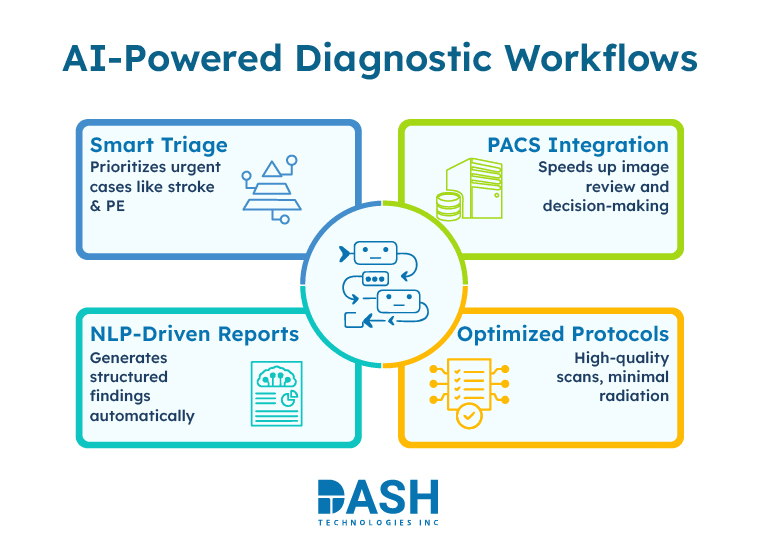
The AI-Based Diagnostic Assistant is a smart healthcare platform designed to assist doctors in analyzing medical images (X-ray, MRI, CT scans) using machine learning, explainable AI, and large language models. It delivers accurate predictions, highlights critical regions in scans, and generates diagnostic reports—enhancing the speed and quality of medical decisions.
AI-powered Streamlit app for multi-disease medical image diagnosis with Grad-CAM explainability — community-driven project where contributors can add and train new disease models. 🩺 AI-Powered Multi-Disease Medical Image Diagnosis System Using Streamlit + TensorFlow + Grad-CAM Explainability 🚀 Overview Multi-Disease Medical Image Diagnosis is an AI-based diagnostic assistant designed to analyze medical images (X-rays, CT scans, MRIs, etc.) and detect diseases with deep learning models . The app provides real-time Grad-CAM heatmaps to visualize areas of interest — making the predictions interpretable and clinically useful . Built using: 🧠 TensorFlow/Keras for deep learning 🌐 Streamlit for an interactive, browser-based interface 🔍 Grad-CAM for model explainability 🧩 Key Features ✅ Multi-Disease Classification – Supports multiple pretrained disease models (e.g., pneumonia, brain tumor, skin disease, etc.) ✅ Explainable AI – Uses Grad-CAM to show visual attention maps ✅ Dynamic JSON Configuration – Easily manage supported diseases and model paths via disease_info.json ✅ Streamlit Interface – Clean, responsive web UI ✅ Cross-Platform Deployment – Runs on Windows, Linux, or cloud platforms (Streamlit Cloud / Hugging Face Spaces) 🧠 System Architecture User Uploads Image → Preprocessing → Deep Learning Model Inference → Grad-CAM Heatmap Generation → Visualization on Streamlit Dashboard markdown Copy code Components: multi_disease_diagnosis.py → Main Streamlit app disease_info.json → Contains model configuration and disease metadata models/ → Folder containing pre-trained model .h5 files uploads/ → Temporary uploaded images 🧪 Example Workflow Launch Streamlit: streamlit run multi_disease_diagnosis.py Upload a medical image (X-ray / CT / MRI). Select the disease model to use. View: 🧩 Predicted Class 🔥 Grad-CAM Heatmap Visualization 📊 Confidence Scores ⚙️ Installation Guide Clone Repository bash Copy code git clone https://github.com/ /.git cd Create Virtual Environment (Recommended) bash Copy code python -m venv venv source venv/bin/activate # On Linux/Mac venv\Scripts\activate # On Windows Install Dependencies bash Copy code pip install -r requirements.txt Run Application bash Copy code streamlit run multi_disease_diagnosis.py 🧬 File Structure graphql Copy code 📦 Multi-Disease-Diagnosis ┣ 📜 multi_disease_diagnosis.py # Main Streamlit application ┣ 📜 disease_info.json # Disease configuration and model mapping ┣ 📜 requirements.txt # Python dependencies ┣ 📜 README.md # Documentation ┣ 📂 models/ # Pre-trained TensorFlow models (.h5) ┗ 📂 uploads/ # Uploaded image storage 📚 disease_info.json Example json Copy code { "pneumonia": { "model_path": "models/pneumonia_model.h5", "labels": ["Normal", "Pneumonia"] }, "brain_tumor": { "model_path": "models/brain_tumor_model.h5", "labels": ["No Tumor", "Tumor Detected"] } } You can easily extend this by adding new diseases and models to the JSON file. 🔬 Grad-CAM Visualization Grad-CAM highlights the most influential regions in the image that contributed to the model’s decision. Example Output: Original X-ray Image Grad-CAM Heatmap Overlay Disease Prediction: Pneumonia (Confidence: 96.7%) ☁️ Deployment Options 🟢 Streamlit Cloud – Easiest option for free hosting 🟣 Hugging Face Spaces – Supports Streamlit + TensorFlow ⚙️ Docker / Local Server – For hospital or internal deployments 🤝 Contribution Guidelines Fork the repository Create a new branch (feature/add-new-disease) Commit your changes with clear messages Submit a pull request 📄 License This project is licensed under the MIT License — you are free to use, modify, and distribute it with attribution. 💡 Future Enhancements 🧬 Support for 3D medical data (CT/MRI volumes) 🏥 Integration with FHIR-based patient data ☁️ Real-time model serving via TensorFlow Serving or ONNX 📈 Advanced analytics dashboard 👨💻 Developed By MedImage-WebAI
5. Training Protocol, Convergence Behavior & Experimental Evaluation
AI-powered Streamlit app for multi-disease medical image diagnosis with Grad-CAM explainability — community-driven project where contributors can add and train new disease models.
Multi-Disease Medical Image Diagnosis is an AI-based diagnostic assistant designed to analyze medical images (X-rays, CT scans, MRIs, etc.) and detect diseases with deep learning models . The app provides real-time Grad-CAM heatmaps to visualize areas of interest — making the predictions interpretable and clinically useful .
✅ Multi-Disease Classification – Supports multiple pretrained disease models (e.g., pneumonia, brain tumor, skin disease, etc.) ✅ Explainable AI – Uses Grad-CAM to show visual attention maps ✅ Dynamic JSON Configuration – Easily manage supported diseases and model paths via disease_info.json ✅ Streamlit Interface – Clean, responsive web UI ✅ Cross-Platform Deployment – Runs on Windows, Linux, or cloud platforms (Streamlit Cloud / Hugging Face Spaces)
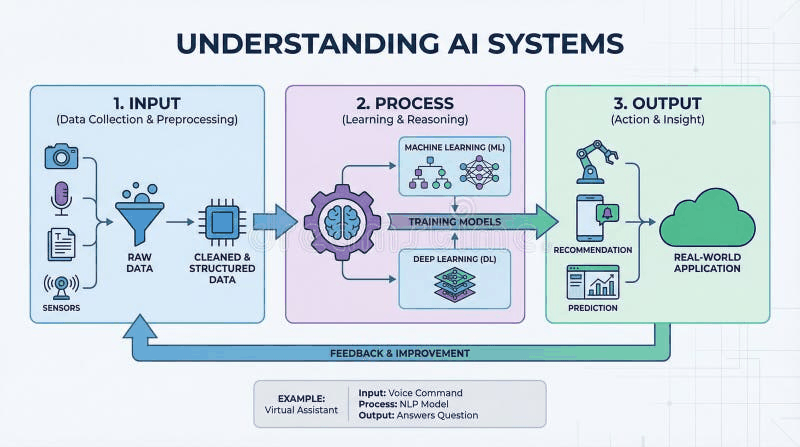
User Uploads Image → Preprocessing → Deep Learning Model Inference → Grad-CAM Heatmap Generation → Visualization on Streamlit Dashboard
🔬 Grad-CAM Visualization Grad-CAM highlights the most influential regions in the image that contributed to the model’s decision.
📄 License This project is licensed under the MIT License — you are free to use, modify, and distribute it with attribution.
Model Figures & Evaluation Curves (4 Images)
Deep Learning Execution Pipeline
(Preprocessing)
(Feature Extraction)
(Self-Attention)
(Loss Optimization)