Complete Technical Paper Content — Ai Exam Proctoring
1. Executive Abstract, Problem Formulation & Background
🤖 AI Proctoring System An AI-powered online examination proctoring system built using Python , OpenCV , YOLO , and Deep Learning to monitor candidates during online examinations in real time. 📌 Overview The AI Proctoring System is designed to maintain academic integrity during online examinations. Using Artificial Intelligence and Computer Vision, it detects suspicious activities such as multiple faces, mobile phone usage, books, and absence of the candidate while monitoring through a webcam. ✨ Features 👤 Real-Time Face Detection 👥 Multiple Face Detection 📱 Mobile Phone Detection 📚 Book Detection 👀 Eye Monitoring ⚠️ Suspicious Activity Detection 🎥 Live Webcam Monitoring 🤖 AI-Based Online Exam Proctoring 📊 Detection Accuracy Evaluation 🛠️ Tech Stack Python OpenCV YOLO TensorFlow Keras NumPy Computer Vision Deep Learning 📂 Project Structure AI-Proctoring-System/ │ ├── ProctoringSystem/ │ ├── Screenshots/ │ ├── model/ │ ├── templates/ │ ├── static/ │ ├── app.py │ └── ... │ ├── README.md └── .gitignore 🚀 Installation Clone the repository git clone https://github.com/MuzammilShaik16/AI-Proctoring-System.git Move into the project directory cd AI-Proctoring-System/ProctoringSystem Install dependencies pip install -r requirements.txt Run the project python app.py 📸 Project Screenshots 🔐 Login Page 👤 Face Detection 📱 Mobile Phone Detection 👥 Multiple Face Detection 📚 Book Detection 📈 Detection Accuracy 🎯 Applications Universities Colleges Schools Online Certification Platforms Corporate Recruitment Tests Remote Learning 🔮 Future Enhancements Face Recognition Authentication Head Pose Estimation Browser/Tab Switching Detection Voice & Background Noise Detection Cloud-Based Monitoring Dashboard AI-Generated Violation Reports 👨💻 Author Shaik Muzammil 🎓 B.E. Computer Science and Engineering (Data Science) 🔗 GitHub: https://github.com/MuzammilShaik16 ⭐ Support If you found this project useful, please consider giving it a ⭐ Star on GitHub!
An AI-powered online examination proctoring system built using Python , OpenCV , YOLO , and Deep Learning to monitor candidates during online examinations in real time.
The AI Proctoring System is designed to maintain academic integrity during online examinations. Using Artificial Intelligence and Computer Vision, it detects suspicious activities such as multiple faces, mobile phone usage, books, and absence of the candidate while monitoring through a webcam.
AI-Proctoring-System/ │ ├── ProctoringSystem/ │ ├── Screenshots/ │ ├── model/ │ ├── templates/ │ ├── static/ │ ├── app.py │ └── ... │ ├── README.md └── .gitignore
AI-powered online examination proctoring system using Computer Vision, OpenCV, YOLO, and Deep Learning for real-time face, eye, and mobile phone detection.
AI-Powered Exam Proctoring System A real-time AI-based exam proctoring system that monitors candidate behavior during online examinations using Computer Vision, Deep Learning, Face Recognition, and Object Detection techniques. The system automatically detects suspicious activities such as phone usage, multiple person presence, candidate absence, head movement, and unauthorized person substitution. It also generates evidence snapshots, event logs, risk scores, and session reports for audit purposes. Demo Features Candidate Verification Face verification using InsightFace embeddings Detection of unauthorized candidates Identity matching against registered student embeddings Phone Detection Real-time mobile phone detection using YOLOv8 Confidence-based detection filtering Evidence capture on violation Multiple Person Detection Detects more than one person in front of the webcam Logs violations after configurable duration Face Missing Detection Detects prolonged absence of the candidate Generates evidence and logs suspicious behavior Head Direction Monitoring Tracks head orientation using MediaPipe Face Mesh Detects prolonged looking-away behavior Risk Scoring Engine Assigns risk points for suspicious activities Generates cumulative exam risk score Evidence Capture Stores screenshots when violations occur Maintains an audit trail for review Session Reporting Generates exam summary reports Includes event counts and final risk score Performance Monitoring Real-time FPS display Optimized identity verification pipeline System Architecture Webcam Input │ ▼ YOLOv8 Object Detection │ ▼ MediaPipe Face Detection & Face Mesh │ ▼ InsightFace Verification │ ▼ Violation Detection Engine │ ▼ Risk Scoring Engine │ ▼ Evidence Capture + Event Logging + Session Reports Tech Stack Python OpenCV YOLOv8 (Ultralytics) MediaPipe InsightFace NumPy SciPy ONNX Runtime YAML Configuration Project Structure AI-Proctor/ │ ├── src/ │ ├── proctor_engine.py │ ├── phone_detection.py │ ├── face_verification.py │ └── ... │ ├── data/ │ └── embeddings/ │ ├── docs/ │ └── demo.png │ ├── evidence/ ├── logs/ ├── reports/ │ ├── config.yaml ├── requirements.txt └── README.md Installation Clone Repository git clone https://github.com/max66782/AI-Proctor.git cd AI-Proctor Create Virtual Environment python -m venv .venv source .venv/bin/activate Install Dependencies pip install -r requirements.txt Run Application python src/proctor_engine.py Current Capabilities Module Status Face Verification ✅ Phone Detection ✅ Multiple Person Detection ✅ Face Missing Detection ✅ Head Direction Detection ✅ Risk Scoring ✅ Evidence Capture ✅ Session Reports ✅ FPS Monitoring ✅ Configurable Thresholds ✅ Future Enhancements Eye Gaze Tracking Mouth Activity Detection Audio Monitoring Dashboard Analytics Database Integration Cloud Deployment Multi-Camera Support Author Krishn Bhushan Singh Electrical Engineering, IIT Roorkee Interested in Software Engineering, Data Engineering, Computer Vision, Machine Learning, and Artificial Intelligence.
A real-time AI-based exam proctoring system that monitors candidate behavior during online examinations using Computer Vision, Deep Learning, Face Recognition, and Object Detection techniques.
The system automatically detects suspicious activities such as phone usage, multiple person presence, candidate absence, head movement, and unauthorized person substitution. It also generates evidence snapshots, event logs, risk scores, and session reports for audit purposes.
Webcam Input │ ▼ YOLOv8 Object Detection │ ▼ MediaPipe Face Detection & Face Mesh │ ▼ InsightFace Verification │ ▼ Violation Detection Engine │ ▼ Risk Scoring Engine │ ▼ Evidence Capture + Event Logging + Session Reports
AI-Proctor/ │ ├── src/ │ ├── proctor_engine.py │ ├── phone_detection.py │ ├── face_verification.py │ └── ... │ ├── data/ │ └── embeddings/ │ ├── docs/ │ └── demo.png │ ├── evidence/ ├── logs/ ├── reports/ │ ├── config.yaml ├── requirements.txt └── README.md
Interested in Software Engineering, Data Engineering, Computer Vision, Machine Learning, and Artificial Intelligence.
Generated by BLACKBOX.AI https://www.blackbox.ai YOU hii i a participating in a hackathon and i want to create ai exam proctor i had written all the fetueeres AI-Powered Online Exam Proctoring Platform Dual Portals | Advanced AI Proctoring | Real-Time Alerts | Modern UI | Hackathon-Ready Build a fully-functional AI-based online exam proctoring system with two separate portals—Student and Teacher—featuring secure login panels, role-specific dashboards, and a modern, responsive UI. The system must enforce real-time AI proctoring rules like face detection, phone detection, sound analysis, eye tracking, and tab switch monitoring.
2. Related Work, Literature Survey & Algorithmic Foundations
hii i a participating in a hackathon and i want to create ai exam proctor i had written all the fetueeres
AI-Powered Online Exam Proctoring Platform Dual Portals | Advanced AI Proctoring | Real-Time Alerts | Modern UI | Hackathon-Ready
Build a fully-functional AI-based online exam proctoring system with two separate portals—Student and Teacher—featuring secure login panels, role-specific dashboards, and a modern, responsive UI. The system must enforce real-time AI proctoring rules like face detection, phone detection, sound analysis, eye tracking, and tab switch monitoring.
Generated by BLACKBOX.AI https://www.blackbox.ai YOU hii i a participating in a hackathon and i want to create ai exam proctor i had written all the fetueeres AI-Powered Online Exam Proctoring Platform Dual Portals | Advanced AI Proctoring | Real-Time Alerts | Modern UI | Hackathon-Ready Build a fully-functional AI-based online exam proctoring system with two separate portals—Student and Teacher—featuring secure login panels, role-specific dashboards, and a modern, responsive UI. The system must enforce real-time AI proctoring rules like face detection, phone detection, sound analysis, eye tracking, and tab switch monitoring.
hii i a participating in a hackathon and i want to create ai exam proctor i had written all the fetueeres
AI-Powered Online Exam Proctoring Platform Dual Portals | Advanced AI Proctoring | Real-Time Alerts | Modern UI | Hackathon-Ready
Build a fully-functional AI-based online exam proctoring system with two separate portals—Student and Teacher—featuring secure login panels, role-specific dashboards, and a modern, responsive UI. The system must enforce real-time AI proctoring rules like face detection, phone detection, sound analysis, eye tracking, and tab switch monitoring.
Generated by BLACKBOX.AI https://www.blackbox.ai YOU hii i a participating in a hackathon and i want to create ai exam proctor i had written all the fetueeres AI-Powered Online Exam Proctoring Platform Dual Portals | Advanced AI Proctoring | Real-Time Alerts | Modern UI | Hackathon-Ready Build a fully-functional AI-based online exam proctoring system with two separate portals—Student and Teacher—featuring secure login panels, role-specific dashboards, and a modern, responsive UI. The system must enforce real-time AI proctoring rules like face detection, phone detection, sound analysis, eye tracking, and tab switch monitoring.
hii i a participating in a hackathon and i want to create ai exam proctor i had written all the fetueeres
AI-Powered Online Exam Proctoring Platform Dual Portals | Advanced AI Proctoring | Real-Time Alerts | Modern UI | Hackathon-Ready
Build a fully-functional AI-based online exam proctoring system with two separate portals—Student and Teacher—featuring secure login panels, role-specific dashboards, and a modern, responsive UI. The system must enforce real-time AI proctoring rules like face detection, phone detection, sound analysis, eye tracking, and tab switch monitoring.
Generated by BLACKBOX.AI https://www.blackbox.ai YOU hii i a participating in a hackathon and i want to create ai exam proctor i had written all the fetueeres AI-Powered Online Exam Proctoring Platform Dual Portals | Advanced AI Proctoring | Real-Time Alerts | Modern UI | Hackathon-Ready Build a fully-functional AI-based online exam proctoring system with two separate portals—Student and Teacher—featuring secure login panels, role-specific dashboards, and a modern, responsive UI. The system must enforce real-time AI proctoring rules like face detection, phone detection, sound analysis, eye tracking, and tab switch monitoring.
3. Dataset Ingestion, Preprocessing & Stochastic Augmentations
hii i a participating in a hackathon and i want to create ai exam proctor i had written all the fetueeres
AI-Powered Online Exam Proctoring Platform Dual Portals | Advanced AI Proctoring | Real-Time Alerts | Modern UI | Hackathon-Ready
Build a fully-functional AI-based online exam proctoring system with two separate portals—Student and Teacher—featuring secure login panels, role-specific dashboards, and a modern, responsive UI. The system must enforce real-time AI proctoring rules like face detection, phone detection, sound analysis, eye tracking, and tab switch monitoring.
Generated by BLACKBOX.AI https://www.blackbox.ai YOU hii i a participating in a hackathon and i want to create ai exam proctor i had written all the fetueeres AI-Powered Online Exam Proctoring Platform Dual Portals | Advanced AI Proctoring | Real-Time Alerts | Modern UI | Hackathon-Ready Build a fully-functional AI-based online exam proctoring system with two separate portals—Student and Teacher—featuring secure login panels, role-specific dashboards, and a modern, responsive UI. The system must enforce real-time AI proctoring rules like face detection, phone detection, sound analysis, eye tracking, and tab switch monitoring.
hii i a participating in a hackathon and i want to create ai exam proctor i had written all the fetueeres
AI-Powered Online Exam Proctoring Platform Dual Portals | Advanced AI Proctoring | Real-Time Alerts | Modern UI | Hackathon-Ready
Build a fully-functional AI-based online exam proctoring system with two separate portals—Student and Teacher—featuring secure login panels, role-specific dashboards, and a modern, responsive UI. The system must enforce real-time AI proctoring rules like face detection, phone detection, sound analysis, eye tracking, and tab switch monitoring.
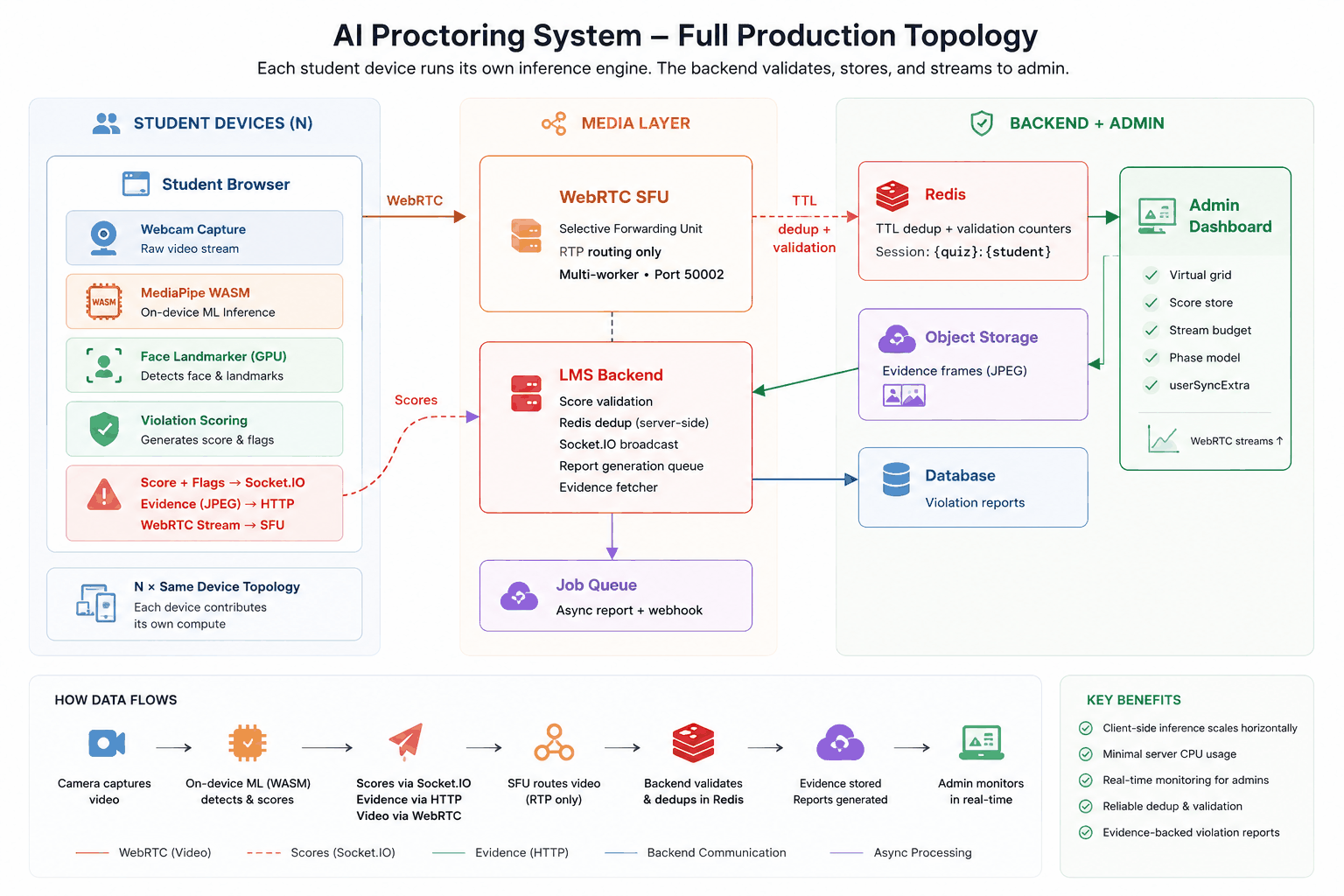
Proctoring System Architecture A deep-dive engineering case study on building a scalable real-time AI-powered online exam proctoring system using WebRTC, Mediasoup, MediaPipe, Redis, Socket.IO, and browser-side WebAssembly inference. This repository documents the architecture evolution, scaling bottlenecks, production failures, and optimization strategies involved in transforming a prototype real-time proctoring platform into a system designed for large-scale concurrent exam monitoring. Overview The project began as a basic WebRTC streaming platform where students published webcam streams and admins consumed them through a Mediasoup SFU. As AI-based proctoring features were introduced — including face detection, gaze analysis, multiple-face detection, camera blackout detection, and live scoring — the architecture encountered severe scalability limitations. The repository walks through: Initial WebRTC architecture Server-side MediaPipe inference Python + aiortc processing pipeline Redis-based violation deduplication EC2 CPU saturation failures Client-side ML migration using MediaPipe Tasks WASM Live admin dashboard scaling Stream virtualization and consumer lifecycle management Real-world production tradeoffs and lessons Key Topics Covered Real-Time Streaming WebRTC fundamentals Mediasoup SFU architecture Producer / consumer lifecycle Transport management Stream race conditions Multi-user signaling AI Proctoring Pipeline MediaPipe Face Detection Face Mesh inference Gaze tracking Suspicious activity scoring Violation detection system Evidence frame generation Scaling Challenges CPU saturation under concurrent load Blocking inference bottlenecks Redis throughput issues Stream lifecycle bugs LiveView rendering bottlenecks WebRTC consumer explosion Architecture Evolution Initial Architecture Server-side inference Python aiortc worker Shared EC2 instance Centralized AI processing Refactored Architecture Browser-side WebAssembly inference GPU-accelerated MediaPipe Tasks Server-side validation only Reduced infrastructure load Horizontally scalable topology Frontend Optimization Virtualized student grids Stream phase models React rendering optimization useSyncExternalStore Consumer warm/cold states Stream attach recovery logic Tech Stack Backend Node.js Express.js Socket.IO Redis Mediasoup Python aiortc Frontend React.js MediaPipe Tasks Vision WebAssembly (WASM) WebRTC APIs Infrastructure AWS EC2 AWS S3 Redis WebRTC SFU Architecture Highlights Server-Side Inference (Initial Design) Student Browser → Mediasoup SFU → Python AI Worker → Redis → Admin Dashboard Problems CPU-bound inference Event loop blocking Poor concurrency scaling Shared resource contention Client-Side Inference (Refactored Design) Student Browser (MediaPipe WASM) → LMS Backend → Admin Dashboard Benefits Distributed compute Minimal server inference cost Lower latency Better concurrency scaling Reduced infrastructure dependency Important Engineering Lessons Real-time systems fail differently under actual concurrency. WebRTC lifecycle management is mostly a state synchronization problem. AI inference pipelines become infrastructure bottlenecks faster than expected. Browser-side ML can fundamentally change scaling characteristics. React rendering strategy matters at high-frequency update rates. Production systems are shaped more by operational failures than ideal architecture diagrams. Repository Structure . ├── index.html ├── assets/ ├── diagrams/ ├── charts/ └── README.md Running Locally Simply open the HTML file in a browser: open index.html Or serve locally: npx serve . Publishing This repository is designed to be hosted via: GitHub Pages Netlify Vercel Future Improvements Multi-worker Mediasoup clustering Adaptive stream quality management Edge inference Fraud-resistant validation layers Better evidence integrity verification Advanced behavioral anomaly detection Author Shashank Dhiman Full Stack & Systems Engineer Areas of Interest Real-time systems WebRTC architecture Scalable backend systems AI-assisted infrastructure License This repository is intended for educational and portfolio purposes.
A deep-dive engineering case study on building a scalable real-time AI-powered online exam proctoring system using WebRTC, Mediasoup, MediaPipe, Redis, Socket.IO, and browser-side WebAssembly inference.
This repository documents the architecture evolution, scaling bottlenecks, production failures, and optimization strategies involved in transforming a prototype real-time proctoring platform into a system designed for large-scale concurrent exam monitoring.
The project began as a basic WebRTC streaming platform where students published webcam streams and admins consumed them through a Mediasoup SFU.
As AI-based proctoring features were introduced — including face detection, gaze analysis, multiple-face detection, camera blackout detection, and live scoring — the architecture encountered severe scalability limitations.
4. Neural Network Backbone, Layer Specifications & Loss Formulations
Architecture and implementation notes for a scalable real-time AI proctoring system, covering WebRTC streaming, Mediasoup SFU setup, server-side and client-side ML inference, Redis-based deduplication, and admin live-view optimization.
Core AI & Machine Learning Architecture This document focuses exclusively on the core Artificial Intelligence (AI) and Machine Learning (ML) algorithms utilized in the ExamHub proctoring system. It explains the underlying packages, mathematical principles, and how they function to ensure academic integrity. 1. Face Detection & Recognition Package Used: face_recognition (built on top of dlib ) The system verifies the identity of the student by detecting their face and comparing it to their registered profile image. A. Face Detection (HOG - Histogram of Oriented Gradients) Before a face can be recognized, it must be located within the image frame. dlib uses the HOG algorithm. Concept: It looks at the flow of light-to-dark pixels (gradients) across the image to find patterns resembling a human face. Equations: For every pixel (x,y), it calculates the horizontal gradient (g_x) and vertical gradient (g_y). The magnitude (g) and direction (θ) are: Magnitude (g) = √(g_x² + g_y²) Direction (θ) = arctan(g_y / g_x) These gradients are grouped into a histogram to form a "descriptor" that confidently identifies a face shape. B. Face Encoding & Matching (ResNet) Once the face is localized, the system must recognize who it is. Concept: dlib uses a deep Convolutional Neural Network (CNN), specifically a ResNet architecture, to map the detected face into a 128-dimensional vector (embedding) of numbers. Equation (Euclidean Distance): To verify identity, the system compares the live face vector ( v_live ) with the registered face vector ( v_reg ) using the Euclidean Distance formula: d = √ [ (v_live₁ - v_reg₁)² + (v_live₂ - v_reg₂)² + ... + (v_live₁₂₈ - v_reg₁₂₈)² ] Logic: If the distance d is less than or equal to 0.6 (the tolerance threshold), the faces are considered a match. If not, a WRONG_FACE violation is triggered. 2. Object Detection (Prohibited Items) Package Used: ultralytics (specifically the YOLOv8 Nano model) The system scans the student's physical environment to detect unauthorized items like smartphones, digital devices, or books. A. YOLO (You Only Look Once) Algorithm Concept: YOLOv8 divides the image into a grid and simultaneously predicts bounding boxes and class probabilities for objects within that grid in a single pass of the neural network. This allows for extremely fast, real-time detection. Equation (IoU - Intersection over Union): To determine the accuracy of the bounding box around a detected object (e.g., a cell phone), YOLO uses IoU to measure the overlap between the predicted box and the actual object: Area of Overlap IoU = ---------------- Area of Union Equation (Confidence Score): The model assigns a confidence score to each detection based on the probability of a specific class (like Class 67 for Cell Phones) existing within the bounding box: Confidence = Probability(Class | Object) × Probability(Object) If the Confidence Score crosses a certain threshold (e.g., 50%), an OBJECT_DETECTED violation is logged. 3. Head Pose Estimation & Behavioural Tracking Packages Used: mediapipe (Google) and opencv-python ( cv2 ) The system tracks the exact 3D orientation of the student's head to detect if they are looking away from the screen for answers. A. Facial Landmark Detection (MediaPipe Face Mesh) Concept: MediaPipe applies machine learning to identify 468 discrete 3D landmarks (points) on the human face in real-time. Key points include the tip of the nose, the corners of the eyes, and the edges of the chin. B. Perspective-n-Point (PnP) Algorithm Concept: The system maps the 2D facial landmarks found in the webcam feed back to a standard 3D human head model to deduce the camera's pose relative to the head. Equation (solvePnP): OpenCV's cv2.solvePnP function calculates a Rotation Matrix ( R ) and Translation Vector ( t ) that minimizes the reprojection error between the 3D world points (X, Y, Z) and the 2D pixel coordinates (u, v): [ u ] [ R₁₁ R₁₂ R₁₃ t₁ ] [ X ] [ v ] = K × [ R₂₁ R₂₂ R₂₃ t₂ ] × [ Y ] [ 1 ] [ R₃₁ R₃₂ R₃₃ t₃ ] [ Z ] [ 1 ] (where K is the intrinsic camera matrix holding optical center and focal length) . C. Euler Angles (Yaw, Pitch, Roll) Concept: The Rotation Matrix ( R ) from the equation above is converted mathematically into human-readable Euler angles: Yaw (Horizontal movement): Looking left or right. Pitch (Vertical movement): Looking up or down. Roll: Tiling the head side-to-side. Logic: If the Yaw angle exceeds ±10 degrees (looking away) or the Pitch angle drops below -10 degrees (looking down into the lap), a HEAD_POSE violation is logged. 4. Audio Anomaly Detection Technology Used: Web Audio API (JavaScript) The system listens for unauthorized talking or background coaching. A. Decibel Level Calculation Concept: The browser captures raw Pulse Code Modulation (PCM) audio samples from the microphone in real-time arrays. Equation (RMS - Root Mean Square): To measure the loudness of the audio, the system calculates the RMS of the sound sample values over a specific timeframe (buffer size N): RMS = √ [ (x₁² + x₂² + ... + xₙ²) / N ] Equation (Decibel Level DB): Converting the raw RMS to human-readable decibel units: Sound Level (dB) = 20 × log₁₀(RMS) Logic: The RMS value or dB level is continuously analyzed to determine volume intensity. If the calculated intensity stays consistently above a set threshold (e.g., 30%) for multiple continuous seconds, an AUDIO violation is triggered.
This document focuses exclusively on the core Artificial Intelligence (AI) and Machine Learning (ML) algorithms utilized in the ExamHub proctoring system. It explains the underlying packages, mathematical principles, and how they function to ensure academic integrity.
The system verifies the identity of the student by detecting their face and comparing it to their registered profile image.
Before a face can be recognized, it must be located within the image frame. dlib uses the HOG algorithm.
Concept: It looks at the flow of light-to-dark pixels (gradients) across the image to find patterns resembling a human face.
Equations: For every pixel (x,y), it calculates the horizontal gradient (g_x) and vertical gradient (g_y). The magnitude (g) and direction (θ) are:
These gradients are grouped into a histogram to form a "descriptor" that confidently identifies a face shape.
Concept: dlib uses a deep Convolutional Neural Network (CNN), specifically a ResNet architecture, to map the detected face into a 128-dimensional vector (embedding) of numbers.
Equation (Euclidean Distance): To verify identity, the system compares the live face vector ( v_live ) with the registered face vector ( v_reg ) using the Euclidean Distance formula:
Logic: If the distance d is less than or equal to 0.6 (the tolerance threshold), the faces are considered a match. If not, a WRONG_FACE violation is triggered.
The system scans the student's physical environment to detect unauthorized items like smartphones, digital devices, or books.
5. Training Protocol, Convergence Behavior & Experimental Evaluation
Concept: YOLOv8 divides the image into a grid and simultaneously predicts bounding boxes and class probabilities for objects within that grid in a single pass of the neural network. This allows for extremely fast, real-time detection.
Equation (IoU - Intersection over Union): To determine the accuracy of the bounding box around a detected object (e.g., a cell phone), YOLO uses IoU to measure the overlap between the predicted box and the actual object:
Equation (Confidence Score): The model assigns a confidence score to each detection based on the probability of a specific class (like Class 67 for Cell Phones) existing within the bounding box:
If the Confidence Score crosses a certain threshold (e.g., 50%), an OBJECT_DETECTED violation is logged.
The system tracks the exact 3D orientation of the student's head to detect if they are looking away from the screen for answers.
Concept: The system maps the 2D facial landmarks found in the webcam feed back to a standard 3D human head model to deduce the camera's pose relative to the head.
Equation (solvePnP): OpenCV's cv2.solvePnP function calculates a Rotation Matrix ( R ) and Translation Vector ( t ) that minimizes the reprojection error between the 3D world points (X, Y, Z) and the 2D pixel coordinates (u, v):
[ u ] [ R₁₁ R₁₂ R₁₃ t₁ ] [ X ] [ v ] = K × [ R₂₁ R₂₂ R₂₃ t₂ ] × [ Y ] [ 1 ] [ R₃₁ R₃₂ R₃₃ t₃ ] [ Z ] [ 1 ]
Concept: The browser captures raw Pulse Code Modulation (PCM) audio samples from the microphone in real-time arrays.
Equation (RMS - Root Mean Square): To measure the loudness of the audio, the system calculates the RMS of the sound sample values over a specific timeframe (buffer size N):
Logic: The RMS value or dB level is continuously analyzed to determine volume intensity. If the calculated intensity stays consistently above a set threshold (e.g., 30%) for multiple continuous seconds, an AUDIO violation is triggered.
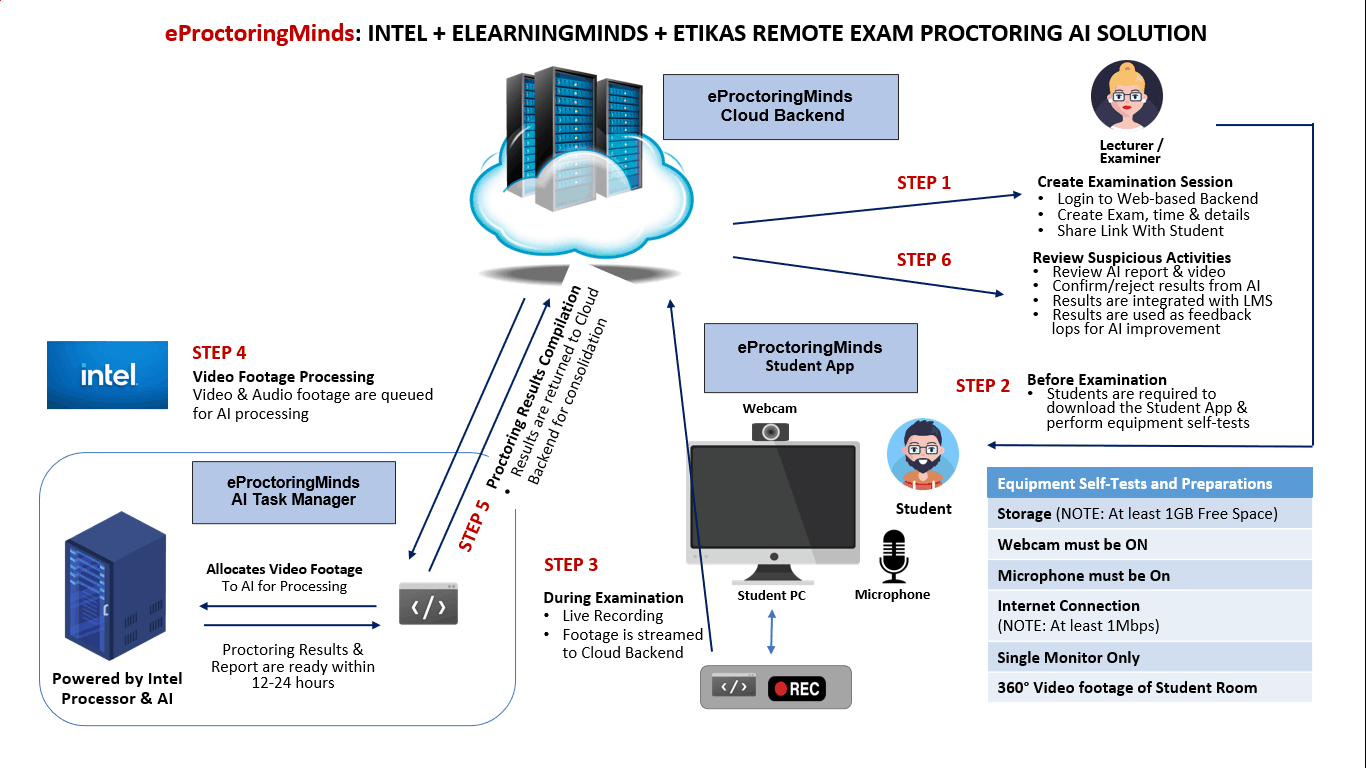
PROCTOR EDGE is a secure and intelligent online examination platform designed to ensure fairness, transparency, and academic integrity in remote assessments. The system provides a controlled digital environment where examinations can be conducted with continuous real-time monitoring and detailed post-exam analysis.
Model Figures & Evaluation Curves (4 Images)
Deep Learning Execution Pipeline
(Preprocessing)
(Feature Extraction)
(Self-Attention)
(Loss Optimization)