Complete Technical Paper Content — Ai Subtitle Generation
1. Executive Abstract, Problem Formulation & Background
Multimedia translation, also sometimes referred to as audiovisual translation, is a specialized branch of translation which deals with the transfer of multimodal and multimedial texts into another language and/or culture and which implies the use of a multimedia electronic system in the translation or in the transmission process.
Reverso is a company specialized in AI-based language tools, translation aids, and language services. These include online translation based on neural machine translation (NMT), contextual dictionaries, online bilingual concordances, definition dictionaries, grammar and spell checking and conjugation tools.
Subtitles have become an indispensable part of video content, expanding audience reach by breaking language barriers and enhancing accessibility for the deaf and hard of hearing community. In an era where video content dominates the internet—from educational materials and corporate presentations to entertainment and social media—subtitles ensure inclusivity and comprehension for a global audience. Moreover, they aid in understanding complex content, learning new languages, and ensuring clarity in noisy environments or where audio cannot be used.
Advancements in artificial intelligence (AI) have revolutionized the process of subtitle creation, making it more efficient and accurate. AI-driven subtitle generation involves automatic speech recognition (ASR), natural language processing (NLP), and machine learning algorithms to transcribe and synchronize spoken words with video content. These technologies can detect nuances in speech, accommodate various accents and dialects, and adapt to context for higher accuracy. This section will explore the key AI technologies that facilitate this process, including their operational mechanisms and how they’ve evolved over time.
Implementing AI in subtitle generation offers numerous advantages over traditional manual transcription methods:
In the subsequent sections, we will delve into how AI powers the creation of subtitles, explore various AI tools available for this purpose, discuss best practices in AI-generated subtitle creation, and consider the future of AI in this evolving field.
Artificial Intelligence, or AI, refers to the simulation of human intelligence in machines that are programmed to think and learn like humans. When it comes to video subtitling, AI is revolutionizing how subtitles are created by automating the process, which was traditionally manual and time-consuming. The integration of AI into subtitling not only speeds up the process but also increases accuracy and efficiency, making video content more accessible and engaging to a global audience.
The process of AI-powered subtitle generation involves several sophisticated steps that mimic and enhance human capabilities in language understanding and processing:
Recent advancements in AI technology have significantly improved the quality and efficiency of subtitle generation:
These advancements not only streamline the subtitle creation process but also enhance the viewing experience, making content more inclusive and accessible to audiences worldwide.
One of the standout advantages of AI-generated subtitles is their superior accuracy coupled with impressive speed. Traditional subtitling methods, often prone to human error and time-intensive processes, can’t compete with the efficiency AI brings to the table. This technology minimizes errors and inconsistencies, providing a precise reflection of the spoken dialogue in the video content. Additionally, AI dramatically accelerates the subtitling process, delivering fast turnaround times that are essential in today’s fast-paced media environment.
AI-generated subtitles shine in their ability to support an extensive array of languages , breaking down linguistic barriers that once limited audience reach. This multilingual capability ensures that content creators can cater to a global audience, allowing for the automatic generation of subtitles in various languages from the same source material. Such support not only amplifies the content’s accessibility but also fosters a more inclusive and engaging user experience for viewers around the world.
Opting for AI to generate subtitles represents a cost-effective solution for content creators. Traditional subtitling services can be costly, especially when requiring high accuracy and quick turnaround times. AI, on the other hand, streamlines the process, reducing the need for extensive human intervention and thus lowering the overall costs associated with subtitle production. This efficiency makes it an economically viable option for a wide range of users, from independent video producers to large broadcasting companies.
AI-generated subtitles play a pivotal role in enhancing accessibility, ensuring that video content is more inclusive for individuals with hearing impairments or those who are not fluent in the video’s language . By providing accurate and timely subtitles, AI helps to democratize access to information and entertainment, enabling all viewers to enjoy and engage with media content. This inclusivity is crucial in today’s diverse and interconnected world, as it ensures that content can be universally appreciated and understood, regardless of auditory or language limitations.
The first step in leveraging AI for subtitle generation is selecting an appropriate AI-powered tool that aligns with your specific needs. There are numerous options available, each offering different features, languages, and levels of customization. Consider factors such as the tool’s accuracy, language options, ease of use, and pricing. Opt for a platform that has a proven track record of delivering high-quality subtitles and offers robust customer support.
2. Related Work, Literature Survey & Algorithmic Foundations
Before you dive into the subtitle generation process, it’s essential to ensure your video is ready. This preparation involves checking the audio quality, as clear audio will significantly enhance the AI’s transcription accuracy. Also, if your video contains segments with no relevant audio (like long pauses or music interludes), consider whether these need subtitles or should be marked differently to inform viewers.
Once you’re satisfied with the quality and accuracy of the subtitles, the final step is to export them in the desired format and integrate them into your video. Many AI subtitle tools offer various export options to accommodate different platforms and players. After exporting, you can embed the subtitles into the video file or keep them as a separate file, depending on your distribution strategy. This integration ensures that your audience will have the option to view your content with accurate and readable subtitles, enhancing their viewing experience.
While AI-generated subtitles have come a long way in terms of accuracy, they’re not infallible. A critical best practice is to meticulously review and edit the subtitles post-generation. This scrutiny involves checking for transcription errors, ensuring proper noun capitalization, and verifying technical terms or names. Additionally, context is key; make sure that the subtitles accurately convey the intended meaning, especially in nuanced or complex dialogues. Editing might also include adjusting timing to ensure that subtitles appear and disappear in sync with the audio, providing a seamless viewing experience.
The effectiveness of subtitles is not only in their accuracy but also in their presentation. Customizing the appearance of your subtitles can significantly enhance viewer engagement and comprehension. This customization can involve choosing clear and easily readable fonts, adjusting sizes for visibility, and selecting contrasting colors to ensure that text stands out against the background. Furthermore, consider the placement of subtitles to avoid obscuring important visual elements in the video and ensure consistency in your subtitle formatting throughout the content to maintain a professional look.
AI technology is continuously evolving, with new updates and features being released regularly. Staying informed about the latest advancements can help you leverage improved functionalities, leading to better subtitle accuracy and efficiency. This could involve updating your AI subtitling software, exploring new tools that offer enhanced features, or simply staying abreast of industry trends. By embracing these advancements, you can optimize your subtitling process, maintain a competitive edge, and ensure that your content remains accessible and enjoyable for all audiences.
When utilizing AI technologies for subtitle generation, data privacy emerges as a significant concern . It’s imperative to ensure that the AI tools you employ adhere to stringent data security and privacy standards. Be cautious about the types of data you upload and understand how your data is being used. Is the information stored, shared, or sold? Selecting reputable AI subtitle tools that prioritize user data privacy and comply with relevant regulations can mitigate risks and safeguard your content against unauthorized access or misuse.
While AI can streamline the subtitling process, overreliance on this technology may lead to complacency regarding accuracy. AI systems, despite their advanced capabilities, can still make mistakes, especially with complex language nuances, technical jargon, or varying accents. It’s essential to maintain a level of human oversight to catch and correct any errors or inconsistencies, ensuring the final subtitles meet the highest standards of accuracy and reliability. Balancing AI’s efficiency with careful human review can help maintain the integrity and quality of your subtitles.
AI systems, inherently, learn from vast datasets that may contain biases. These biases can inadvertently be reflected in AI-generated subtitles, potentially leading to misrepresentation or discrimination. Being proactive in recognizing and correcting biases is crucial. Ensure the AI tools you use are developed with diverse and inclusive datasets and continually test and refine the AI models to mitigate bias. Moreover, being aware of and addressing these biases not only enhances the quality of your subtitles but also contributes to ethical AI practices, promoting fairness and inclusivity in media content.
The trajectory of AI in subtitle generation suggests a future where predictive analytics plays a central role. As AI technologies evolve, they are expected to become more adept at anticipating the needs of content creators and audiences alike. For instance, AI could predict the type of subtitles most effective for specific genres or audiences, optimizing readability and engagement. Furthermore, future AI systems might offer actionable insights into viewer preferences and accessibility requirements, enabling creators to tailor their subtitles more effectively to diverse audience needs.
The scope of AI-powered subtitle generation is set to broaden significantly, with advancements aimed at encompassing a wider array of languages and dialects. This expansion will likely facilitate more nuanced and accurate translations, accommodating regional variations and colloquialisms. As AI systems become more sophisticated, they will better capture the intricacies of different languages, making content accessible to an even broader audience and fostering greater cultural exchange and understanding.
Future AI subtitle generators are poised to offer unprecedented levels of personalization and context-awareness. Imagine a system that not only transcribes dialogue but also interprets tone, sentiment, and situational context, adjusting the subtitles accordingly to convey the intended message more effectively. Such advancements could lead to subtitles that adapt to individual viewer preferences, such as highlighting key information or adjusting complexity based on the viewer’s language proficiency or familiarity with the subject matter. Enhanced context-awareness will also improve the handling of ambiguous phrases or culturally specific references, ensuring that subtitles are as informative and relevant as possible.
Table of Contents Hide Before You Start Basic familiarity with Python (you’ll be running and editing scripts) Access to a Google Cloud account (for Speech-to-Text and Translation APIs) Access to an OpenAI account (for Whisper API usage) FFmpeg installed on your system (for audio extraction) Test video file(s) ready for processing Time needed: 1.5–3 hours (including API setup and testing) AI-powered subtitle generation can transform video workflows, enabling rapid, scalable, and accurate captioning in multiple languages. In this AI subtitle generation tutorial , you’ll build a practical pipeline that extracts audio from a video, transcribes it using AI, translates the transcript, and formats subtitles for use on any major video platform. This guide covers: Choosing the best AI APIs for transcription and translation Handling accuracy, timing, and language challenges Step-by-step integration with example code for Google Cloud and OpenAI Whisper Exporting subtitles in SRT format Tips, pitfalls, and next steps Step 1: Choose Your AI APIs for Transcription and Translation What to do: Select APIs that provide speech-to-text and multilingual translation capabilities. The most robust, developer-friendly options are: Google Cloud Speech-to-Text : High-accuracy transcription in many languages, with word-level timing. OpenAI Whisper API : State-of-the-art transcription and translation, robust on noisy or accented speech. Google Cloud Translation API : Supports 100+ languages, easy integration. Why it matters: The choice affects accuracy, supported languages, cost, and developer experience. For most use cases: Google Cloud — best for granular timing and enterprise support. OpenAI Whisper — best for difficult audio and direct translation/transcription in one call. What can go wrong: Some APIs have language or file-size restrictions. Always check Google quotas or OpenAI limits before processing large batches. Pro Tip Test a 1–2 minute sample video with your chosen API before committing to a full workflow. This quickly surfaces issues with accents, background noise, or timing. Step 2: Extract Audio from Your Video File What to do: Use FFmpeg to extract a clean audio track from your video. Most APIs accept .wav or .mp3 files. ffmpeg -i input_video.mp4 -vn -acodec pcm_s16le -ar 16000 -ac 1 audio.wav -vn : Ignore video -acodec pcm_s16le : Uncompressed audio (good for AI models) -ar 16000 : Sets sample rate to 16kHz (often required) -ac 1 : Mono channel (many APIs require mono) Why it matters: Clean, correctly formatted audio ensures accurate AI transcription. Incorrect sample rates or stereo audio can cause API errors or degraded results. What can go wrong: If your audio is noisy, consider preprocessing with an AI denoiser or manually cleaning the file. Otherwise, you may get garbled transcripts. Pro Tip Keep your audio length under 1 hour and file size below 100MB if possible. Split longer videos into chunks for more reliable processing. Step 3: Transcribe Audio with AI You’ll now convert speech to text, capturing timestamps for accurate subtitle alignment. Here’s how to do it with both Google Cloud and OpenAI Whisper. Option A: Google Cloud Speech-to-Text API Enable the API in your Google Cloud console and create a service account key (JSON). Install the Python client: pip install google-cloud-speech Transcribe your audio: from google.cloud import speech client = speech.SpeechClient.from_service_account_file('path/to/your-key.json') with open("audio.wav", "rb") as audio_file: content = audio_file.read() audio = speech.RecognitionAudio(content=content) config = speech.RecognitionConfig( encoding=speech.RecognitionConfig.AudioEncoding.LINEAR16, sample_rate_hertz=16000, language_code="en-US", # Change as needed enable_word_time_offsets=True ) response = client.recognize(config=config, audio=audio) for result in response.results: alternative = result.alternatives[0] print("Transcript:", alternative.transcript) for word_info in alternative.words: print(f"Word: {word_info.word}, start: {word_info.start_time.total_seconds()}, end: {word_info.end_time.total_seconds()}") Expected output: You get the full transcript plus word-level timestamps, ideal for generating subtitle segments. Option B: OpenAI Whisper API Install openai-whisper and openai Python client: pip install openai-whisper openai Transcribe with Whisper (using OpenAI API): import openai openai.api_key = "YOUR_OPENAI_API_KEY" audio_file = open("audio.wav", "rb") transcript = openai.Audio.transcribe( "whisper-1", audio_file, response_format="verbose_json" # For segment-level timing ) print(transcript) Expected output: JSON with segments array, each with start , end , and text for subtitle timing. Why it matters: Accurate timestamps are critical for subtitle synchronization. Both APIs deliver this, but Whisper’s segment-level timing is more “subtitle ready” out of the box. What can go wrong: If you get empty or low-confidence transcripts, review your audio quality. For non-English, set the correct language_code (Google) or use Whisper’s auto-detection. Pro Tip To reduce costs, downsample your audio to the minimum acceptable quality and trim silences before uploading. Publicidade Step 4: Translate the Transcript to Target Languages What to do: Use AI translation to convert your transcript into one or more target languages. Google Translate API is robust and easy to integrate. Install the Python client: pip install google-cloud-translate Translate text: from google.cloud import translate_v2 as translate translate_client = translate.Client.from_service_account_json('path/to/your-key.json') def translate_text(text, target='es'): result = translate_client.translate(text, target_language=target) return result['translatedText'] for segment in transcript['segments']: translated = translate_text(segment['text'], target='fr') # To French print(f"{segment['start']} --> {segment['end']}: {translated}") Expected output: Each segment or subtitle line in your target language, ready to be formatted. Why it matters: Automated translation enables scalable multilingual content. Segment-level translation (not whole-paragraph) preserves subtitle timing. What can go wrong: Machine translation may mistranslate idioms, technical terms, or names. For critical content, have a native speaker review output. Pro Tip Batch translate all subtitle lines in a single API call to reduce latency and cost (Google Translate supports batch requests). Step 5: Format and Export Subtitles (SRT) What to do: Convert your transcript and translations into SRT (SubRip Subtitle) format, which is supported by nearly all video platforms (YouTube, Vimeo, etc.). def srt_timestamp(seconds): h = int(seconds // 3600) m = int((seconds % 3600) // 60) s = int(seconds % 60) ms = int((seconds - int(seconds)) * 1000) return f"{h:02}:{m:02}:{s:02},{ms:03}" def write_srt(segments, filename): with open(filename, "w", encoding="utf-8") as f: for i, seg in enumerate(segments, 1): start = srt_timestamp(seg['start']) end = srt_timestamp(seg['end']) text = seg['text'] f.write(f"{i}\n{start} --> {end}\n{text}\n\n") translated_segments = [] for seg in transcript['segments']: translated_text = translate_text(seg['text'], target='fr') translated_segments.append({ 'start': seg['start'], 'end': seg['end'], 'text': translated_text }) write_srt(translated_segments, "output_fr.srt") Expected output: A file output_fr.srt with numbered subtitle entries, each with start & end timestamps and translated text. Why it matters: Correct SRT formatting ensures subtitles display properly and stay in sync. This is the final step for ready-to-upload multilingual subtitles. What can go wrong: Incorrect timestamp formatting, missing line breaks, or encoding issues can cause subtitles to fail to load. Always open your SRT in a subtitle editor (like Aegisub ) to check before publishing. Pro Tip To create multiple subtitle languages at once, loop through your segments with different target language codes and export separate SRT files for each. Step 6: Integrate with Video Platforms What to do: Upload your generated SRT files to your video platform of choice. Here’s how for two major platforms: YouTube Go to YouTube Studio > Subtitles. Select your video, click Add language , choose the language, then Add > Upload file > With timing . Upload your SRT. Vimeo Go to your video, click Advanced > Distribution > Subtitles . Click Upload subtitles , select the language, and choose your SRT file. Why it matters: Most platforms support multiple subtitle tracks. Accurate language tagging ensures viewers can select their preferred language. What can go wrong: If your SRT file doesn’t upload, check for encoding issues (use UTF-8), line break problems, or unsupported characters. Some platforms require SRT filenames to match language codes (e.g., output_fr.srt for French). Pro Tip Automate the upload step using platform APIs if you’re handling large video libraries. Both YouTube and Vimeo offer endpoints for subtitle management. Common Mistakes in AI Subtitle Generation Ignoring audio quality: Noisy or low-bitrate audio drastically reduces transcription accuracy. Always preview your audio. Wrong language settings: Mismatched language codes (e.g., en-US vs. en-GB) lead to errors or mis-transcriptions. Overlong subtitle segments: Segments over 2 lines or 6 seconds reduce readability. Split long segments during SRT generation. Skipping human review: Even the best AI makes mistakes, especially with technical terms or names. Have a bilingual reviewer spot-check output. Not handling API rate limits: Bulk processing without respecting quotas leads to failed jobs or blocked accounts. Next Steps Integrate subtitle review and editing with a tool like Aegisub or Subtitle Edit for quality control. Automate the full pipeline (audio extraction, transcription, translation, SRT export, upload) with a workflow manager like Airflow or Prefect. Explore open-source alternatives for offline or privacy-sensitive projects, as discussed in Building a Custom AI Agent Workflow with Open-Source Tools: Step-by-Step for 2026 . For more automation tips, check out Automating Data Entry with AI: Practical Methods and Tools in 2026 . With this workflow, you can rapidly scale subtitle generation for global audiences—without sacrificing quality or control. Test, iterate, and soon your multilingual video content will be accessible to all. Continue Reading How to Automate Email Outreach and Follow-Ups with AI in 2026 sub-pillar Building a Custom AI Agent Workflow with Open-Source Tools: Step-by-Step for 2026 sub-pillar Automating Data Entry with AI: Practical Methods and Tools in 2026 deep How to Use AI Tools for Podcast Production: A Step-by-Step Workflow 📚 Recommended Master AI with our complete guide collection 8 guides, 375+ prompts, instant download. Save 41% with the All-Access Bundle. Get All-Access — €49.90 → Browse all guides AI subtitles multilingual video automation tutorial developer guide Sophia Chen AI Tutorials Lead AI Tutorials Lead. Makes AI practical for everyone. Prompt engineering & automation specialist. Share this article 𝕏 Twitter LinkedIn WhatsApp Email Copy Link ☆ Save
AI-powered subtitle generation can transform video workflows, enabling rapid, scalable, and accurate captioning in multiple languages. In this AI subtitle generation tutorial , you’ll build a practical pipeline that extracts audio from a video, transcribes it using AI, translates the transcript, and formats subtitles for use on any major video platform.
What to do: Select APIs that provide speech-to-text and multilingual translation capabilities. The most robust, developer-friendly options are:
Why it matters: The choice affects accuracy, supported languages, cost, and developer experience. For most use cases:
3. Dataset Ingestion, Preprocessing & Stochastic Augmentations
What can go wrong: Some APIs have language or file-size restrictions. Always check Google quotas or OpenAI limits before processing large batches.
Test a 1–2 minute sample video with your chosen API before committing to a full workflow. This quickly surfaces issues with accents, background noise, or timing.
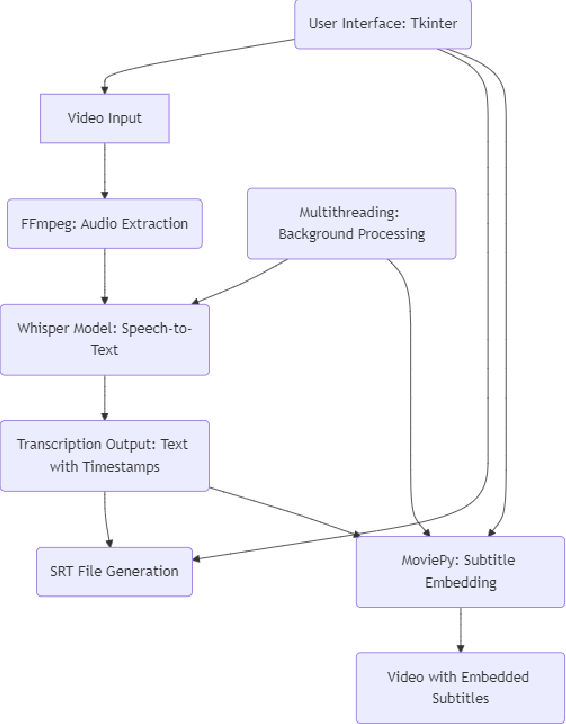
What to do: Use FFmpeg to extract a clean audio track from your video. Most APIs accept .wav or .mp3 files.
Why it matters: Clean, correctly formatted audio ensures accurate AI transcription. Incorrect sample rates or stereo audio can cause API errors or degraded results.
What can go wrong: If your audio is noisy, consider preprocessing with an AI denoiser or manually cleaning the file. Otherwise, you may get garbled transcripts.
Keep your audio length under 1 hour and file size below 100MB if possible. Split longer videos into chunks for more reliable processing.
You’ll now convert speech to text, capturing timestamps for accurate subtitle alignment. Here’s how to do it with both Google Cloud and OpenAI Whisper.
from google.cloud import speech client = speech.SpeechClient.from_service_account_file('path/to/your-key.json') with open("audio.wav", "rb") as audio_file: content = audio_file.read() audio = speech.RecognitionAudio(content=content) config = speech.RecognitionConfig( encoding=speech.RecognitionConfig.AudioEncoding.LINEAR16, sample_rate_hertz=16000, language_code="en-US", # Change as needed enable_word_time_offsets=True ) response = client.recognize(config=config, audio=audio) for result in response.results: alternative = result.alternatives[0] print("Transcript:", alternative.transcript) for word_info in alternative.words: print(f"Word: {word_info.word}, start: {word_info.start_time.total_seconds()}, end: {word_info.end_time.total_seconds()}")
Expected output: You get the full transcript plus word-level timestamps, ideal for generating subtitle segments.
import openai openai.api_key = "YOUR_OPENAI_API_KEY" audio_file = open("audio.wav", "rb") transcript = openai.Audio.transcribe( "whisper-1", audio_file, response_format="verbose_json" # For segment-level timing ) print(transcript)
Expected output: JSON with segments array, each with start , end , and text for subtitle timing.
Why it matters: Accurate timestamps are critical for subtitle synchronization. Both APIs deliver this, but Whisper’s segment-level timing is more “subtitle ready” out of the box.
What can go wrong: If you get empty or low-confidence transcripts, review your audio quality. For non-English, set the correct language_code (Google) or use Whisper’s auto-detection.
To reduce costs, downsample your audio to the minimum acceptable quality and trim silences before uploading.
What to do: Use AI translation to convert your transcript into one or more target languages. Google Translate API is robust and easy to integrate.
4. Neural Network Backbone, Layer Specifications & Loss Formulations
from google.cloud import translate_v2 as translate translate_client = translate.Client.from_service_account_json('path/to/your-key.json') def translate_text(text, target='es'): result = translate_client.translate(text, target_language=target) return result['translatedText'] for segment in transcript['segments']: translated = translate_text(segment['text'], target='fr') # To French print(f"{segment['start']} --> {segment['end']}: {translated}")
Expected output: Each segment or subtitle line in your target language, ready to be formatted.
Why it matters: Automated translation enables scalable multilingual content. Segment-level translation (not whole-paragraph) preserves subtitle timing.
What can go wrong: Machine translation may mistranslate idioms, technical terms, or names. For critical content, have a native speaker review output.
Batch translate all subtitle lines in a single API call to reduce latency and cost (Google Translate supports batch requests).
What to do: Convert your transcript and translations into SRT (SubRip Subtitle) format, which is supported by nearly all video platforms (YouTube, Vimeo, etc.).
def srt_timestamp(seconds): h = int(seconds // 3600) m = int((seconds % 3600) // 60) s = int(seconds % 60) ms = int((seconds - int(seconds)) * 1000) return f"{h:02}:{m:02}:{s:02},{ms:03}" def write_srt(segments, filename): with open(filename, "w", encoding="utf-8") as f: for i, seg in enumerate(segments, 1): start = srt_timestamp(seg['start']) end = srt_timestamp(seg['end']) text = seg['text'] f.write(f"{i}\n{start} --> {end}\n{text}\n\n") translated_segments = [] for seg in transcript['segments']: translated_text = translate_text(seg['text'], target='fr') translated_segments.append({ 'start': seg['start'], 'end': seg['end'], 'text': translated_text }) write_srt(translated_segments, "output_fr.srt")
Expected output: A file output_fr.srt with numbered subtitle entries, each with start & end timestamps and translated text.
Why it matters: Correct SRT formatting ensures subtitles display properly and stay in sync. This is the final step for ready-to-upload multilingual subtitles.
What can go wrong: Incorrect timestamp formatting, missing line breaks, or encoding issues can cause subtitles to fail to load. Always open your SRT in a subtitle editor (like Aegisub ) to check before publishing.
To create multiple subtitle languages at once, loop through your segments with different target language codes and export separate SRT files for each.
What to do: Upload your generated SRT files to your video platform of choice. Here’s how for two major platforms:
Why it matters: Most platforms support multiple subtitle tracks. Accurate language tagging ensures viewers can select their preferred language.
What can go wrong: If your SRT file doesn’t upload, check for encoding issues (use UTF-8), line break problems, or unsupported characters. Some platforms require SRT filenames to match language codes (e.g., output_fr.srt for French).
Automate the upload step using platform APIs if you’re handling large video libraries. Both YouTube and Vimeo offer endpoints for subtitle management.
5. Training Protocol, Convergence Behavior & Experimental Evaluation
With this workflow, you can rapidly scale subtitle generation for global audiences—without sacrificing quality or control. Test, iterate, and soon your multilingual video content will be accessible to all.
AI Tutorials Lead. Makes AI practical for everyone. Prompt engineering & automation specialist.
AdTransPro is an AI-powered batch video transcription and translation platform supporting 145+ languages, designed for marketing teams that need to localize video content at scale with frame-aligned subtitles and enterprise API integration.
AI subtitle generation uses automatic speech recognition (ASR) and neural machine translation to automatically create frame-aligned subtitles from any video — without manual transcription. Top tools like AdTransPro achieve 87–90 BLEU accuracy across 145+ languages, processing a 10-minute video in under 2 minutes. For marketing teams producing multilingual content at scale, AI subtitle generation cuts localization costs by up to 70% versus traditional subtitle agencies.
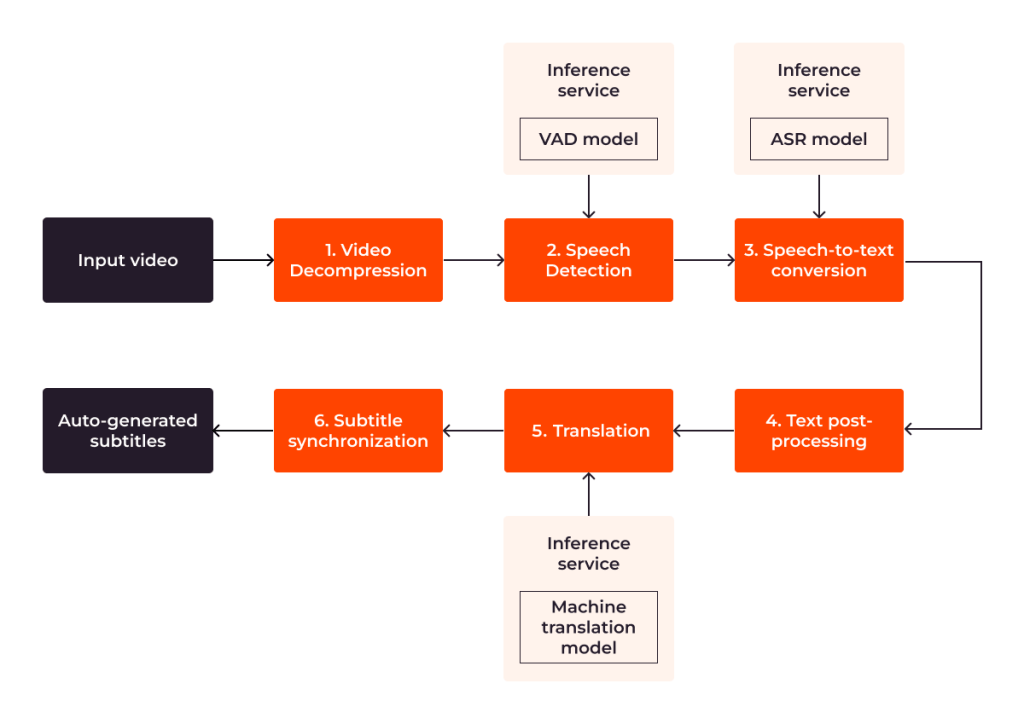
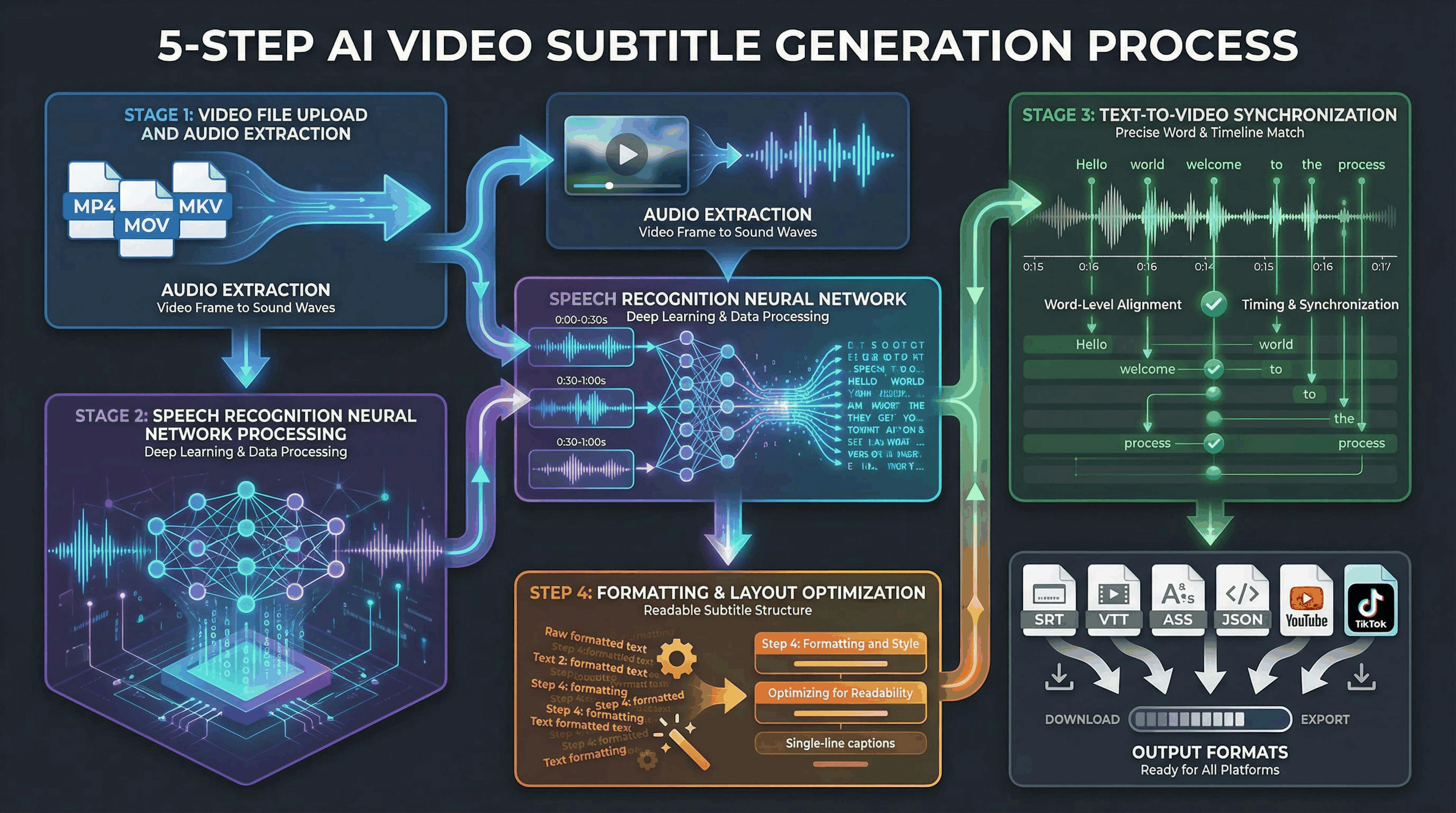
Modern AI subtitle generation isn't a single model — it's a five-stage pipeline where each step feeds precision into the next:
The audio track is transcribed to text with token-level timestamps — not sentence-level blocks. This granularity is what enables accurate subtitle timing downstream. Speaker-diarization separates multiple voices so each speaker's lines can be styled independently.
A large language model translates the transcript while preserving semantic context, idioms, and brand tone. Context-aware models significantly outperform older phrase-based MT — especially for marketing copy where punchlines and calls to action need to land in the target language.
Subtitle timecodes are snapped to scene cuts and speaker transitions — not arbitrary 2-second intervals. This is the key differentiator between professional AI subtitle tools and generic MT wrappers: naive tools produce 'floating' captions that don't match lip movements or on-screen visuals.
Automated checks flag line length violations, reading speed outliers (chars/sec), blank caption gaps, and subtitle overlap. AdTransPro's QA engine highlights low-confidence segments before export so editors know exactly where to spend review time.
SRT/VTT files per language are ready for YouTube Studio, Meta Ads Manager, or your CMS. DOCX voice-over scripts and XLSX LSP handoff files are also generated in the same job. API webhooks fire on completion for CI/CD integration.
Raw numbers matter when you're choosing a subtitle platform for production workloads. Here's how AdTransPro performs on standard quality metrics:
Internal benchmark, April 2026. Reading speed default: 21 chars/sec (adjustable per market). Generic MT tools average 61% frame alignment vs. AdTransPro's 94.7%.
Drag-drop your MP4/MOV/WebM, or paste a YouTube or Vimeo URL directly into the dashboard.
Source language is auto-detected. Override if your recording switches languages mid-video.
Select 1–145 target languages. Multi-select is supported — one upload generates all outputs in parallel.
Model Figures & Evaluation Curves (4 Images)
Deep Learning Execution Pipeline
(Preprocessing)
(Feature Extraction)
(Self-Attention)
(Loss Optimization)