Complete Technical Paper Content — Species Classification Computer Vision
1. Executive Abstract, Problem Formulation & Background
Wildlife Species Classification Overview This project implements an image classification model to identify different wildlife species from images. It uses a Convolutional Neural Network (CNN) to classify images of various wildlife species. This project is designed for educational purposes and demonstrates a practical application of deep learning in wildlife conservation. Table of Contents Introduction Dataset Model Architecture Installation Results Future Work Contributing License 1. Introduction This project addresses the challenge of automatically identifying wildlife species from images. Accurate species identification is crucial for various applications, including: Wildlife Monitoring: Tracking populations and distributions. Conservation Efforts: Identifying endangered species and prioritizing conservation efforts. Research: Automating species identification for ecological studies. 2. Dataset The model was trained and evaluated on a dataset consisting of images of various wildlife species. Source: This project uses the dataset from ConserVision: Image Classification competition on DrivenData. Data Download Classes: The dataset includes images of 'hog', 'blank', 'monkey_prosimian', 'antelope_duiker', 'leopard', 'civet_genet', 'bird', and 'rodent'. Dataset Size: "The training set contains 16488 images, and the test set contains 4464 images." 3. Model Architecture The model architecture is a custom Convolutional Neural Network (CNN) implemented in Pytorch. 4. Installation Clone the repository: git clone https://github.com/Aminah-Dodiya/wildlife-species-classification cd wildlife-species-classification (Optional) Create a virtual environment: conda create -n conserviz-compitition python=3.8 conda activate conserviz Install the dependencies pip install pandas matplotlib Pillow tqdm scikit-learn torch torchvision 5. Results The model achieved an accuracy of 85% on the validation set. The confusion matrix reveals that the model performs well on identifying 'hog', 'leopard' and 'bird', but struggles with differentiating between 'antelope_duiker' and 'blanck'. The visualization indicates the learning rate is optimal. We can see a clear convergence of both validation and training set. 6. Future Work Explore different model architectures (e.g., EfficientNet, Vision Transformer). Implement data augmentation techniques. Fine-tune hyperparameters to optimize model performance. Deploy the model as a web application or API. Focus more on high performing classes and high performing images. 7. Contributing Contributions to this project are welcome! Feel free to submit pull requests with bug fixes, new features, or improvements to the documentation. 8. License This project is licensed under the MIT License. Please review the LICENSE file for more details.
This project implements an image classification model to identify different wildlife species from images. It uses a Convolutional Neural Network (CNN) to classify images of various wildlife species. This project is designed for educational purposes and demonstrates a practical application of deep learning in wildlife conservation.
This project addresses the challenge of automatically identifying wildlife species from images. Accurate species identification is crucial for various applications, including:
The model was trained and evaluated on a dataset consisting of images of various wildlife species.
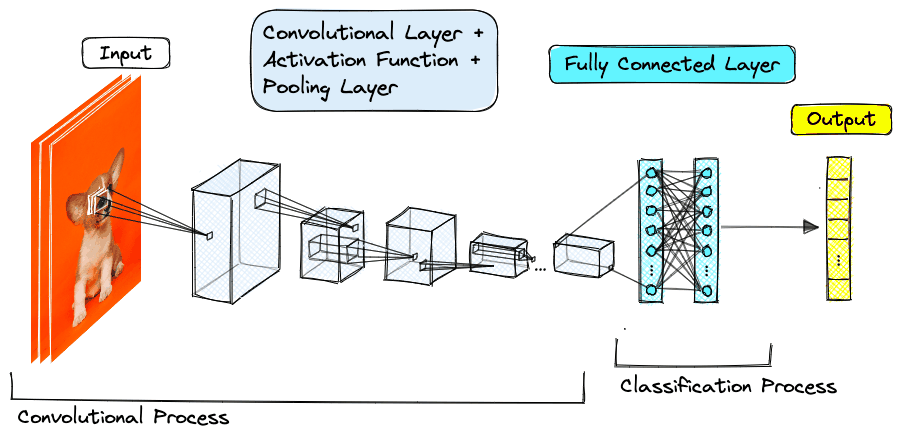
The model architecture is a custom Convolutional Neural Network (CNN) implemented in Pytorch.
git clone https://github.com/Aminah-Dodiya/wildlife-species-classification cd wildlife-species-classification
Contributions to this project are welcome! Feel free to submit pull requests with bug fixes, new features, or improvements to the documentation.
This project is licensed under the MIT License. Please review the LICENSE file for more details.
A computer vision project for classifying wildlife species using deep learning techniques.
Project_Wildlife_Classification Abstract Wildlife monitoring through camera-trap images is vital for conservation, yet manual annotation of vast image datasets is time-consuming and prone to human error. This project addresses the challenge of automating wildlife species classification from camera trap images. Previous studies used clean datasets achieving high accuracy but leading to overfitting and poor generalization. They fail under real-world environmental noise, such as adverse weather, occlusion, and lighting issues. In this project, we propose a Convolutional Classifier for robust wildlife image classification under authentic field conditions, also relying on site metadata. This project mainly focuses on using computer vision to classify wildlife species in camera trap images. The dataset used for this project is provided by the Wild Chimpanzee Foundation and the Max Planck Institute for Evolutionary Anthropology , specifically for images captured in Taï National Park . The task is to develop a machine learning model capable of classifying images into one of the following categories: antelope_duiker bird blank civet_genet hog leopard monkey_prosimian rodent Each image either contains one of these animal species or has no animals (blank). The goal is to build a model that predicts the probability distribution across these classes. Workflow Problem Overview The competition involves classifying camera trap images, where each image is assigned a label indicating one of the species or marked as blank if there are no animals detected in the image. The challenge is set up as a multi-class classification problem with the added difficulty of handling images from different environmental conditions and ensuring the model generalizes well to unseen data from different sites within the park. Dataset Description The dataset consists of images taken from camera traps at different sites in Taï National Park . There are total seven species/categories/classes of animals including rodents, birds, antelopes, civets, hogs, leapards and monkeys. Each image either contains one of these animal species or has no animals (blank). The training and testing datasets are split by site, with no overlap between the training and testing sets. Training Data train_features : Images of wildlife and blank scenes. train_labels : Corresponding labels for each image in train_features , with one-hot encoded values indicating the species class. Testing Data test_features : Images without labels, which are to be predicted by the model. Features id : Unique identifier for each image. filepath : Path to the image file. site : The site where the image was captured. Model The model uses deep learning techniques, specifically Convolutional Neural Networks (CNNs) , to classify images. The model leverages transfer learning from a pre-trained model (EfficientNetB0) and fine-tunes it on the provided dataset to predict species classifications or blank images. Preprocessing Image augmentation techniques such as rotation, flipping, and color jittering are applied to improve model generalization. Images are resized to a consistent shape for input into the CNN. Evaluation Metric The model's performance is evaluated using log loss (cross-entropy loss), which is a measure of how well the predicted probabilities match the actual labels. The lower the log loss, the better the model's performance. Results and Findings Achieved cross entropy loss/log loss of 1.2567 on test data which is quite efficient from the benchmark baseline model having a log loss of 1.8210. This is an advanced level practice competition on drivenata.org with over 1500 participants joined and 330 leaderboard ranks, was able to achieve #24 rank i.e coming in top 7.2% Requirements The following libraries and tools are required to run the code: Python 3.x TensorFlow or PyTorch (for model development) Keras (for deep learning) scikit-learn (for data preprocessing and evaluation metrics) OpenCV (for image processing) Pandas (for data handling) Installation Clone this repository: git clone https://github.com/RamamAgarwal/Project_Wildlife_Classification.git Install the required dependencies: pip install -r requirements.txt
Wildlife monitoring through camera-trap images is vital for conservation, yet manual annotation of vast image datasets is time-consuming and prone to human error. This project addresses the challenge of automating wildlife species classification from camera trap images. Previous studies used clean datasets achieving high accuracy but leading to overfitting and poor generalization. They fail under real-world environmental noise, such as adverse weather, occlusion, and lighting issues. In this project, we propose a Convolutional Classifier for robust wildlife image classification under authentic field conditions, also relying on site metadata.
This project mainly focuses on using computer vision to classify wildlife species in camera trap images. The dataset used for this project is provided by the Wild Chimpanzee Foundation and the Max Planck Institute for Evolutionary Anthropology , specifically for images captured in Taï National Park .
The task is to develop a machine learning model capable of classifying images into one of the following categories:
2. Related Work, Literature Survey & Algorithmic Foundations
Each image either contains one of these animal species or has no animals (blank). The goal is to build a model that predicts the probability distribution across these classes.
The competition involves classifying camera trap images, where each image is assigned a label indicating one of the species or marked as blank if there are no animals detected in the image. The challenge is set up as a multi-class classification problem with the added difficulty of handling images from different environmental conditions and ensuring the model generalizes well to unseen data from different sites within the park.
The dataset consists of images taken from camera traps at different sites in Taï National Park . There are total seven species/categories/classes of animals including rodents, birds, antelopes, civets, hogs, leapards and monkeys. Each image either contains one of these animal species or has no animals (blank). The training and testing datasets are split by site, with no overlap between the training and testing sets.
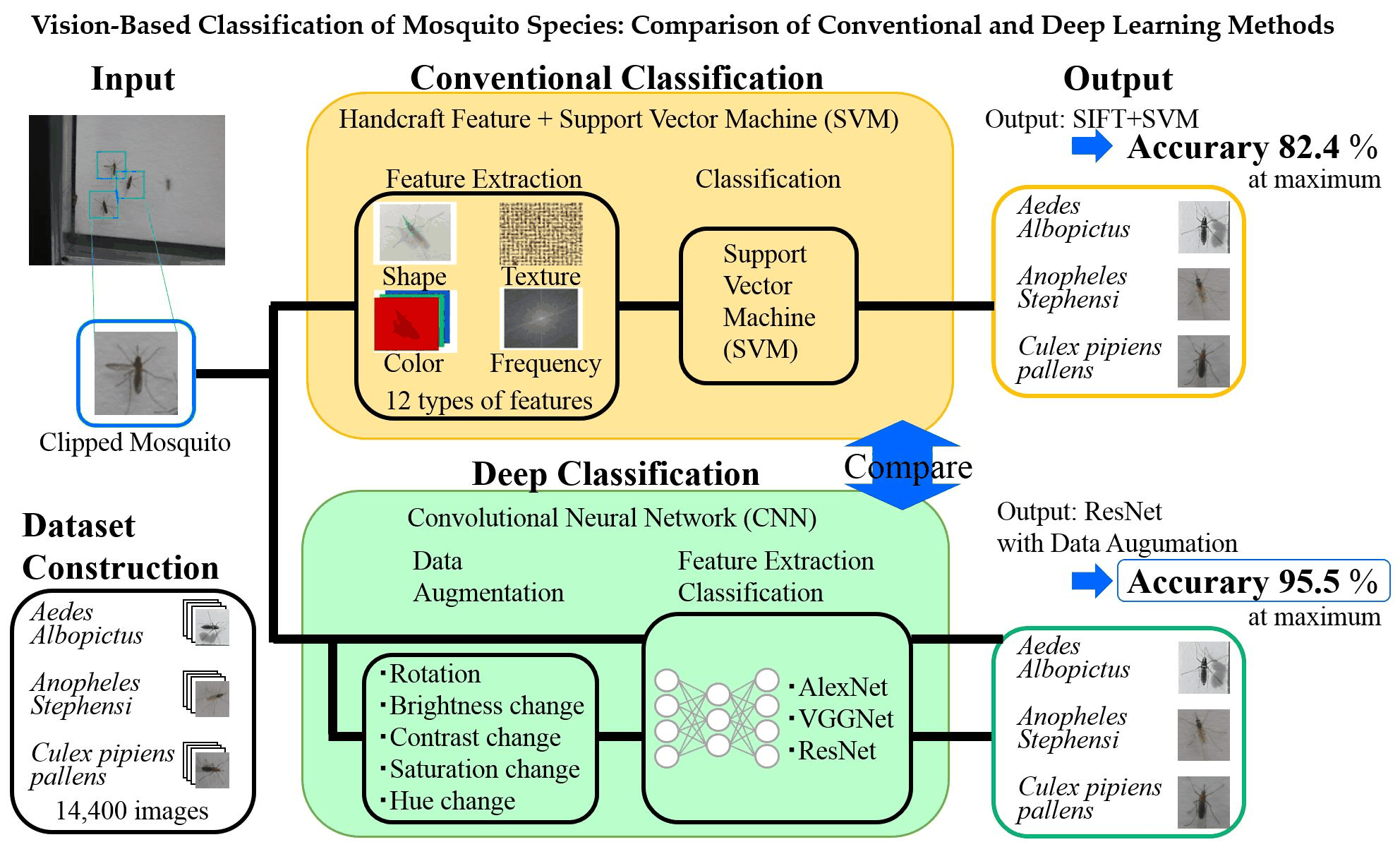
The model uses deep learning techniques, specifically Convolutional Neural Networks (CNNs) , to classify images. The model leverages transfer learning from a pre-trained model (EfficientNetB0) and fine-tunes it on the provided dataset to predict species classifications or blank images.
The model's performance is evaluated using log loss (cross-entropy loss), which is a measure of how well the predicted probabilities match the actual labels. The lower the log loss, the better the model's performance.
Achieved cross entropy loss/log loss of 1.2567 on test data which is quite efficient from the benchmark baseline model having a log loss of 1.8210. This is an advanced level practice competition on drivenata.org with over 1500 participants joined and 330 leaderboard ranks, was able to achieve #24 rank i.e coming in top 7.2%
This project deals with Wildlife Classification using Computer Vision and Image Processing
Overview Goals of this tutorial Special thanks Consider using AI to take it from here What to expect from species classification, and when fine-tuning is/isn’t worth it How much data do I need? Sample data Steps in this tutorial Setting up your environment Preparing your data The format this tutorial expects Why camera locations matter How filenames are resolved Creating your data .csv file Running MegaDetector on your images Preparing a mapping file Why you might remap your categories The mapping CSV format Fine-tuning What you need Starting a fine-tuning run Fine-tuning options What a fine-tuning run produces Resuming an interrupted run Choosing how much to fine-tune Running your fine-tuned model Inference options Working with your results Evaluation tips Future work Topics that aren’t very interesting
SpeciesNet is an AI model that classifies species in camera trap images. SpeciesNet was trained on around 2,500 categories (mostly species, but also some higher-level taxa) from a variety of global geographies . 2,500 is a lot, but it’s just a fraction of the species that are monitored with camera traps, so in some scenarios, users might benefit from a local model that “knows” the species in a particular study area.
While it’s possible to train a regionally-specific model from scratch, using SpeciesNet as a starting point can significantly reduce the amount of data required to train a new classifier. However, using SpeciesNet as a starting point doesn’t make it easier to train a new model (in terms of technical complexity), it just reduces the amount of training data required. The goal of this tutorial is to guide a user through the process of creating a fine-tuned version of SpeciesNet on your own data.
This tutorial will ask you to set up a Python environment so you can run the code from this repo, but you won’t need to write any code.
You may want to work through this tutorial on your own data, but examples in this tutorial will use the Orinoquía Camera Traps dataset, so you can follow along if you don’t have your own data.
If you have any questions or feedback about this tutorial, or you get stuck, or anything here is just outright wrong, email me !
3. Dataset Ingestion, Preprocessing & Stochastic Augmentations
This tutorial builds on the amazing work of Peter Bull , who ported the SpeciesNet weights to a fine-tuning-friendly container. See his speciesnet-convert repo for more information. That work was in support of the Zamba Cloud platform, a no-code tool that allows you to, among other things, train a custom model (SpeciesNet is one of several base models from which you can fine-tune in Zamba Cloud). If you prefer a no-code approach to fine-tuning, you might consider skipping this tutorial and instead trying Zamba Cloud.
Another way of looking at this tutorial is that it helps guide a user’s agent through the process of creating a fine-tuned version of SpeciesNet. So rather than reading this entire tutorial, consider opening a command-line AI tool - e.g. Antigravity CLI , Claude Code , or Codex CLI - on the computer where your data lives, and saying something like this:
I want to review my camera trap images as efficiently as possible. My images are in c:\my-images. Visit https://github.com/agentmorris/speciesnet-finetuning, read the README, and talk to me about whether fine-tuning SpeciesNet on my data is likely to be helpful. If we decide to proceed, walk me through the process of fine-tuning.
Whether you’re a human who is still reading or an agent whose human asked you to read this tutorial, welcome.
In general, AI is not yet ready to fully automate most camera trap review workflows (not just SpeciesNet, this is true for any AI model). If your focal species is a rare small cat, and you have other small cats in your study area that look similar, you probably don’t want to trust AI to differentiate one small cat from another. But that doesn’t mean that AI can’t help you! IMHO too many users bail on AI because it doesn’t perform as well as they like on rare species.
For most users, the benefit of AI comes from getting you through your common classes quickly , so you can focus your time and expertise on the species that are important and/or difficult. I.e., think of AI as helping you separate “images you need to look at” from “images you don’t need to look at”. If you are studying rare cats, but 75% of your images are blank, and another 15% of your images are cattle, AI can save you lots of time - by letting you auto-accept or very quickly review the blanks and cattle - even if it’s terrible at differentiating your rare cats, as long as it doesn’t call your rare cat images blanks or cattle .
In machine learning terminology, AI can help you as long as it has very high precision and adequate recall on your common classes. I.e., if cattle is your most common class, it’s not OK to call your rare cats “cattle” (because you’re not going to look at those images), but it’s fine to call a few cattle images “unknown”, or “mammal”, or even “cat” (because you’re going to look at those images anyway).
So AI-based species classification is most likely to be helpful if you have common, easy species you don’t want to spend a lot of time on. If all of your classes are equally common and equally important, unless AI is nearly perfect (which isn’t really a thing), species classification is less likely to be helpful.
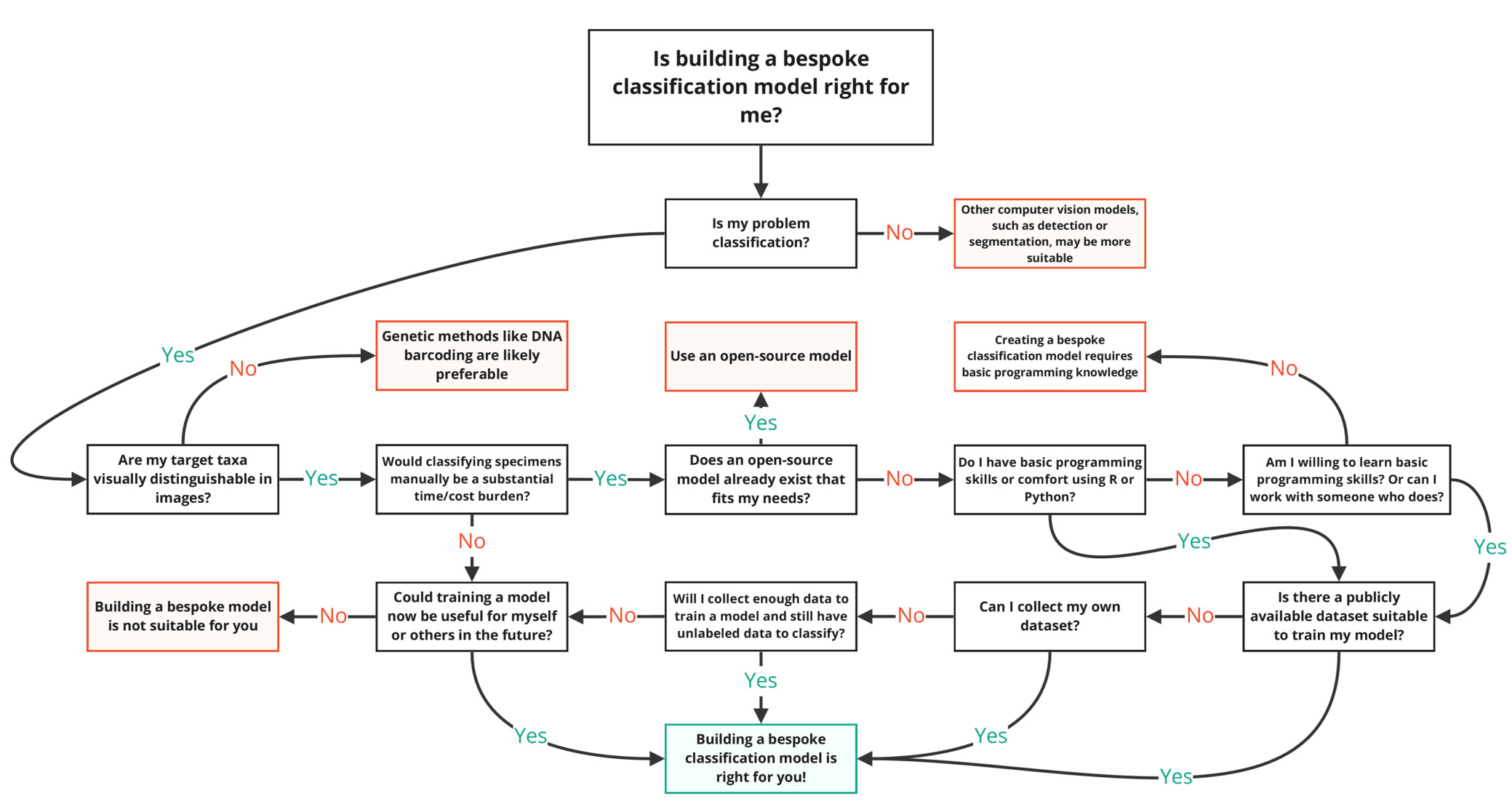
If SpeciesNet is already very good at your common species, fine-tuning might not be worth it . If AI species classification is most helpful for helping you avoid spending time on common, easy species, this also means that even if SpeciesNet doesn’t know about your focal species, it might not be worth the hassle of fine-tuning, as long as SpeciesNet has very high precision on your common classes . Maybe you would get better accuracy on your rare classes if you fine-tuned on your own data, and maybe you wouldn’t, but in many scenarios, even if fine-tuning does improve accuracy, it won’t save you any more time than the non-fine-tuned version. E.g. if you are studying lynx in an area where you also have bobcats, and most of your images are blanks and cattle, maybe fine-tuning will get you 5% more accuracy differentiating bobcat from lynx, but this doesn’t help you at all if you’re going to look at all of those bobcat/lynx images anyway.
If SpeciesNet doesn’t know about some of your species, but it consistently classifies them as some other species, fine-tuning is almost definitely not the ideal solution . E.g. if you have a lot of European red deer in your study area, and SpeciesNet consistently classifies them as elk (which don’t co-occur with red deer), it’s much easier to just re-map all the “elk” predictions to “red deer” than to fine-tune. More on this kind of re-mapping below, in the “what might I try before fine-tuning?” section.
If MegaDetector doesn’t detect your animals well in the first place, fine-tuning SpeciesNet won’t help . SpeciesNet depends on MegaDetector to find animals, so if MegaDetector fails to find some of your animals, SpeciesNet never sees them, and fine-tuning SpeciesNet can’t “rescue” those missed animals. For example, semi-aquatic mammals that are partially submerged (e.g. beavers, otters, nutria, etc. with just their heads sticking out of the water) are a struggle for MegaDetector, and fine-tuning SpeciesNet won’t help you recover those animals.
If humans can’t easily tell your species apart, AI can’t either . A good guideline for the ceiling of what you can ask of AI is that with lots of data, a computer vision model can distinguish species that you could teach a wildlife novice to distinguish with a few minutes of training.
If you have common, easy-to-see species that are not in SpeciesNet’s training data and don’t look exactly like something in SpeciesNet’s training data, fine-tuning might help . For example, SpeciesNet does not have a “polar bear” class, and does not consistently classify polar bears as any other specific class. I.e., SpeciesNet might very well lump your polar bears in with a more common class, so if you have polar bears in your data, SpeciesNet can’t really save you time. Fine-tuning SpeciesNet is likely to be helpful in this case, even if polar bears are rare. This is true for any scenario where you have an important class that is generally easy to see, but doesn’t look anything like what SpeciesNet knows about.
4. Neural Network Backbone, Layer Specifications & Loss Formulations
If you are one of the lucky few who is within “striking distance” of full automation, and that little bit of improvement you might see on rare classes could be the difference between reviewing images and trusting high-confidence AI predictions entirely, fine-tuning might be worth it . This is rare! This is typically a case where you have very few categories that are easily confused with each other, and a relatively high tolerance for a few mistakes. E.g. maybe your primary goal is to count livestock species, and you find that SpeciesNet is almost good enough at this task in your images to do this with no human review. If this is your scenario, fine-tuning might be worth it.
Try other models . SpeciesNet is great (in my super-biased opinion), but it’s not the only game in town. If there’s another classifier whose training distribution matches your species distribution pretty well, try that before fine-tuning. I try to keep track of publicly-available species classification models here .
Get the most out of “vanilla SpeciesNet” . In particular, many issues that might make fine-tuning seem like a good option can be resolved by just remapping SpeciesNet’s outputs differently, instead of using the standard SpeciesNet geofence (a list of taxa that are allowed in each country (or US state)). You can do this with the restrict_to_taxa_list function, which takes a list of SpeciesNet taxa in a .csv file, and maps them to whatever labels you want. In addition to mapping one species to another, you could, for example, map all birds that aren’t otherwise mapped to an “other bird” label. This skill or this app can help you make those .csv files. More generally, I have some “pro tips” for getting the most out of MegaDetector and SpeciesNet here .
Invest in workflow efficiency . Remember that the goal of processing your camera trap images with AI is to save you (ecologists) time, and in many cases the best hour that you can invest in saving yourself time isn’t fine-tuning an AI model, it’s increasing the efficiency of your workflow in ways that have nothing to do with AI. Are you using the mouse to move between images and assign species? If so, I recommend moving to the keyboard. Do you know all the keyboard shortcuts in whatever tool you use to review images? If not, I recommend learning them (and practicing them) before fine-tuning an AI model. Are you tagging species in an Excel spreadsheet? That’s OK, but it’s not optimal, and you might find that learning to use an image review tool like Timelapse gives you a bigger efficiency boost than you would get from investing time in fine-tuning a model. All of these things are dull, but at least as important as AI accuracy in terms of making a camera trap workflow efficient.
All that said, there are lots of good reasons to fine-tune your own model, so if I haven’t talked you out of fine-tuning, read on!
There’s no easy answer to this; if you can predict the relationship between the amount of training data someone has and the accuracy they’ll see after training a model, you can have a free PhD in computer science. But as a very general rule, I wouldn’t bother training a category with less than 100 training examples that are pretty distinct (i.e., the same deer standing in the same place in the same sequence of ten images is more like one training sample). “Low-single-digit thousands” of examples per category would be more comfortable for fine-tuning. “High-single-digit thousands” would be more comfortable for training from scratch. All of these numbers depend on how distinctive your species are: a species with bright stripes, or a species that looks nothing like any of your other species, might be fine with 100 examples. If you have two rodents that can be distinguished, but not easily, maybe those need more like 1000 examples each.
So, consider grouping together categories that are very small in terms of training examples, e.g. if you have 50 different songbirds with 10 examples each, I wouldn’t try to train a category on each one; consider lumping them into an “other songbird” category (more later on how to do this).
Because we will be training on animals that are cropped out of their original images with MegaDetector, if you have a group of four elephants in an image, that “counts” as four examples.
Throughout this tutorial, I am going to use the Orinoquía Camera Traps dataset as an example. You likely want to work with your own data, but if you want to follow along, start by downloading the data from that page:
This dataset contains around 100k images; for this tutorial, we will be ignoring the ~20k empty images.
At each step in the tutorial, there will be a heading called “applying this to the sample data”, where I link to a file that was created for that step using this dataset.
This tutorial assumes that you have cloned this GitHub repository to your computer. Rather than taking up lots of space here describing all the ways one might install git, I’m going to punt this one to AI: if you have never cloned a git repo before or you’re not sure whether you have git installed, ask AI. But, tl;dr: git clone https://github.com/agentmorris/speciesnet-fine-tuning .
This tutorial assumes that you have a Python environment set up. For folks new to Python, I recommend installing Miniforge , a free tool for managing Python environments. Consider following the “ Setting up a Python environment ” instructions from the SpeciesNet repo, which will walk you through installing Miniforge.
5. Training Protocol, Convergence Behavior & Experimental Evaluation
Assuming you’ve installed Miniforge and git, and cloned this repo to a folder on your computer, start a Miniforge prompt, then cd into that folder like this:
Then create a new Python environment for this tutorial, like this (any environment name is fine, I’m just using “speciesnet-finetuning” as an example):
That command says “create a new Python environment called ‘speciesnet-finetuning’ that has Python version 3.12, and install the ‘pip’ package inside that environment”.
That was a lot of random Python gibberish, I know, but if anything goes wrong, feel free to email me with questions, or ask AI! If you ask AI questions about setup stuff, consider pointing it to this README so it has the context of what we’re trying to do.
This tutorial does not require any particular organization of your images on disk. Instead, you will describe your dataset with a .csv file with one row per labeled image, and the following three columns:
filename,category,location A01/01100085.JPG,black_agouti,A01 A01/01140096.JPG,collared_peccary,A01 A01/01140097.JPG,empty,A01 A01/01290101.JPG,spixs_guan,A01
A camera trap dataset of 1,000,000 images might come from only ~200 cameras, and the images from a single camera are highly repetitive (same background, same lighting, often the same individual animals passing repeatedly). If you let images from one camera land in both your training and validation sets, your validation accuracy will look great, but won’t reflect how your model will perform in the real world.
So the right thing to do is to split the data by camera: every image from a given camera goes entirely into training or entirely into validation, never both. Code that you will use later in this tutorial does that splitting for you, but to do it, it needs to know which images share a camera. That is the only reason the location column exists. You don’t have to think about the splitting itself; you just have to provide the location for each image.
If you genuinely have no camera/location information, you can put the same value (e.g. unknown ) in every row, but in that scenario, take your validation numbers with a grain of salt.
For the examples we provide in this section, let’s imagine we have the following image files:
Everyone’s data is in a different format, so we can’t provide universal guidelines for preparing your .csv file. As long as you can get your data into the above format (a .csv with filename , category , and location columns), everything in the rest of this tutorial is agnostic to how you made that file. If you would like help getting your data into that format, feel free to email me . But also, this is a great task for AI: if you describe how your data is organized and point AI to this page, it will have no trouble creating a .csv file that follows the format described above.
COCO Camera Traps (CCT) is a common format for camera trap labels among machine-learning-y types, e.g., this is where you’ll start if you are creating a fine-tuned model based on data from LILA . If your labels are in a CCT .json file, coco_to_csv.py produces the .csv for you. Your CCT file must have a location field on every image (the script will stop with a clear error if any image is missing one).
You can run the script like this (assuming you cloned this repo to c:\git\speciesnet-finetuning and created a Python environment called speciesnet-finetuning ):
Model Figures & Evaluation Curves (4 Images)
Deep Learning Execution Pipeline
(Preprocessing)
(Feature Extraction)
(Self-Attention)
(Loss Optimization)