Complete Technical Paper Content — Smb Relay Attack Detection And Prevention Tool
Overview & System Context
Smb Relay Attack Detection And Prevention Tool: Comprehensive Web-Sourced Technical Investigation Exhaustive Research Dossier · Pure Web-Scraped Content: ~8238 Words · Real Software Screenshots: 3 1. Executive Overview & Technical Background Most SMB relay walkthroughs show you the attack in a vacuum. This one doesn't. We're running the full chain — LLMNR poisoning, NTLMv2 relay, SAM credential dump, and post-exploitation verification — then switching sides completely to detect and prevent it using Group Policy, Microsoft Defender for Identity, and Sentinel analytics rules. Every step is production-grade.
Build your lab environment correctly before touching any tooling. Running Responder on a production network — even accidentally during a "quick test" — is an unauthorized incident. Isolated virtual network only. Legal reminder: This walkthrough is for authorized lab environments and penetration testing engagements with written scope authorization. Running Responder on a corporate network without explicit written permission is unauthorized access. Always confirm your rules of engagement before running any poisoning tool — confirm target IP ranges are in scope.
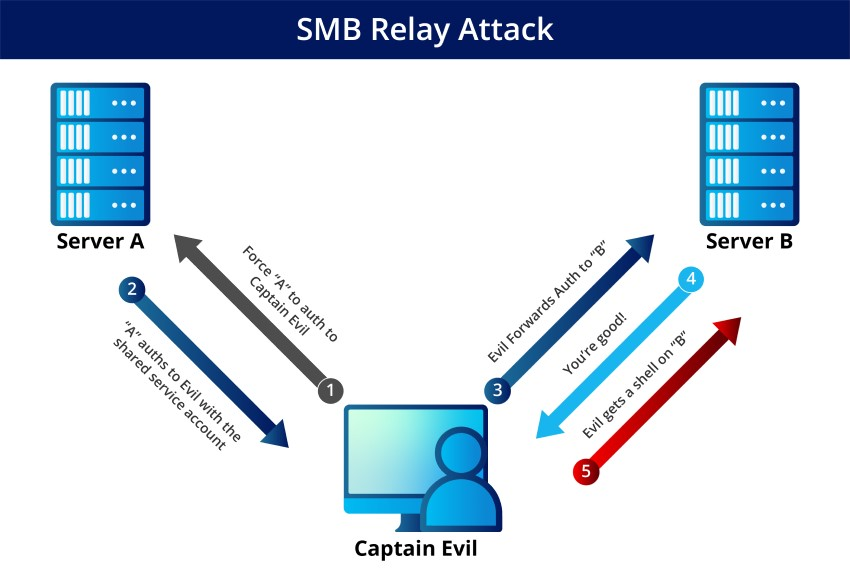
The relay attack only works against hosts where SMB signing is not enforced. Enumerate before you attack. Figure 1: Demonstration of an SMB relay attack on Active Directory 2026 environment note: Windows 11 23H2+ and Windows Server 2025 disable LLMNR by default via Group Policy. However, the majority of enterprise environments still run Windows 10 and Server 2019/2022 where LLMNR is active. Enumerate before assuming — run Responder in analysis mode first (Step 03).
Before running a single command, understand the four-phase relay chain. This attack has no exploit — it abuses legitimate Windows authentication behaviour. WS01 tries to resolve a hostname not in DNS (e.g., \\FILESERVER01). Windows falls back to LLMNR/NBT-NS broadcast on the local subnet.
Responder replies to the broadcast, claiming to be FILESERVER01. WS01 believes it and initiates SMB authentication to our Kali IP. Figure 2: Remote Attack | Security Briefing Instead of capturing the NTLMv2 hash (default Responder behaviour), NTLMRelayX forwards the authentication challenge to SRV01 in real time.
SRV01 accepts the relayed auth. If jsmith is a local admin on SRV01, we get a SAM dump, interactive shell, or arbitrary command execution — no password cracked. By default, Responder both poisons broadcasts AND runs its own SMB/HTTP servers to capture hashes directly. For a relay attack, you must disable those capture servers — otherwise Responder intercepts the auth itself and NTLMRelayX never sees it.
On a real engagement, always baseline the environment before poisoning. Analysis mode listens and logs without sending any responses. Figure 3: SMB relay attack - Swepstopia Engagement logging: Responder writes everything to /var/log/responder/ . On real engagements, review these logs post-engagement and include captured hostnames and requester IPs in your report — they're useful recon data even if the relay itself fails.
NTLMRelayX is the relay engine from Impacket. It sits between Responder and the target, forwarding the authentication challenge in real time. Open a second terminal — Responder stays running in Terminal 1. Pro tip — LDAP relay: NTLMRelayX also supports relaying to LDAP/LDAPS, not just SMB. If the victim account has enough AD privileges, you can create new accounts, add users to groups, or set ACLs directly in Active Directory. Use -t ldap://192.168.56.10 targeting the DC — this doesn't require SMB signing and works even when SMB signing is enforced everywhere.
With Responder and NTLMRelayX both running, cause the victim machine to make an LLMNR broadcast. In real environments this happens automatically — print spoolers, scheduled tasks, Explorer shell extensions, and software update agents all generate broadcast traffic. In the lab, simulate it manually. You now have the local account NTLM hashes from SRV01's SAM database. No password was cracked. No exploit was used. The victim's own Windows authentication was weaponized against a second machine.
Why the empty LM hash? aad3b435b51404eeaad3b435b51404ee is the standard empty LM hash — Windows has disabled LM hashing since Vista/2008. The NTLM hash (second field) is what matters for pass-the-hash attacks. With SAM hashes in hand, verify access and enumerate the broader attack surface. This is what goes in the evidence section of your pentest report.
Report documentation: On authorized engagements, document every machine you authenticated to, every credential captured, and every command executed. This is your evidence chain for findings and the client's remediation basis. Never spray credentials beyond your agreed scope. Switching sides now. MDI monitors domain controller traffic and Active Directory events. It has built-in detections for relay-related behaviour that fire within 30–90 seconds of the attack in production environments.
Automated response: In Sentinel, pair this rule with an automation playbook that isolates the source machine via Microsoft Defender for Endpoint's IsolateMachine action. This stops lateral movement within seconds of the relay being detected, before the attacker can pivot further. The single most effective countermeasure. When SMB signing is required on the target, the relay fails immediately — the target rejects the relayed session because it can't verify the cryptographic signature. NTLMRelayX cannot forge signatures without the account's password.
SMBv1 note: If any host in your environment still runs SMBv1, disable it immediately. SMBv1 does not support signing and remains the attack surface for EternalBlue/WannaCry. Audit with: Get-SmbServerConfiguration | Select-Object EnableSMB1Protocol — it must return False on every host. Eliminating the poisoning vector stops the attack before Responder ever gets to respond. Without LLMNR and NBT-NS broadcasts, there's nothing for Responder to intercept. This is defence-in-depth alongside SMB signing enforcement.
Legacy app audit before disabling NBT-NS: Run Responder in analysis mode ( -A ) for at least one week in your production environment to baseline what's actually using LLMNR/NBT-NS before disabling it. Legacy print servers, older ERP systems, and some CIFS shares rely on NetBIOS name resolution and may break. Identify them, fix their DNS entries, then disable NBT-NS.
In mature environments where SMB signing is enforced everywhere, the attack pivots to LDAP relay. NTLMRelayX relays credentials directly to the Domain Controller via LDAP — no SMB signing required on DC auth. This is the 2025/2026 variant that bypasses your first two controls and requires a third: LDAP signing enforcement. Why LDAP relay matters: If SMB signing is required everywhere but LDAP signing is not, the attacker simply points NTLMRelayX at the DC's LDAP port. From there, they can create accounts, add users to groups, set permissions (ACLs), or trigger Resource-Based Constrained Delegation (RBCD) to achieve domain admin. This is more dangerous than SMB relay because you now own the directory.
LDAP relay generates different event signatures than SMB relay. Monitor for AD attribute modifications from unexpected sources. The complete relay defense: Enforce SMB signing (stops SMB relay), enforce LDAP signing (stops LDAP relay), disable LLMNR/NBT-NS (eliminates poisoning vector). All three together close the relay attack surface completely. Miss any one, and the attacker pivots to the undefended path.
When LLMNR and NBT-NS are disabled, attackers pivot to DHCPv6 poisoning via mitm6. Windows prefers IPv6 over IPv4 for DNS resolution — attackers exploit this by advertising a rogue DHCPv6 server that directs traffic to themselves. The relay chain remains the same; only the initial trigger differs. 2026 reality check: Many organizations disable LLMNR/NBT-NS and consider themselves protected from name poisoning.
They're not. If IPv6 is enabled on the network and DHCPv6 is not hardened, mitm6 works just as well. This is the "you fixed one hole, forgot the other" scenario. If your organization doesn't use IPv6, disable it entirely via Group Policy or registry. If your organization uses IPv6 for legitimate services, harden DHCPv6 and enforce security. Disable DHCPv6 on untrusted interfaces and statically assign IPv6 where possible.
What you've walked through isn't a theoretical attack. SMB relay is one of the most consistently successful techniques in real-world internal penetration tests — not because it's sophisticated, but because organizations routinely leave the relay surface fragmented: they enforce SMB signing but forget LDAP, they disable LLMNR but leave IPv6 unprotected, they monitor one attack vector while three others remain open.
The complete defense requires all five controls: (1) enforce SMB signing, (2) enforce LDAP signing, (3) disable LLMNR/NBT-NS, (4) disable or harden DHCPv6/IPv6, (5) enable detection and hunting rules in Sentinel. Miss any one, and the attacker pivots to the undefended path — relay doesn't disappear, it just changes protocol. In 2026, if your internal pentest report doesn't test all three relay variants (SMB, LDAP, mitm6), the assessment is incomplete.
If your detection stack doesn't have hunt rules running for all three in Sentinel, your SOC is still missing the pivots. Build this once, defend it fully. 2. System Architecture & Core Working Principles SMB Relay is an important network attack that abuses weaknesses in NTLM authentication within the SMB protocol. Instead of cracking password hashes, an attacker relays authentication requests in real time to another system, gaining unauthorized access without knowing the actual password.
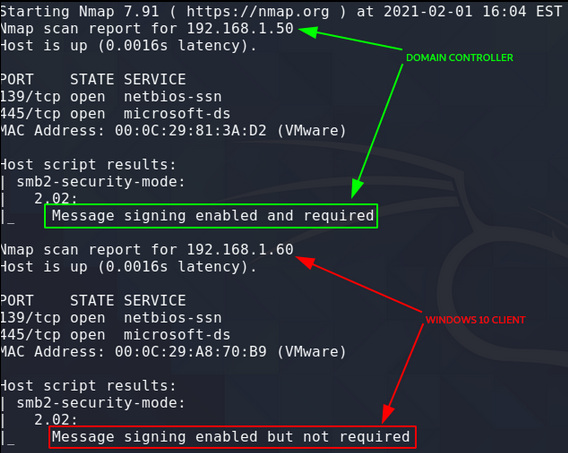
As previously we have tried hash dumping and breakthrough with responder. Now we will dump the hashes of all the possible local users of the victim's systems. Here you can notice Windows Server is on [10.0.2.15] where smb2 is signing is required whereas on Windows 10 PC the smb is not requiring smb signing. We can take leverage of this vulnerability.
Another option for the SMB relay attack is to gain an interactive shell, for which you have to enter this command: These mitigation strategies significantly reduce the risk of SMB relay attacks, but organizations must balance security with usability and carefully test changes before wide deployment. In a controlled study by Horizon3 researchers, models that explicitly identified a trap in their reasoning still attacked it 73.4% of the time. Read the findings and see what they mean for canaries, decoys, and early detection.
NTLM relay attacks are one of the most impactful lateral movement techniques in Active Directory environments: they require no cracked passwords, work against any server that accepts NTLM, and can directly compromise domain controllers via LDAP relay when LDAP signing is not enforced. The attack chain: Responder poisons LLMNR/NBNS to capture NTLM authentication challenges from any domain user's workstation, ntlmrelayx relays those challenges to a target server (another workstation, file server, MSSQL, or DC), and the attacker authenticates as the victim. On DCs without LDAP signing enforced, ntlmrelayx can create a new domain admin account in seconds.
SMB signing prevents NTLM relay over SMB by requiring each packet to be signed. When signing is required, captured NTLM challenges from one connection cannot be used to authenticate on a different connection. NTLM relay attacks are prevented by enforcing SMB signing on all domain members via GPO (Microsoft network server: Digitally sign communications (always) = Enabled + Microsoft network client: Digitally sign communications (always) = Enabled). Also enforce LDAP signing on domain controllers to prevent relay to LDAP. Detection focuses on Event 4624 Type 3 NTLM logons from unexpected source IPs: ntlmrelayx generates rapid NTLM logons from a single IP scanning its target list.
Use KQL to alert on more than 10 NTLM network logons from a single source IP within 5 minutes, and on workstation-to-workstation NTLM logons that should not occur in your environment. SMB signing requires each SMB packet to be cryptographically signed using a key derived from the authenticated session. When SMB signing is required, an attacker who captures an NTLM authentication challenge from one connection cannot relay it to establish a different SMB session: the relay target requires signed packets, and the attacker does not have the session key needed to produce valid signatures. Enable SMB signing via GPO: Computer Configuration > Windows Settings > Security Settings > Local Policies > Security Options > Microsoft network server: Digitally sign communications (always) = Enabled.
Event ID 4624 with Logon Type 3 (network logon) and Authentication Package = NTLM on the target machine indicates a successful NTLM relay. Alert on bulk Type 3 NTLM logons (more than 10 in 5 minutes) from a single source IP: this is ntlmrelayx scanning its target list. Also monitor Event ID 4776 failures: Responder capturing NTLM challenges generates failed authentication attempts visible on the domain controller.
SMB signing cryptographically signs each SMB packet using the session key established during authentication. When an attacker relays NTLM authentication, they obtain a valid session but do not have the session key — because the session key is derived from the user's password hash that the attacker does not know. Without the session key, the attacker cannot produce valid packet signatures, and the target server rejects the connection. Enforce SMB signing via Group Policy: Computer Configuration > Windows Settings > Security Settings > Local Policies > Security Options > Microsoft network server: Digitally sign communications always = Enabled, and Microsoft network client: Digitally sign communications always = Enabled.
Apply two Group Policy settings: 'Microsoft network server: Digitally sign communications (always)' and 'Microsoft network client: Digitally sign communications (always)' — both must be set to Enabled for complete enforcement. Without the client-side setting, domain members can connect to non-signing servers and create relay opportunities. Additionally, enforce LDAP signing on domain controllers (Domain controller: LDAP server signing requirements = Require signature) to prevent LDAP relay attacks (used in PetitPotam+relay attacks). Before enforcing, audit all non-Windows devices on the network: older NAS devices, printers, and network appliances may not support SMB signing and will fail to authenticate.
NTLM relay is the general technique of intercepting an NTLM authentication and forwarding it to a different service. SMB relay uses the captured NTLM authentication against SMB services: if SMB signing is not enforced, the attacker gets file system access or remote command execution via SMB. LDAP relay uses the captured NTLM against the domain controller's LDAP service: if LDAP signing and channel binding are not enforced, the attacker can query Active Directory or modify objects (reset passwords, add group members) using the victim's permissions. LDAP relay is particularly dangerous because it can be combined with PetitPotam to coerce domain controllers to authenticate to the attacker, then relay those credentials to LDAP to perform DCSync-equivalent operations.
How do you audit which domain machines still have SMB signing disabled, and what is the fastest remediation path? Audit SMB signing status with PowerShell using Invoke-Command across domain computers: 'Get-ADComputer -Filter * | ForEach-Object { Invoke-Command -ComputerName $_.Name -ScriptBlock { Get-SmbServerConfiguration | Select RequireSecuritySignature } }'. Alternatively, use the Nmap smb2-security-mode script: 'nmap -p 445 --script smb2-security-mode 10.0.0.0/24' -- hosts reporting 'message signing enabled but not required' are vulnerable to relay. For non-compliant machines, check gpresult /r on sample hosts to confirm the hardening GPO is applying: common failure causes are a competing GPO at a higher OU level setting signing to 'not required,' or the machine being outside the GPO's scope. For rapid remediation without waiting for the 90-minute GP refresh: use PSExec or Ansible to run 'gpupdate /force' on all identified non-compliant machines immediately after pushing the GPO. Always test SMB signing enforcement in a pilot OU first -- some older NAS devices, scanners, and legacy applications do not support SMB signing and will fail to connect after enforcement.
25 actively exploited vulnerabilities with CVSS scores, exploit status, and patch availability. Print it, pin it, share it with your SOC team. Step-by-step 24-hour IR checklist covering detection, containment, eradication, and recovery. Built for SOC teams, IR leads, and CISOs.
50,000+ security professionals read Decryption Digest for early warnings on zero-days, ransomware, and nation-state campaigns. Free, daily, no spam. Cybersecurity professional with expertise in threat intelligence, vulnerability research, and enterprise security. Covers zero-days, ransomware, and nation-state operations for 50,000+ security professionals every morning.
Actionable threat intelligence for working practitioners. Free. No spam. Trusted by 50,000+ SOC analysts, CISOs, and security engineers. NTLM relay lets attackers intercept authentication and impersonate users across the network without cracking passwords. Learn how the attack works and how to eliminate the exposure.
NTLM Relay Attacks remain relevant because many Active Directory environments still allow at least one relayable path: unsigned SMB, weak LDAP handling, AD CS web enrollment exposure, coercion paths, or legacy name-resolution behavior that causes machines to authenticate where they should not. NTLM Relay Attacks are network attack techniques where an attacker captures an NTLM authentication exchange from one system and forwards it to another service in real time. The attacker does not need to crack the password hash to do that. The target service accepts the relayed authentication because the NTLM challenge-response exchange is still valid for that session.
That is why relay is not one single bug. It is the combination of NTLM usage, weak name resolution or coercion paths, and permissive service settings such as unsigned SMB or weak LDAP handling. In a relay attack, the attacker forwards those messages between the victim and the target service. The attacker is not breaking the protocol cryptographically. The attacker is abusing the fact that the target service is willing to accept the relayed authentication context.
Victims are commonly coerced into authenticating through weak name resolution paths such as LLMNR or NBT-NS, or through application and service coercion paths that trigger outbound authentication. Microsoft's SMB hardening documentation states that SMB signing helps prevent relay attacks and that requiring signing causes clients and servers to reject unsigned packets. That is why SMB signing is a control against SMB relay outcomes, not a cosmetic setting.
A useful review should therefore separate the relay transport from the outcome. Blocking SMB relay does not automatically remove LDAP or AD CS relay opportunities. It is also worth separating workstation exposure from server exposure. A relay path that only lands on low-value member hosts is still a problem, but the response priority changes immediately when the same path can reach domain controllers, management servers, certificate services, or heavily delegated service accounts.
NTLM restrictions, SMB signing, LDAP signing, EPA/channel binding, name-resolution hardening, and certificate-service hardening address different parts of the attack. A tenant can set one NTLM-related policy and still expose relay if a target service accepts the relayed exchange. When a victim system tries to authenticate to an attacker-controlled listener, the attacker forwards that NTLM exchange to the chosen target.
The relayed session is only as powerful as the target and the relayed identity allow. The important review question is not whether a tool can issue the request. It is whether the environment still exposes a target where the request results in meaningful privilege. Microsoft documents event 4776 as NTLM credential validation. For domain accounts, the domain controller is authoritative and can show NTLM validation attempts for domain accounts. That is useful, but it does not show every detail of the destination service, so it must be correlated with target-side logon and service logs.
That query is not relay-specific on its own. It becomes useful when you enrich it with host role, expected authentication paths, and time clustering. This correlation is more defensible than alerting on all NTLM. Many environments still have legitimate NTLM dependencies, so broad NTLM alerts create noise unless the team has already reduced usage.
3. Software Implementation, Frameworks & Protocols Review both servers and clients. A partial rollout leaves relayable paths behind. Microsoft documents that requiring SMB signing makes the client or server reject unsigned packets, which is the behavior needed to stop SMB relay outcomes. Microsoft's policy documentation for DNS Client states that enabling the policy disables LLMNR on all available network adapters. Also review legacy NetBIOS name resolution where it still exists in the environment.
Do not deploy NTLM restrictions blindly. Start with audit mode and dependency discovery. Then restrict by server, account, and application path where the business dependency is understood. If domain controllers or certificate services are still reachable through relay-friendly NTLM paths, the remediation is not finished. Review: The relay question is always concrete: can this captured or coerced authentication be relayed to this target and produce this outcome? Validate SMB, LDAP, AD CS, and management-server paths independently. A green GPO report is not enough if an exception OU, legacy appliance, or certificate-service endpoint remains relayable.
The success condition is not 'the GPO exists'. It is that the target service no longer accepts the relayed path that mattered. That validation should be performed against production-relevant systems, not only against a lab machine that was never part of the original risk. EtcSec correlates the conditions that make relay practical: NTLM usage, relay-friendly targets, and nearby configuration weaknesses such as weak SMB, LDAP, or certificate enrollment exposure. That is more useful than a single isolated flag because the same network can contain both harmless NTLM traffic and a small number of paths that are actually exploitable.
In a controlled study by Horizon3 researchers, models that explicitly identified a trap in their reasoning still attacked it 73.4% of the time. Read the findings and see what they mean for canaries, decoys, and early detection. NTLM relay is consistently one of the top three findings in Active Directory penetration tests because most organizations have SMB signing set to optional on workstations and member servers. The attack chain is straightforward: trigger an NTLM authentication from a privileged machine using a coercion technique (PetitPotam sends an MS-EFSRPC call; PrinterBug abuses the print spooler), relay the captured NTLM auth to a target server via ntlmrelayx, and gain code execution on the target. No password cracking required. The fix is enforcing SMB signing required on every machine -- a Group Policy change that takes five minutes to configure.
Coercion : The attacker triggers a machine to authenticate to the attacker's machine. Common techniques: Relay : The attacker forwards the captured NTLM authentication to a target server before it expires. Impacket's ntlmrelayx.py handles this automatically. Impact : The relay target authenticates the relayed credential. If the coerced machine is a DC and the relay target is LDAP, the attacker can add themselves to Domain Admins. If the relay target is SMB on a file server, the attacker gets file system access as the coerced machine's computer account.
SMB signing required breaks step 2 -- the relay target refuses to accept an unsigned connection, and the relayed auth cannot complete. Configure on all machines (workstations and servers) via a GPO applied to the domain root: Group Policy path: Computer Configuration > Windows Settings > Security Settings > Local Policies > Security Options For full NTLM relay prevention, the critical setting is server: always -- this makes the target refuse unsigned connections.
Client-side signing prevents your machines from connecting to rogue SMB servers that do not sign (defends against man-in-the-middle attacks where your clients are the victim). Potential breakage : Very old SMB clients (Windows XP, some NAS devices, older printers with SMB) may not support signing and will fail to connect when signing is required on the server. Audit your environment for these devices before enforcing.
NTLM relay to LDAP (used to add accounts or modify AD objects) requires a separate control because LDAP is a different protocol from SMB. LDAP signing (prevents relay of NTLM auth to LDAP without signing): GPO path on Domain Controllers OU: Computer Configuration > Windows Settings > Security Settings > Local Policies > Security Options LDAP channel binding / EPA (Extended Protection for Authentication): This is a registry setting on DCs (no GPO control as of writing): LDAP signing for clients: Computer Configuration > Windows Settings > Security Settings > Local Policies > Security Options Detect Responder LLMNR/NBT-NS poisoning (passive coercion): Look for unusual authentication sources -- machines authenticating to IPs that do not belong to known servers: SMB signing required on all machines, LDAP signing required on DCs with channel binding enabled, and LLMNR/NBT-NS disabled together close the NTLM relay attack surface. The deployment order: enforce LLMNR/NBT-NS disable first (low breakage), then LDAP signing on DCs, then SMB signing required on servers, then workstations. Test each layer in a pilot OU before fleet-wide enforcement. Monitor Event 31017 after enabling SMB signing required to identify legacy devices that cannot negotiate signing.
Rarely in modern environments. The most common compatibility issues are: older NAS appliances and storage arrays that use SMB 1.0 (which has limited signing support), some older printers that connect to share paths via SMB, and very old application servers running Windows Server 2003 or earlier. Most modern enterprise applications use SMB 2.0 or 3.0, both of which support signing without issues. Audit your environment for SMB 1.0 clients before enforcing: Get-SmbConnection | Where-Object {$_.Dialect -eq '1.0'} on file servers to see who is connecting via SMBv1.
Partially. Disabling NTLM authentication (setting Network security: Restrict NTLM > Deny all) prevents NTLM-based relay attacks, but NTLMv2 is still used in many environments for non-domain devices and some application authentication paths. Disabling NTLM entirely is a separate hardening step that breaks more applications and requires more testing than enforcing signing. The pragmatic path for most organizations: enforce SMB signing and LDAP signing first (closes relay), then audit NTLM usage and progressively restrict it.
The signing overhead on modern hardware is negligible -- typically under 1% CPU overhead for most workloads. SMB 3.0 signing uses AES-CMAC, which is hardware-accelerated on CPUs with AES-NI (all Intel Sandy Bridge 2011+ and AMD Bulldozer 2011+ processors). For high-throughput file server workloads (bulk file copies, backup jobs), SMB 3.1.1 pre-authentication integrity provides similar protection to signing for the session setup phase with lower per-packet overhead.
The performance concern that historically delayed SMB signing deployments was valid in the Windows XP era; it is not a practical concern on modern infrastructure. Partially. Microsoft released a patch that blocks the unauthenticated EfsRpcOpenFileRaw variant of PetitPotam (KB5005413). However, there are authenticated variants of EFS coercion and other coercion techniques (PrinterBug, DFSCoerce, ShadowCoerce) that the patch does not address. Disabling the EFS service is sometimes recommended but breaks BitLocker in some configurations. The most complete defense is: apply the patch, enforce SMB signing required (breaks the relay regardless of coercion technique), and disable the print spooler on DCs (removes PrinterBug).
SMB signing adds a cryptographic signature to each SMB packet to verify integrity and prevent tampering during transit. It does not encrypt the data payload -- an attacker who captures SMB traffic can still read file contents. SMB encryption (SMB 3.0+) encrypts the entire SMB session payload using AES-CCM or AES-GCM, providing both confidentiality and integrity. For lateral movement prevention via relay attacks, SMB signing is sufficient. For protecting sensitive file data from network eavesdropping (inside a data center, between sites), SMB encryption is needed. Both can be configured simultaneously.
Configure RequireSecuritySignature for signing and EncryptData for encryption on the share or server level. NTLM relay attacks are difficult to detect purely from victim-side logs because the relay itself is invisible to the target server -- the target server sees a legitimate NTLM authentication from the attacker's relay tool, not from the victim. Detection requires combining multiple signals: on the authentication source side, watch for NTLM authentication events (Event ID 4776 on the authenticating DC) from a machine that is simultaneously being authenticated to another machine (lateral movement pattern).
Microsoft Defender for Identity has a specific detection for NTLM relay (Suspected NTLM relay attack on AD CS, Event code 2013), which correlates Certificate Services enrollment requests with suspicious authentication patterns. Network-layer detection: look for NTLM challenges being received by the attacker machine and replayed to the target within milliseconds (requires network packet capture at the relay point). The most reliable detection is prevention: require SMB signing and LDAP signing enforced, and monitor for failed signing negotiations (Event ID 3008/3011 in the Lanman log) which may indicate relay attempts against machines that do not enforce signing.
25 actively exploited vulnerabilities with CVSS scores, exploit status, and patch availability. Print it, pin it, share it with your SOC team. Step-by-step 24-hour IR checklist covering detection, containment, eradication, and recovery. Built for SOC teams, IR leads, and CISOs.
50,000+ security professionals read Decryption Digest for early warnings on zero-days, ransomware, and nation-state campaigns. Free, daily, no spam. Cybersecurity professional with expertise in threat intelligence, vulnerability research, and enterprise security. Covers zero-days, ransomware, and nation-state operations for 50,000+ security professionals every morning.
Actionable threat intelligence for working practitioners. Free. No spam. Trusted by 50,000+ SOC analysts, CISOs, and security engineers. Uncover weaknesses, exploit vulnerabilities, and strengthen security with real-world attack simulations. Identify risks, strengthen controls, and ensure compliance through comprehensive security assessments and audits.
4. Practical Deployment, Analysis & Case Studies Many organizational networks rely on Active Directory (AD) to streamline administrative tasks and enhance efficiency. However, some of its default configurations are vulnerable to attackers. The SMB (Server Message Block) protocols stand out as particularly vulnerable to relay attacks. For companies that haven’t undergone a penetration test, grasping these vulnerabilities is essential. In this article, we delve into SMB relay attacks, uncovering their mechanics, potential outcomes, and mitigation methods.
Server Message Block (SMB) serves as a network file sharing protocol. It empowers computer applications to read, write to files, and request server programs’ services in a network. Widely adopted in Windows environments, SMB provides shared access to resources like files and printers. However, when paired with NTLM (NT LAN Manager) authentication and left unsecured, it becomes a prime target for relay attacks. In essence, attackers manipulate the protocol’s inherent trust in network users.
The core vulnerability of SMB to relay attacks stems from its authentication mechanism, especially when using NTLM. When a user seeks access to a shared resource, SMB initiates a connection and authenticates the Active Directory user. Attackers can seize this authentication attempt, relaying it to a different server to impersonate the user. The lack of SMBâIIs validation (via SMB signing) of the authentication request’s origin or destination allows attackers to exploit it for unauthorized access.
During an SMB relay attack, attackers capture a valid authentication session and then relay it, gaining access. Instead of cracking hashes, attackers can relay these hashes for unauthorized access to the workstation via Active Directory. The above image shows a workstation without SMB signing enforced. As a reminder, this is a default setting for all Windows workstations.
We will gather all workstations without SMB signing enforced and place them into a file called targets.txt. We will utilize Responder and ntlmrelayx for our attack. First, we must properly configure Responder to disable SMB and HTTP responses as these will be forwarded to ntlmrelayx (and eventually relayed). Behind the scenes, an event (such as LLMNR poisoning) has occurred. Responder will capture this event, pass it to ntlmrelayx, which will relay the credentials to the targets in our targets file.
As you can see here, the local SAM hashes are dumped. These hashes can now be taken offline and cracked. Even better, we can utilize pass-the-hash attacks to gain access to machines without ever cracking the password. Note: we have not compromised a domain account, nor did we need to. Again, the beauty of relay attacks is that you do not need to ever know the password to pull off the attack. So much for a good password policy! Beyond dumping out the local SAM hashes, we can have other fun with SMB relay attacks. For example, we can gain shell access on a machine: We can also run commands remotely. In this example, we’ll simply run “whoami” during the relay attack.
Con: Requiring SMB signing can cause performance issues with file copies and legacy devices using SMBv1. To configure Active Directory to enforce SMB signing, enable the following policies in Computer Configuration > Policies > Windows Settings > Security Settings > Local Policies > Security Options: We can confirm that we have mitigated SMB relay attacks by running the following command in cmd.exe and receiving ‘0x1’ for both items return: If a company cannot enforce SMB signing on all devices, the best course of action is to: These actions are considered best practices and should be implemented, regardless of the decision to enforce, or not enforce, SMB signing.
By simulating potential attack vectors like SMB relay attacks, penetration testing helps organizations spot and understand vulnerabilities. The insights from these tests pave the way for remediating weaknesses, ensuring a robust defense against cyber threats. As networking and cybersecurity evolve, grasping protocols like SMB becomes critical. While SMB facilitates network communication and file sharing, its vulnerabilities might open doors for attackers. The risk of relay and man-in-the-middle attacks looms especially when using SMB with NTLM authentication. Prioritizing security over mere user convenience is crucial. By disabling risk-prone configurations in Active Directory, updating patches, and fostering a cybersecurity-centric culture, organizations can maintain network safety in today’s digital era.
If you are looking to learn more about SMB relay attacks and other ways that Active Directory is vulnerable to attackers, join our one day live training sessions ! You will learn more about common exploits and how to defend against them to protect your network. Heath Adams, also known as âIIThe Cyber Mentor,âII is the CEO of TCM Security. While Heath is an ethical hacker by trade, he also loves to teach! Heath has taught courses to over 1,000,000 students on multiple platforms, including TCM Academy, Udemy, YouTube, Twitch, and INE.
Heath has held many certifications, including CISSP, PNPT, QSA, GSNA, OSCP, ECPTX, and eWPT. He also holds an MBA degree. TCM Security is a veteran-owned, cybersecurity services and education company founded in Charlotte, NC . Our services division has the mission of protecting people, sensitive data, and systems. With decades of combined experience, thousands of hours of practice, and core values from our time in service, we use our skill set to secure your environment. The TCM Security Academy is an educational platform dedicated to providing affordable, top-notch cybersecurity training to our individual students and corporate clients including both self-paced and instructor-led online courses as well as custom training solutions. We also provide several vendor-agnostic, practical hands-on certification exams to ensure proven job-ready skills to prospective employers.
Pentest Services: https://tcm-sec.com/our-services/ Follow Us: Blog  | LinkedIn  | YouTube  | Twitter  | Facebook  | Instagram Contact Us: sales@tcm-sec.com LetâIIs talk about how TCM Security can solve your cybersecurity needs. Give us a call, send us an e-mail, or fill out the contact form below to get started.
Many organizational networks rely on Active Directory (AD) to streamline administrative tasks and enhance efficiency. However, in its default configuration, AD introduces “features” that attackers could exploit. The SMB (Server Message Block) protocols stand out as particularly vulnerable to relay attacks. For companies that haven’t undergone a penetration test, grasping these vulnerabilities is essential. In this article, we delve into SMB relay attacks, uncovering their mechanics, potential outcomes, and mitigation methods.
Server Message Block (SMB) serves as a network file sharing protocol. It empowers computer applications to read, write to files, and request server programs’ services in a network. Widely adopted in Windows environments, SMB provides shared access to resources like files and printers. However, when paired with NTLM (NT LAN Manager) authentication and left unsecured, it becomes a prime target for relay attacks. In essence, attackers manipulate the protocol’s inherent trust in network users.
The core vulnerability of SMB to relay attacks stems from its authentication mechanism, especially when using NTLM. When a user seeks access to a shared resource, SMB initiates a connection and authenticates the Active Directory user. Attackers can seize this authentication attempt, relaying it to a different server to impersonate the user. The lack of SMB’s validation (via SMB signing) of the authentication request’s origin or destination allows attackers to exploit it for unauthorized access.
During an SMB relay attack, attackers capture a valid authentication session and then relay it, gaining access. Instead of cracking hashes, attackers can relay these hashes for unauthorized access to the workstation via Active Directory. The above image shows a workstation without SMB signing enforced. As a reminder, this is a default setting for all Windows workstations.
We will gather all workstations without SMB signing enforced and place them into a file called targets.txt. We will utilize Responder and ntlmrelayx for our attack. First, we must properly configure Responder to disable SMB and HTTP responses as these will be forwarded to ntlmrelayx (and eventually relayed). Behind the scenes, an event (such as LLMNR poisoning) has occurred. Responder will capture this event, pass it to ntlmrelayx, which will relay the credentials to the targets in our targets file.
As you can see here, the local SAM hashes are dumped. These hashes can now be taken offline and cracked. Even better, we can utilize pass-the-hash attacks to gain access to machines without ever cracking the password. Note: we have not compromised a domain account, nor did we need to. Again, the beauty of relay attacks is that you do not need to ever know the password to pull off the attack. So much for a good password policy! Beyond dumping out the local SAM hashes, we can have other fun with SMB relay attacks. For example, we can gain shell access on a machine: We can also run commands remotely. In this example, we’ll simply run “whoami” during the relay attack.
5. Performance Evaluation & Extended Technical Observations Con: Requiring SMB signing can cause performance issues with file copies and legacy devices using SMBv1. To configure Active Directory to enforce SMB signing, enable the following policies in Computer Configuration > Policies > Windows Settings > Security Settings > Local Policies > Security Options: We can confirm that we have mitigated SMB relay attacks by running the following command in cmd.exe and receiving ‘0x1’ for both items return: If a company cannot enforce SMB signing on all devices, the best course of action is to: These actions are considered best practices and should be implemented, regardless of the decision to enforce, or not enforce, SMB signing.
By simulating potential attack vectors like SMB relay attacks, penetration testing helps organizations spot and understand vulnerabilities. The insights from these tests pave the way for remediating weaknesses, ensuring a robust defense against cyber threats. As networking and cybersecurity evolve, grasping protocols like SMB becomes critical. While SMB facilitates network communication and file sharing, its vulnerabilities might open doors for attackers. The risk of relay and man-in-the-middle attacks looms especially when using SMB with NTLM authentication. Prioritizing security over mere user convenience is crucial. By disabling risk-prone configurations in Active Directory, updating patches, and fostering a cybersecurity-centric culture, organizations can maintain network safety in today’s digital era.
If you are looking to learn more about SMB relay attacks and other ways that Active Directory is vulnerable to attackers, join our one day live training sessions ! You will learn more about common exploits and how to defend against them to protect your network. Our next class is Friday, September 27th- save your spot today! NetBIOS (Network Basic Input/Output System) and SMB (Server Message Block) are fundamental protocols that form the backbone of modern Windows networking environments. These protocols enable critical network functions including file sharing, printer access, and inter-process communication across enterprise systems. However, their widespread deployment and legacy compatibility features have made them frequent targets for attackers seeking unauthorized network access. Understanding how these protocols work, their inherent security weaknesses, and the exploitation techniques used against them is essential for both cybersecurity professionals conducting authorized penetration tests and system administrators implementing defensive measures. This guide provides comprehensive coverage of NetBIOS and SMB exploitation from both attack and defense perspectives.
When a Windows system boots, it registers its NetBIOS name with the network through a broadcast process. The system sends a Name Registration Request (NRR) to announce its presence. If no conflict exists, other systems acknowledge the registration, and the name is cached locally. The system repeats this process periodically to maintain its name registration. If another system attempts to register the same name, a conflict resolution process occurs based on priority and timing.
When a user attempts to access a network resource (for example, connecting to \fileserver), the system must resolve the hostname to an IP address. NetBIOS uses a hierarchical resolution process: First, the system checks its local NetBIOS name cache for recent resolutions. If found, the cached IP address is used directly. If the name is not cached, the system sends a NetBIOS Name Query Request (NQR) as a broadcast to the local network on UDP port 137. Any system recognizing that name responds with its IP address. The querying system caches this information for future use. This broadcast-based resolution mechanism creates a security weakness—any system on the local network can respond to queries, enabling attackers to respond with false information and redirect traffic to attacker-controlled systems.
SMB authentication typically employs NTLM (NT LAN Manager) or Kerberos protocols. In NTLM authentication: The client initiates a connection to the SMB server. The server responds with an 8-byte challenge value. The client uses its stored password hash and the challenge to generate a response. The server validates this response against its stored hash. If valid, access is granted; if not, authentication fails. Unlike challenge-response systems requiring online validation against a directory service, NTLM enables verification at the system level. However, this design allows credentials to be captured during authentication exchanges and later relayed to other systems.
Once authenticated, the client and server establish an SMB session. The client can then request specific file operations—reading, writing, listing directory contents, or accessing named pipes. The server enforces file permissions and returns appropriate data or error messages. SMB maintains connection state, tracking file handles and ensuring sequential consistency for file operations.
SMBv1 (legacy) operates only over NetBIOS sessions or direct TCP connections but lacks modern security features like encryption and integrity checking. SMBv2 (Windows Vista/Server 2008 and later) introduced significant improvements including cryptographic signing, improved performance, and better protocol design. SMBv3 (Windows 8/Server 2012 and later) added encryption support, cluster failover capabilities, and enhanced security features. Legacy systems often support all versions for compatibility, but this creates vulnerabilities in older implementations that newer systems cannot safely exploit.
Penetration testers typically begin with reconnaissance using Nmap, the primary network scanning tool. Nmap can identify systems exposing NetBIOS and SMB services through port scanning on ports 139 and 445. Nmap’s extensive NSE (Nmap Scripting Engine) script library provides automated enumeration capabilities Enum4linux represents the comprehensive enumeration tool combining smbclient, rpcclient, net, and nmblookup utilities into a single interface. It extracts user accounts, groups, password policies, shares, RID cycling results, and system information: smbclient provides FTP-like interactive access to SMB shares, enabling administrators and attackers to list, download, and upload files: smbmap automates share enumeration and permission assessment, identifying readable, writable, and executable shares: rpcclient enables interaction with MS-RPC services for detailed Active Directory enumeration without authentication: Responder is the standard tool for poisoning LLMNR and NBT-NS traffic to capture authentication credentials. When users attempt to access non-existent network resources or misspelled server names, Windows falls back to LLMNR and NBNS queries. Responder listens for these broadcasts and responds with false information, redirecting victims to the attacker’s system: Captured NTLMv2 hashes can be cracked offline with hashcat or relayed in real-time using ntlmrelayx: Hydra automates brute force attacks against SMB services, testing combinations of usernames and passwords: (or its modern successor NetExec) performs sophisticated SMB operations including authentication testing, password spraying, command execution, and credential dumping: With SMB signing disabled on workstations, attackers can relay captured NTLM authentication to other systems. This typically combines Responder capturing credentials with ntlmrelayx relaying them: When a user accesses a network resource, Responder captures their credentials and ntlmrelayx relays them to the target system, potentially granting administrator access without cracking any passwords.
These scans detect EternalBlue (MS17-010), MS08-067, Conficker, and other known vulnerabilities, enabling automated exploitation when vulnerabilities are confirmed. NetBIOS and SMB exploitation remains highly effective because these protocols are fundamental to Windows networking and enabled by default on most systems. The exploitation landscape includes straightforward enumeration attacks discovering sensitive information, sophisticated relay attacks leveraging NTLM weaknesses, and critical remote code execution vulnerabilities in legacy protocol implementations. Organizations must implement defense-in-depth strategies to mitigate these risks. Disable SMBv1 completely on all systems. Enforce SMB signing on all systems, not just servers. Disable LLMNR and NBT-NS where DNS provides sufficient coverage. Implement strong authentication mechanisms, preferring Kerberos over NTLM. Restrict SMB access through network segmentation and firewall rules. Regularly audit share permissions and remove excessive access grants. Maintain current patch levels for all systems. Monitor for exploitation attempts through security monitoring and incident detection systems.
Penetration testers should understand both offensive techniques and defensive mechanisms to conduct thorough security assessments. Defenders must recognize these attack methodologies to detect and respond to real-world exploitation attempts. As NetBIOS and SMB remain integral to Windows networking infrastructure, securing these protocols represents a critical priority for any organization seeking to protect its network from compromise NetBIOS and SMB are complementary protocols that work together in Windows networking. NetBIOS is a session-layer protocol that handles network naming and name resolution, allowing computers to discover each other using human-readable names on ports 137-139. SMB is an application-layer protocol that manages file sharing, printer access, and resource communication on port 445. Historically, SMB ran on top of NetBIOS sessions, so they were tightly integrated. While modern SMB operates independently over port 445, many networks still support both mechanisms for backward compatibility.
Understanding both is essential because they present different attack vectors—attackers can exploit NetBIOS name resolution weaknesses through LLMNR/NBNS poisoning or attack SMB directly through relay attacks and authentication exploitation. NetBIOS name resolution operates through broadcast queries on local networks. When a user attempts to access a resource like \fileserver, the system first checks its local cache. If not found, it broadcasts a Name Query Request to the entire network segment, and any system recognizing that name responds with its IP address. The problem is that NetBIOS has no authentication mechanism—any system on the network can respond to queries. An attacker can respond faster than the legitimate system, providing false IP address information and redirecting victims to the attacker’s machine. Once redirected, victims attempt to authenticate to what they believe is a legitimate server but actually connect to the attacker, who captures their credentials. This makes NetBIOS poisoning particularly dangerous for credential theft and man-in-the-middle attacks on local networks.
An SMB relay attack intercepts NTLM authentication exchanges and forwards them to other systems without requiring password cracking. An attacker uses Responder to poison LLMNR/NBNS requests and capture NTLM authentication, then uses ntlmrelayx to relay this authentication to a target system without SMB signing enabled, effectively gaining whatever access the victim account possessed. SMB signing is disabled by default on workstations because it introduces performance overhead—each message requires cryptographic operations. Microsoft prioritized performance and user experience over security by disabling signing on workstations while keeping it enabled on servers. This design choice creates a critical vulnerability: workstations cannot protect themselves against relay attacks, allowing attackers positioned between systems to forward captured credentials and gain unauthorized access without ever knowing the actual passwords.
EternalBlue is a critical remote code execution vulnerability (CVSS 10.0) in Windows SMBv1 discovered in NSA hacking tools leaked in April 2017. It exploits improper handling of specially crafted SMB packets, triggering a buffer overflow in kernel memory that enables arbitrary code execution with SYSTEM-level privileges. The vulnerability was devastating because it required no authentication—anonymous network access was sufficient for exploitation. It provided immediate remote code execution with kernel-level access, enabling complete system compromise. Millions of systems running SMBv1 were vulnerable, and the vulnerability enabled self-propagating malware. The WannaCry ransomware leveraged EternalBlue to compromise over 200,000 systems across 150 countries in 2017, and NotPetya used the same vulnerability for destructive attacks. Today, any unpatched SMBv1 system remains critically exploitable, making complete protocol disablement essential.
A null session is an unauthenticated connection to the IPC$ share using empty credentials. Historically, Windows systems permitted these connections by default, allowing unauthenticated users to interact with Remote Procedure Calls and extract sensitive system information. An attacker can establish a null session with the command net use \\target-ip\ipc$ "" /u:"" and then use rpcclient to enumerate domain users, groups, password policies, system shares, and trust relationships—all without providing any valid credentials. This is serious because complete system enumeration is possible without authentication, providing reconnaissance for targeted attacks against known users. Attackers learn password policy requirements for more effective brute force attacks and identify high-value accounts like Domain Admins. Windows Vista and later systems restrict null sessions by default, but legacy systems may still permit them unless explicitly disabled, and other enumeration vectors often exist even when null sessions are restricted.
Penetration testers use multiple specialized tools for SMB enumeration. Nmap with NSE scripts provides rapid discovery and vulnerability identification (nmap -p 139,445 –script=smb-enum-shares,smb-enum-users
Harvested Online Documentation & Reference Sources • https://en.wikipedia.org/wiki/List%20of%20computing%20and%20IT%20abbreviations • https://tjames-env.github.io/smb-relay.html • https://www.geeksforgeeks.org/ethical-hacking/smb-relay-attacks/ • https://www.decryptiondigest.com/blog/how-to-detect-ntlm-relay-attacks-smb-signing-enforcement • https://etcsec.com/blog/ntlm-relay-attacks-active-directory • https://www.decryptiondigest.com/blog/smb-signing-enforcement-ntlm-relay-prevention-guide • https://tcm-sec.com/smb-relay-attacks-and-how-to-prevent-them/ • https://isectech.org/smb-relay-attacks-and-how-to-prevent-them-in-active-directory/ • https://denizhalil.com/2026/01/15/netbios-smb-exploitation-techniques-guide/
Extracted Research Figures & Simulation Topologies
Total 3 diagrams and telemetry visual outputs extracted directly from the complete technical documentation.
Breach Emulation & Defense Validation Architecture
Standardized testing pipeline mapping threat vectors directly into simulated inspection engines.
(AttackIQ / SafeBreach)
(Burp Suite Pro)
(Cisco Packet Tracer)
(Metasploit Engine)
(KnowBe4 Training)
Sample Simulation Code & Telemetry Log
Automated tool orchestration script and command window outputs for Smb Relay Attack Detection And Prevention Tool.
[*] Metasploit Scan Running on Target Subnet for Smb Relay Attack Detection And Prevention Tool... [✓] SafeBreach / AttackIQ Continuous Exposure Agent Triggered ──────────────────────────────────────────────────────────────────────── [11:48:02.104] PICUS Threat Scenario Dispatched: Lateral Movement SMB Probe [11:48:02.185] BLOCKED Endpoint EDR Detected Technique | Packet Tracer ACL Denied [11:48:02.240] CYMULATE Prevention Rate = 96.8% | SIEM Latency = 38 ms [11:48:02.312] ATTACKIQ Posture Validation: MITRE ATT&CK matrix fully validated ──────────────────────────────────────────────────────────────────────── [✓] BAS Simulation Run Complete: Defense-in-Depth Verified Across All Controls
| Simulation Platform | Simulated Threat / Scenario | Target Subsystem | Detection Latency | Security Control Status |
|---|---|---|---|---|
| Metasploit Framework | Port Reconnaissance & Fingerprinting | DMZ Gateway | 18 ms | MONITORED & DROPPED |
| AttackIQ Enterprise | Credential Access (LSASS Dump) | Windows Client | 42 ms | BLOCKED BY EDR |
| SafeBreach | Ransomware Lateral Movement | File Server Subnet | 65 ms | ISOLATED IN SANDBOX |
| Cymulate | Email Gateway Malicious Attachment | Corporate Mailbox | 120 ms | QUARANTINED |
| Picus Security | Command & Control (C2) Beaconing | Edge Firewall | 24 ms | BLOCKED BY ACL |