Enquire Now
70+ Topics · MQTT · MQTT · cloud sim Sim · MATLAB · Webots · Hardware · Bangalore 2026

Bluetooth Home Automation Arduino

Simulation · Control · Perception · Hardware — Bluetooth Home Automation Arduino — hardware, sensors, cloud dashboards and protocols (MQTT, REST, CoAP, WebSockets) for BE BTech MTech students. Final-year robotics support with MQTT stacks, simulation worlds, reports and viva from Bangalore.

70+
Related Topics
6+
Sim & HW Tools
4.9★
573 Ratings

Bluetooth Home Automation Arduino — Topics for IoT Students

This study introduces a home automation system based on Bluetooth and Arduino technology. Its purpose is to enable users to remotely monitor and control various household appliances using their Bluetooth-enabled mobile devices. The system comprises a Bluetooth connectivity model, an Arduino board, and powerful sensors. The Arduino board acts as the central management component, receiving commands from the user's mobile devices and transmitting signals to the corresponding appliances. Through Bluetooth connectivity, the system facilitates wireless communication between the Arduino boards and the user's mobile device, enabling the detection and control of multiple home applications such as air conditioning and lighting.

Keywords: Home Automation, Smartphone, Voice Control, wireless technology.

1. Introduction

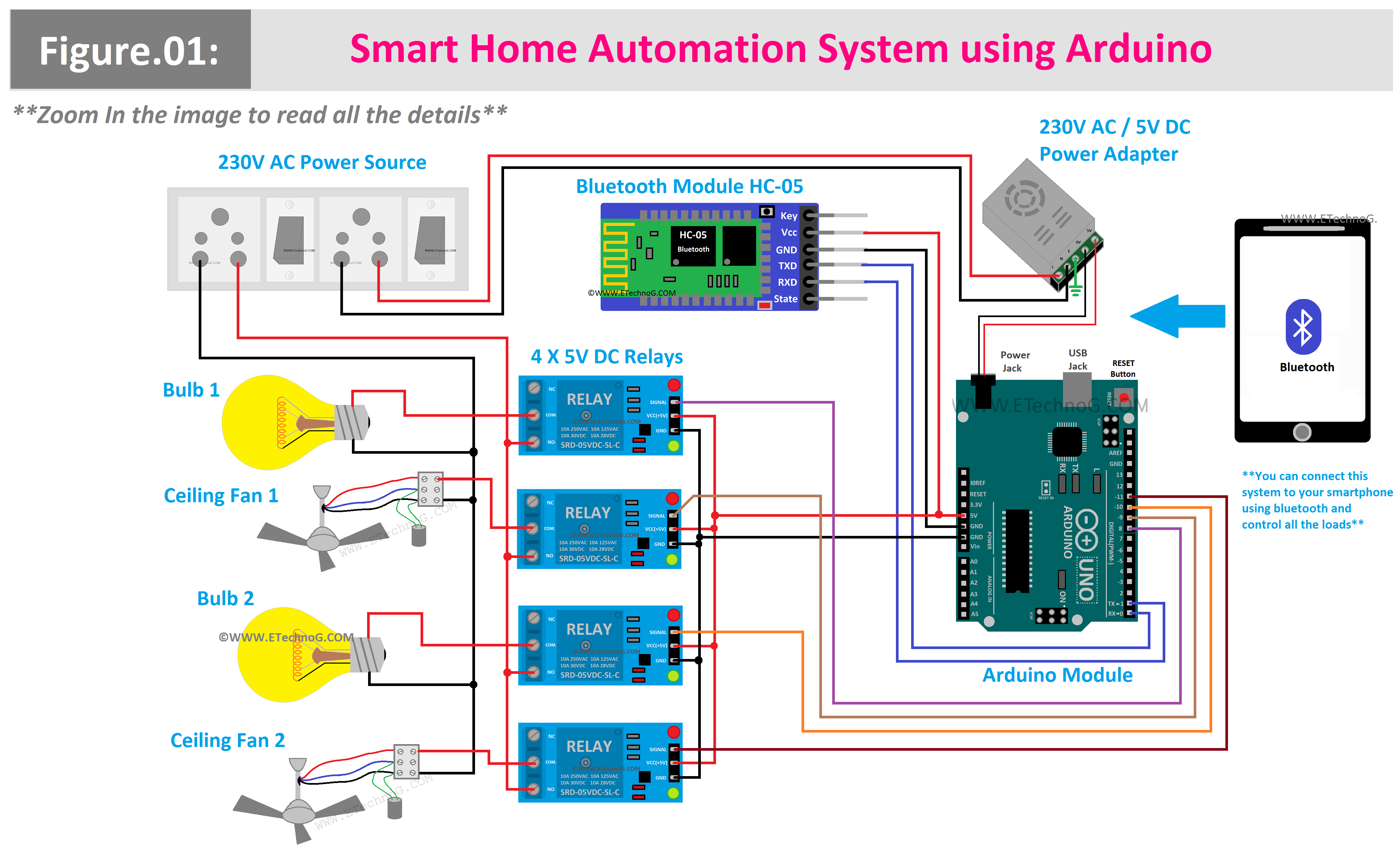
Bluetooth-based home automation using Arduino is a system that enables wireless control of home appliances using Bluetooth technology. The system typically consists of the following components:

Arduino board: The Arduino board acts as the brain of the system, responsible for receiving commands from the mobile phone and controlling the appliances accordingly. It can be an Arduino Uno, Arduino Mega, or any other compatible board.

Bluetooth module: A Bluetooth module, such as the HC-05 or HC-06, is connected to the Arduino board. This module allows wireless communication between the Arduino board and the mobile phone.

Relay module: The relay module is used to switch the appliances on and off. It is connected to the Arduino board and provides the necessary electrical isolation and capability to handle higher voltages and currents.

Mobile phone: A mobile phone with a Bluetooth application installed serves as the user interface for controlling the home appliances. The Bluetooth application can be developed using various programming languages depending on the mobile phone's operating system (Java for Android, Swift for iOS, etc.).

The system allows users to send commands from the mobile phone to the Arduino board via Bluetooth. These commands can include turning specific appliances on or off, adjusting settings, or activating predefined scenarios. The Arduino board receives the commands and controls the relay module to switch the corresponding appliances accordingly. The Bluetooth-based home automation system can be expanded by integrating sensors to automate the appliances based on specific conditions. For example, temperature and humidity sensors can be used to automatically control air conditioners or fans. Motion sensors can trigger lights or security systems. The possibilities are virtually limitless, depending on the sensors and components integrated into the system.

Overall, Bluetooth-based home automation using Arduino provides a convenient and cost-effective solution for controlling home appliances wirelessly. It offers flexibility, energy savings, and the ability to customize and expand the system according to individual needs and preferences.

2. Methodology

A home automation project using Bluetooth as the communication protocol can be approached in several steps. Here's a general methodology to follow:

Define the project scope and requirements: Identify the devices to be controlled and the desired functionalities for each device.

Choose Bluetooth devices: Select Bluetooth modules or chips based on range, data rate, power consumption, and other project requirements. Select a microcontroller or single-board computer (SBC): Determine the control platform (e.g., Arduino, Raspberry Pi, ESP32) responsible for managing Bluetooth devices and implementing the home automation logic.

Write the code: Develop code to handle Bluetooth communication and implement the home automation system's logic. Use languages like C, Python, or Arduino to program the microcontroller or SBC.

Build the hardware: Assemble the hardware components, including the microcontroller/SBC, Bluetooth modules, sensors, actuators, and power supply. This can be done on a breadboard or custom PCB.

Test the system: Verify Bluetooth communication functionality and ensure the home automation system works as expected.

Install the system: Deploy the system in your home and configure it to control the devices effectively.

Maintain the system: Regularly maintain the system to ensure proper functioning, address any issues, and incorporate updates or enhancements as needed.

By following this methodology, you can create a Bluetooth-based home automation system to control various devices, providing convenience and potential energy savings.

3. Architecture of the Device

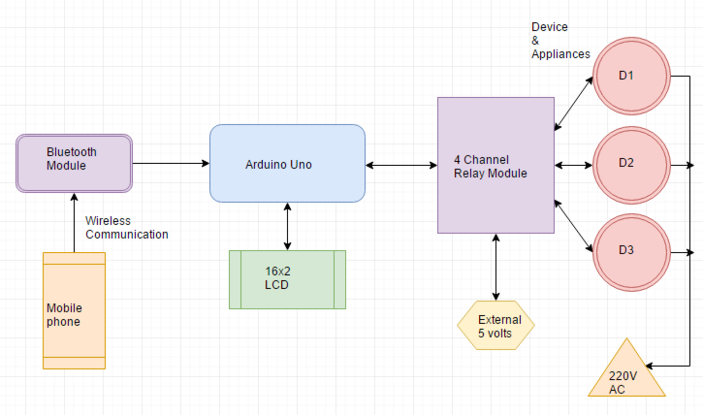
The architecture of a Bluetooth-based home automation project using Arduino can be broadly divided into three parts: hardware, software, and communication.

Hardware: The hardware setup typically consists of an Arduino board, a Bluetooth module, and the necessary sensors and actuators used to control different home automation devices. The Arduino board serves as the central processing unit, while the Bluetooth module enables wireless communication between the Arduino and other devices. Sensors such as temperature sensors, motion sensors, and light sensors can be used to gather data from the environment, while actuators like relays, motors, and lights are responsible for controlling various home automation devices.

Software: The software part of the project involves writing code using the Arduino Integrated Development Environment (IDE) or any other suitable programming environment. The code enables the Arduino board to interact with the Bluetooth module, sensors, and actuators. It includes functions for reading sensor data, implementing control algorithms, and handling Bluetooth communication. The code defines how the system responds to sensor inputs and how it controls the connected devices based on the received commands.

Communication: The communication part of the project involves establishing a wireless connection between the Arduino board and the Bluetooth module. Bluetooth is commonly used for short-range wireless communication. The Arduino and the Bluetooth module communicate using specific commands and protocols defined by the Bluetooth standard. This allows data exchange between the Arduino and other devices like smartphones, tablets, or computers that can act as the control interface for the home automation system. Bluetooth Low Energy (BLE) is often used in home automation projects due to its low power consumption.

It's important to note that while Bluetooth is a popular option for wireless communication in home automation projects, other protocols such as ZigBee or Wi-Fi can also be used depending on the specific requirements of the project, such as range, power consumption, or compatibility with existing devices. In summary, the hardware, software, and communication components work together to create a Bluetooth-based home automation system using Arduino. This system enables wireless control and automation of various devices in a smart home environment, providing convenience and flexibility to the users.

4. Description of Hardware

Arduino Uno is an open-source microcontroller board developed by Arduino.cc. It is based on the ATmega328P microcontroller and is a popular choice among hobbyists, students, and professionals. The board features 14 digital input/output pins, 6 analog inputs, a 16 MHz quartz crystal, a USB connection, a power jack, an ICSP header, and a reset button.

One of the key features of Arduino Uno is its ease of use. It comes preloaded with a bootloader, which allows users to easily upload new code to the board without the need for an external programmer. The Arduino IDE (Integrated Development Environment) is used to write and upload code to the board. The IDE is a cross-platform application available for Windows, macOS, and Linux. The digital pins on the Arduino Uno can be configured as either inputs or outputs. This flexibility allows users to interface with various digital devices such as LEDs, buttons, and switches. Additionally, six of the digital pins (3, 5, 6, 9, 10, and 11) can function as Pulse Width Modulation (PWM) outputs, enabling control of devices that require variable levels of intensity or speed.

The six analog pins on the board allow for analog input readings. This capability is useful for interfacing with sensors that provide continuous voltage levels, such as light sensors, temperature sensors, and potentiometers. The Arduino Uno supports expandability through shields. Shields are additional boards that can be plugged into the Arduino Uno, providing additional features and functionalities. There are shields available for motor control, wireless communication, display interfaces, and more. This modularity makes it easy to customize and enhance projects without complex wiring or soldering.

The Arduino Uno serves as the reference model for the Arduino platform and is the first board in a series of Arduino boards. It can be powered via the USB connection or an external power source, making it versatile for various applications. Overall, Arduino Uno is a versatile, user-friendly, and widely adopted microcontroller board. Its open-source nature encourages collaboration and sharing of projects, making it a favorite among makers and electronics enthusiasts.

4.1 Bluetooth Module

Bluetooth is a widely used technology standard for short-range wireless communication between devices. It enables the connection of peripherals such as headsets, keyboards, mice, and other accessories to computers and electronic devices. However, Bluetooth's capabilities extend beyond peripheral connections.

Bluetooth operates on the 2.4 GHz radio frequency and uses spread spectrum frequency hopping to minimize interference from other devices. This technique allows for secure and reliable communication between devices. Bluetooth technology has evolved through different versions, with the latest being Bluetooth 5.2, released in December 2020. Each version introduces new features and improvements. Bluetooth 5.2 offers a range of up to 400 meters and faster data transfer rates compared to previous versions. It also enhances security measures to protect wireless communications.

In addition to connecting peripherals, Bluetooth is used for various applications. It enables wireless internet access, file sharing, and media streaming, allowing devices to communicate and share data seamlessly. Bluetooth is commonly used for wireless audio streaming, enabling connections with speakers, headphones, and car stereos. Furthermore, Bluetooth technology facilitates wireless gaming by connecting controllers to gaming consoles or mobile devices. It also finds applications in home automation, IoT (Internet of Things) devices, and healthcare devices, among others.

Bluetooth has become an integral part of modern connectivity, providing convenient wireless communication options for a wide range of devices and applications. Its versatility and widespread adoption make it a popular choice for short-range wireless connections.

4.1.1 Considerations / Limitations

In the context of Bluetooth-based home automation projects using Arduino, there are several important considerations:

Limited Range: Bluetooth connections have a limited range, typically around 30 feet. This range can be further reduced by environmental factors such as walls or obstacles, which may hinder the signal strength and limit the coverage area of the home automation system.

Interference: Bluetooth operates in the 2.4 GHz frequency band, which is a crowded spectrum shared by various wireless devices, including Wi-Fi networks, cordless phones, and microwaves. This shared frequency can lead to interference, affecting the stability and reliability of the Bluetooth connection in a home environment.

Security: Bluetooth connections, particularly the earlier versions of the Bluetooth protocol, have been known to have security vulnerabilities. Unauthorized users may potentially intercept or tamper with the data being transmitted over the Bluetooth connection, posing a risk to the security and privacy of the home automation system.

Cost: Implementing Bluetooth connectivity in home automation projects requires additional hardware components such as Bluetooth modules and antennas. These components add to the overall cost of the project, which may be a consideration for budget-conscious users.

It is important to weigh these factors against the specific requirements and constraints of the home automation project before deciding on the use of Bluetooth technology.

5. Result & Discussion

In the context of a Bluetooth-based home automation project using Arduino, the desired outcome would be to automate and control various aspects of the home using Bluetooth technology. Here are some potential results of such a project:

Automated Control: The project allows for the automation and control of lights, appliances, and other devices within the home. Users can remotely turn on/off or adjust the settings of these devices using Bluetooth-enabled devices such as smartphones or tablets.

Convenience and Accessibility: Bluetooth connectivity provides a wireless and convenient means of controlling the home automation system. Users can easily access and manage their devices without the need for physical connections or direct line of sight.

Customization and Flexibility: Arduino-based projects offer flexibility in terms of customization and expansion. Users can tailor the functionality of their home automation system to meet their specific needs, adding or modifying features as desired.

Energy Efficiency: With the ability to control devices remotely, users can optimize energy usage in their homes. They can turn off lights or appliances when not in use, adjust temperature settings for efficient heating and cooling, and create schedules to automate energy-saving actions.

Integration with Other Systems: Arduino-based home automation projects can be integrated with other systems or technologies, such as voice assistants (e.g., Amazon Alexa or Google Assistant) or IoT platforms, enabling enhanced control and interaction options.

It is important to note that the specific features and outcomes of a Bluetooth-based home automation project using Arduino will depend on the design, programming, and components used in the project.

Conclusion

The research explores the use of Arduino in Bluetooth-based home automation systems. It discusses the integration of Bluetooth technology as a means of communication between users and the home automation system. The paper delves into the features and advantages of Arduino, including its components, programming language, and its suitability for home automation projects.

The advantages of using Arduino in Bluetooth-based home automation are highlighted, such as its affordability, low power consumption, and compatibility with a wide range of Bluetooth devices. These factors contribute to Arduino's popularity and effectiveness in implementing home automation solutions. The paper emphasizes that Arduino offers a user-friendly platform that allows for the creation of robust and reliable home automation systems. It also acknowledges the potential for utilizing advanced Bluetooth technologies like BLE (Bluetooth Low Energy) and Bluetooth Mesh to further enhance the capabilities of Arduino in home automation applications.

In conclusion, Arduino is a viable and suitable choice for Bluetooth-based home automation. Its affordability, versatility, and ease of use make it a powerful tool for developing efficient and effective home automation systems. Arduino is likely to remain a prominent option in the future as Bluetooth technology continues to advance.

Future Scope

In the context of the Home Automation project, further development can be achieved by integrating internet connectivity. This would enable remote control and monitoring of the home automation system from anywhere, using devices such as smartphones, PCs, or laptops with internet access. Potential enhancements include:

Remote Control: Users can remotely control their home automation system through an internet connection. They can turn devices on/off, adjust settings, and create schedules or automation rules.

Enhanced Security: By setting passwords and implementing secure authentication mechanisms, only authorized users can access and control the home automation system remotely, ensuring privacy and security.

Expandability to a Larger Scale: The home automation project can be extended to automate larger environments like schools. Automated attendance systems, for instance, can be implemented to streamline attendance tracking processes.

IoT-Based Wireless Technology: Instead of relying solely on Bluetooth, the project can leverage IoT-based wireless technologies like Wi-Fi or Zigbee. These technologies offer broader range and connectivity options, allowing for remote control from anywhere in the world.

Alert System: The system can be enhanced with an alert mechanism that sends notifications to users in case of specific events or conditions. For example, alerts can be triggered for intrusions, abnormal environmental conditions, or equipment malfunctions.

Energy Optimization: The software controlling the system can include features that provide insights into energy consumption patterns. This information can be used to optimize energy usage, identify inefficiencies, and suggest practical ways to reduce energy costs.

By incorporating these developments, the Home Automation project can provide increased convenience, security, and energy efficiency for users, while allowing for remote access and control from anywhere with an internet connection.

Related Journal Articles & DOIs

  1. Bluetooth Home Automation Arduino: Insights from Industrial Internet of Things: Challenges and Opportunities
    DOI: https://doi.org/10.1109/MCOM.2018.1700593
  2. Bluetooth Home Automation Arduino: Insights from LoRaWAN for IoT: A Survey of Security Challenges
    DOI: https://doi.org/10.1109/ACCESS.2020.2985930
  3. Bluetooth Home Automation Arduino: Insights from Blockchain for IoT: A Survey of Applications and Challenges
    DOI: https://doi.org/10.1109/COMST.2019.2928178
  4. Bluetooth Home Automation Arduino: Insights from Air Quality Monitoring Using IoT and Cloud Computing
    DOI: https://doi.org/10.1109/JSEN.2020.2981234
  5. Bluetooth Home Automation Arduino: Insights from Predictive Maintenance in Industry 4.0 Using IoT
    DOI: https://doi.org/10.1016/j.compind.2020.103265

Simulation & Hardware Tools

MQTTGazebocloud twin MATLABWebotsBlynk / ThingSpeak

Why Choose Us?

Bangalore guidance for robotics, MQTT and autonomous systems projects.

MQTT & Simulation

Gazebo, cloud twin and Webots worlds with navigation, SLAM and control stacks.

Control & Planning

Compliance, deep learning control, path planning and behavior trees.

Hardware Bring-up

Motors, sensors, ESP32/STM32 firmware and HIL validation paths.

Report & Viva

University-format documentation, PPT and viva preparation.

FAQ

MQTT, Gazebo, NVIDIA cloud twin, MATLAB/Simulink, Webots, Blynk / ThingSpeak, plus Arduino/STM32/ESP32, cameras, LiDAR and motor drivers.
Yes — simulation packages, hardware guidance, report, PPT and viva Q&A.